Website Security Basics: The Checklist That Actually Works

Most site compromises trace back to five gaps: no HTTPS, weak or single-factor logins, outdated software, missing backups, and zero monitoring. Close those five and you eliminate the overwhelming majority of attacks a small or medium site will ever face. CISA’s website security guidance frames these as baseline protections for a reason. They’re not exotic. They’re the digital equivalent of locking your doors and keeping smoke detectors charged.
Here’s why each one earns its spot on the list:
- HTTPS/TLS encrypts traffic between visitors and your server, so credentials and form data can’t be intercepted mid-transit.
- Two-factor authentication (2FA) stops stolen or guessed passwords from being enough to break in.
- Regular updates patch the exact holes that automated bots scan the internet for, all day, every day.
- Backups turn a catastrophic hack into a two-hour recovery job.
- Monitoring tells you something’s wrong before a customer does.
Proxiumdigital treats these five as the floor, not the ceiling, for every site it manages. What follows is the fuller picture: the threats these controls block, and how to put each one in place.
Key Takeaways
Website security basics come down to five layered controls, HTTPS, 2FA, timely updates, tested backups, and active monitoring, applied consistently rather than perfectly.
| Point | Details |
|---|---|
| Encrypt and authenticate first | Enable HTTPS/HSTS and require 2FA on every admin account before anything else. |
| Patch on a schedule | Automate safe updates weekly and test major updates on staging before pushing live. |
| Back up and verify restores | Store backups off-site and test a full restore quarterly, not just when something breaks. |
| Add traffic-layer defenses | A WAF and CDN block most DDoS attempts and malicious traffic before it reaches your code. |
| Watch for compromise | Enable logging, run scheduled malware scans, and document isolate-restore-rotate steps for incidents. |
Table of Contents
- Common Website Security Threats and What They Actually Do
- Foundational Technical Controls Every Site Needs
- Locking Down the Code: Input Handling, Sessions, and CMS Hygiene
- Passwords, 2FA, and Who Gets Admin Access
- How to Detect Trouble Early and Respond Fast
- Building a Maintenance Routine You’ll Actually Keep
- Where Proxiumdigital Fits Into Your Security Plan
- What the Checklist Culture Gets Wrong About Security
- Sources
- FAQ
Common Website Security Threats and What They Actually Do
Cross-site scripting (XSS) lets an attacker inject malicious code into a page that then runs in a visitor’s browser, often to steal session cookies or redirect traffic. SQL injection (SQLi) exploits sloppy database queries to read, alter, or delete data directly from your backend. Cross-site request forgery (CSRF) tricks a logged-in user’s browser into performing an action they never intended, like changing account settings. DDoS attacks flood a server with junk traffic until legitimate visitors can’t get through. Malware, meanwhile, is the catch-all: injected spam links, defacement, backdoors that let an attacker return later, or ransomware that locks you out of your own files.
The damage these threats cause splits into three buckets: defacement and reputation loss, data loss (customer records, order history, credentials), and downtime that costs revenue every hour the site stays dark. CISA links these outcomes directly to a short list of controls, including DNS record review, multifactor authentication, vulnerability scanning, and backups. That’s not a coincidence. Each control maps to a specific threat:
- Input sanitization and parameterized queries stop XSS and SQLi cold.
- 2FA and access controls blunt the impact of a stolen password.
- WAFs and rate limiting absorb the traffic spikes behind most DDoS attempts.
- File-integrity monitoring and malware scans catch injected code before it spreads.
None of these threats requires a genius attacker. Most exploit a plugin that hasn’t been updated in eight months or a login form with no rate limit.
Foundational Technical Controls Every Site Needs
Getting the technical layer right does most of the heavy lifting, and none of it requires writing code.
1. Enable HTTPS and HSTS. Every modern host and CDN offers auto-managed TLS certificates now, so there’s rarely a reason to run plain HTTP in 2026. Once HTTPS is live, turn on HTTP Strict Transport Security (HSTS) so browsers refuse to load an insecure version of your site even if someone links to it by mistake. Cloudflare recommends auto-renewing certificates specifically because manual renewal is where sites quietly lapse back into unencrypted traffic.
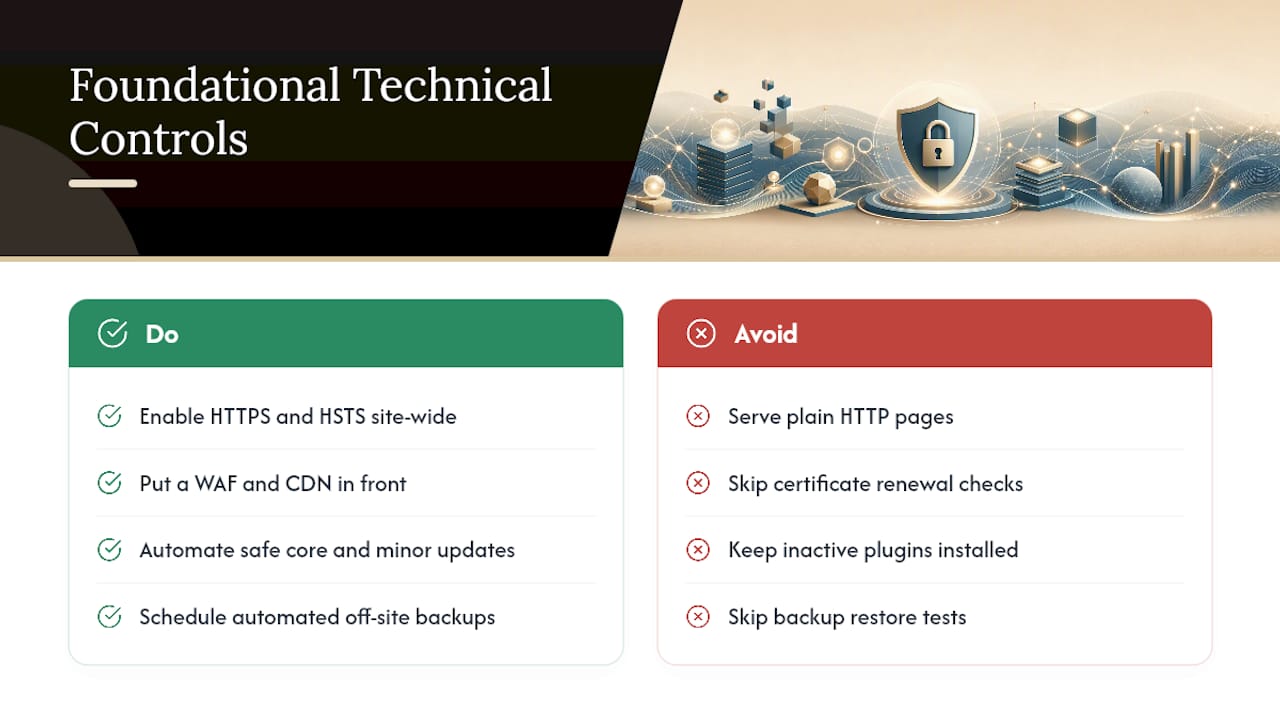
2. Put a WAF and CDN in front of your origin server. A web application firewall filters malicious requests before they reach your code; a CDN spreads traffic across a global network so a DDoS flood dilutes instead of overwhelming a single server. Cloudflare’s guidance groups rate limiting and DNS protections alongside WAF and CDN as the core traffic-layer defenses, and for a small business, this is often the single highest-leverage move available since most providers offer it as a flat monthly add-on rather than a custom build.
3. Automate updates where its safe to do so. Core CMS updates and minor plugin patches can usually run automatically. Major version updates deserve a staging-site test first, since a plugin update can occasionally break a theme or another plugin outright. Either way, delete any plugin or theme you’re not actively using. Every inactive plugin is still a potential entry point sitting on your server doing nothing for you.
4. Back up on a schedule, and store copies off-site. CISA specifically recommends automated, off-site backups with regular restore testing, because a backup you’ve never tested restoring is a backup you don’t actually have. Daily backups for anything with frequent content changes, weekly at minimum for static brochure sites.
Pro Tip: Set a recurring calendar reminder to actually restore a backup to a test environment every quarter. A backup file that exists but has never been restored is unverified, not secure.
Locking Down the Code: Input Handling, Sessions, and CMS Hygiene
The application layer is where most real-world breaches happen, and it’s also where a little discipline goes a long way.
Treat every piece of data coming from a browser, form field, URL parameter, uploaded file, as untrusted until proven otherwise. MDN’s guidance on this point is blunt: sanitize inputs and use parameterized queries (prepared statements) for every database call, rather than building SQL strings by hand. This one habit eliminates the vast majority of SQL injection risk on its own.
Session security matters just as much:
- Set cookies with the Secure flag so they only transmit over HTTPS.
- Set HttpOnly so client-side scripts can’t read them, which blocks a common XSS follow-up attack.
- Set SameSite to restrict when cookies get sent with cross-site requests, cutting off most CSRF paths.
- Use short session timeouts for admin accounts specifically, even if regular user sessions last longer.
- Consider geo or IP restrictions on high-privilege logins if your admin team works from consistent locations.
Third-party scripts (analytics tags, chat widgets, ad pixels) are worth auditing periodically too. Each one runs with a surprising amount of access to your page, and a compromised third-party script becomes your problem the moment it loads. If you’re building or rebuilding a site, secure-by-design development bakes these protections in during the build instead of patching them in after launch, which tends to be both cheaper and more reliable.
Passwords, 2FA, and Who Gets Admin Access
Compromised credentials remain the single most common way attackers get in, which makes account-level controls worth as much attention as anything technical.
Start with passwords. A password manager generating unique, long passwords for every account beats any policy requiring humans to memorize complexity rules. Reused passwords are the real vulnerability, not weak character variety.
From there, layer in two-factor authentication on every account with admin or editor access, no exceptions:
- Authenticator apps (TOTP) generate a rotating code and work offline, making them more reliable than SMS codes, which can be intercepted via SIM-swapping.
- Backup codes should be generated and stored somewhere secure the moment 2FA is enabled, since losing a phone without a backup path means a locked-out admin account.
- Passkeys are gaining ground as a phishing-resistant alternative that skips passwords entirely.
- On WordPress specifically, the Two-Factor plugin supports TOTP and backup codes with straightforward setup for non-technical admins.
Then apply least privilege: remove any account no one’s used in the last six months, and give contributors editor access instead of full admin whenever the role allows it. Rotate API keys and any stored secrets on a schedule too, not just after you suspect a problem.
Pro Tip: Audit your user list right now. Most small business sites have at least one “temporary” admin account from a developer or contractor that never got removed.
How to Detect Trouble Early and Respond Fast
Detection is the piece most checklists skip, and it’s the difference between catching a problem in hours versus months.
- Turn on access and error logging at the server level if it isn’t already, and centralize logs somewhere you’ll actually look at them, not buried in a control panel you open twice a year.
- Run file-integrity checks that flag unexpected changes to core files, themes, or plugins, since injected malware almost always alters something.
- Schedule regular malware scans rather than running them only after something looks wrong.
- If you find a compromise: isolate the site (take it offline or restrict access), restore from your most recent clean backup, rotate every credential and API key tied to the site, and notify anyone whose data might be affected.
- Know when to escalate. If the breach involves customer payment data, appears to have persisted for weeks, or you can’t identify the entry point within a day, bring in a professional rather than troubleshooting indefinitely on your own.
Defense in depth is the underlying principle here: no single plugin or setting catches everything, but layered protections mean one failure doesn’t cascade into a full compromise.
Building a Maintenance Routine You’ll Actually Keep
Security fails most often not from sophisticated attacks but from a patch that never got applied or a backup nobody checked. A simple cadence prevents both:
- Weekly: Check for available plugin, theme, and core updates; skim access logs for anything unusual.
- Monthly: Apply major updates after a quick staging test; review who has admin access.
- Quarterly: Test a full backup restore; rotate any long-lived credentials or API keys.
Write down who’s responsible for each task and how to reach them in an emergency, including a documented process for regaining access if the primary admin is unreachable. This sounds obvious until the one person who knows the hosting login is on vacation during an incident.
The real decision most owners face is DIY versus managed. Handling this yourself costs nothing but time, and that time adds up fast once you’re juggling updates across a CMS, plugins, hosting, DNS, and backups on top of actually running a business. MDN notes that hosting providers secure the infrastructure layer, but application-level security, the plugins, credentials, and code, stays the owner’s responsibility regardless of who hosts the site. A managed plan shifts that ongoing burden to someone whose job is to track it continuously.
Where Proxiumdigital Fits Into Your Security Plan
If the checklist above feels manageable and you have the time, running it yourself works fine. If it feels like one more thing competing with running your business, that’s exactly the gap a managed plan closes.
Proxiumdigital’s website management services cover the maintenance cadence outlined above as a standing service rather than a task you have to remember: software and plugin updates, uptime and security monitoring, and monthly reporting so you can see what changed and why. Because Proxiumdigital builds sites with security considerations baked in from the initial design and development phase, clients typically start from a stronger baseline than a retrofit ever achieves.
This tends to make the most sense for:
- Owners with no in-house technical staff and limited time for weekly checks.
- Sites handling customer data, payments, or bookings, where downtime or a breach carries real financial cost.
- Businesses that already outsource SEO or web design and would rather have one team accountable for the whole site.
If none of those describe your situation, the DIY checklist covers the same ground.
What the Checklist Culture Gets Wrong About Security
Most security advice reads like a compliance form: forty items, no priority order, everything treated as equally urgent. That’s backwards. A handful of controls, HTTPS, 2FA, updates, backups, monitoring, prevent the overwhelming majority of real incidents, and everything past that point is diminishing returns for a small site.
The advice I’d push back on hardest is the obsession with exotic threats. Owners worry about sophisticated zero-day exploits while running a plugin that hasn’t been updated since last spring. That gap between perceived risk and actual risk is where most breaches happen, not in some elaborate attack scenario.
Prioritize in this order: authentication first, because a stolen password bypasses every other control you’ve built. Updates second, because unpatched software is the single most exploited entry point on the internet. Backups third, because they’re your insurance policy when the first two fail anyway. Everything else, WAFs, monitoring, hardened cookies, matters, but it’s refinement layered on top of a foundation that has to be solid first. Get those three right before you spend another afternoon reading about anything more advanced.
— Bryan
Sources
FAQ
What is website security basically about?
Website security basics means protecting a site and its data from unauthorized access, modification, or destruction, primarily through HTTPS, strong authentication, updated software, backups, and monitoring.
What are the most common web security problems small sites face?
The recurring problems are outdated software, weak or single-factor logins, missing backups, no encryption (HTTP instead of HTTPS), and no monitoring to catch a compromise early.
How do you secure a website step by step?
Enable HTTPS with HSTS, require 2FA on all admin accounts, automate safe software updates, run scheduled off-site backups with tested restores, and add a WAF or CDN to filter malicious traffic.
What are the main types of security controls for a website?
They generally fall into four categories: technical controls (HTTPS, WAF, CDN), coding practices (input sanitization, parameterized queries), access management (2FA, least privilege), and backup/recovery planning.
Do I need a web application firewall if I already use a CDN?
Many CDN providers bundle basic WAF functionality, but check your plan specifically. A CDN alone reduces DDoS impact; a WAF adds rule-based filtering against exploits like SQL injection and XSS.