Website Redesign SEO: Protect Rankings and Traffic

TL;DR:
- A redesign without proper redirects risks losing years of organic traffic.
- Protection depends on preserving high-value URLs and implementing correct server-side redirects before launch.
A redesign without a redirect map is one of the fastest ways to lose organic traffic you spent years building. The single most protective action you can take: preserve your high-value URLs exactly as they are, and where URLs must change, implement a server-side 301 or 308 redirect for every old URL to its closest topical equivalent. Pair that with a validated crawlability check and Core Web Vitals targets met before launch, and you have the foundation that separates a clean migration from a ranking disaster.
Redesigns commonly cause short-term traffic fluctuations, with missing or incorrect redirects and redirect chains among the leading causes of traffic loss. The good news: every one of those causes is preventable with the right pre-launch checklist.
Launch-day essentials to run before you flip DNS:
- Submit your XML sitemap in Google Search Console
- Confirm production robots.txt allows Googlebot (no
Disallow: /) - Enable all 301 redirects on the production server
- Verify GA4 and Google Search Console are tracking correctly
- Spot-check at least 50 high-value redirects manually
Les appareils mobiles représentent plus de 50 % du trafic web mondial selon Statista, ce qui signifie que la réactivité mobile et les Core Web Vitals sont aujourd’hui des prérequis indispensables lors d’une refonte. Il s’agit d’un prérequis incontournable.
Table of Contents
- What does website redesign SEO planning actually require?
- How to build a full URL inventory and content audit
- How do you decide which pages are safe to change?
- What is the right redirect strategy for a redesign?
- How should you set up and test the staging environment?
- Technical SEO pre-launch checklist: what must pass before you go live
- How do you preserve content and internal linking during a redesign?
- What Core Web Vitals targets should you hit before launch?
- Launch day: the exact steps to follow in order
- How do you monitor rankings and traffic in the first 30–90 days?
- What extra steps does a domain move require?
- Do you have a rollback plan if something goes wrong?
- Key Takeaways
- The part most teams get wrong about redesign SEO
- Proxiumdigital can run this process for you
- Useful sources and tools
- FAQ
What does website redesign SEO planning actually require?
Most teams start a redesign with wireframes. The ones that protect their rankings start with data. Before any design work begins, you need three things locked down: clear success metrics, the right people in the room, and a baseline snapshot of your current SEO performance.
Assemble the right stakeholders
A redesign touches more systems than most teams realize. You need an SEO lead, a content or product owner, front-end and back-end developers, a designer, an analytics owner, and whoever manages hosting or DNS. Missing even one of these creates gaps. The developer who does not know the redirect map will overwrite it. The designer who does not know the H1 requirements will remove them.
Baseline data to export before anything changes
A thorough migration checklist starts with pre-migration baselines: traffic, rankings, and architecture documented before a single template is touched. Export the following from Google Search Console and GA4:
- Top pages by organic sessions (last 90 days)
- Conversion value or goal completions per URL
- Keyword-to-URL mapping for your top 100 keywords
- Backlink profile by URL (use Ahrefs or a similar tool)
- Current Core Web Vitals field metrics from CrUX
- Crawl and indexation coverage from GSC’s Coverage report
Finally, create a freeze list: pages or templates that must not change structurally at launch unless explicitly tested on staging. Your highest-traffic service pages, cornerstone blog posts, and any URL with significant inbound backlinks belong on it.
Pro Tip: Export your GSC data the week before any design work begins. Once you start making changes, the historical baseline becomes harder to isolate.
How to build a full URL inventory and content audit
You cannot protect what you have not mapped. A complete URL inventory is the document that drives every redirect decision, content choice, and QA check in the project.
Data table: fields to capture for every URL
| Field | What to record |
|---|---|
| Old URL | Full path, exact as crawled |
| Organic sessions (last 90 days) | From GA4 |
| Conversion value / goal completions | From GA4 goals or events |
| Ranking keywords (count) | From GSC Performance report |
| Inbound backlinks | From Ahrefs, Semrush, or Moz |
| Template type | Blog post, service page, category, etc. |
| Recommended action | Keep, improve, redirect-to, or remove |
| Priority level | Critical, high, medium, or low |
Tagging and ownership
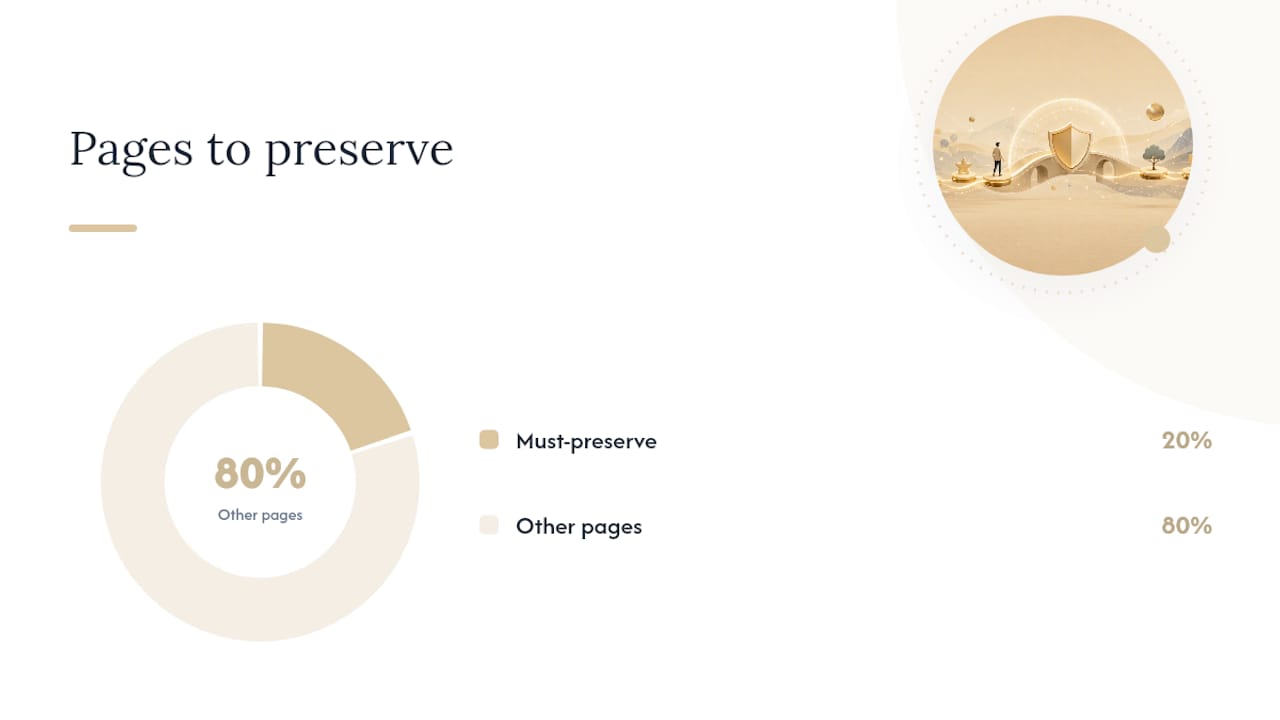
Assign a priority tag to every URL using this logic: any URL in your top 20% by organic sessions, conversions, or backlinks is critical. URLs with moderate traffic or keyword rankings are high. Everything else is medium or low. Assign an owner and a deadline for each critical and high-priority URL. Without ownership, these decisions get deferred until launch week, which is exactly when you do not want to be making them.
How do you decide which pages are safe to change?
Not every page carries the same SEO risk. A risk/value matrix gives your team a defensible framework for deciding which pages get strict protection and which can be reworked freely.
Plot your URLs on two axes:
- X-axis (SEO value): Organic traffic, conversion value, and inbound backlinks combined.
- Y-axis (Change risk): Whether the URL changes, the template changes, or the body content is being rewritten.
Pages in the top-right quadrant (high value, high change risk) are your danger zone. Any URL in the top 20% by organic conversions or backlinks should be treated as must-preserve. Structural changes to these pages require staged testing before they go live.
Practical thresholds to apply:
- If a page drives more than 5% of your total organic sessions, keep its URL unchanged.
- If a page has more than 20 referring domains, map a 1:1 redirect even if the content is being removed.
- If a template change affects more than 10 high-value pages at once, test it on a single page first and monitor for two weeks before rolling out.
Pro Tip: Run incremental changes on copies of high-value pages on staging. Postpone URL changes for at least one monitoring cycle after layout and content have stabilized. Changing URL and content simultaneously makes it impossible to diagnose which change caused a ranking shift.
The pages in the bottom-left quadrant (low value, low change risk) can be redesigned freely. Thin pages with no traffic, no backlinks, and no ranking keywords are candidates for removal or consolidation rather than preservation.
What is the right redirect strategy for a redesign?
Redirects are the single biggest SEO risk in a redesign. Map every old URL to the closest new equivalent, test each one, and you eliminate the most common cause of post-launch ranking drops.
Redirect mapping template
| Old URL | New URL | Reason | Redirect type | Tested (Y/N) | Priority |
|---|---|---|---|---|---|
| /old-service-page | /services/new-name | URL restructure | 301 | N | Critical |
| /blog/old-post | /resources/new-post | Content consolidation | 301 | N | High |
| /removed-page | 410 | Content removed, no equivalent | 410 | N | Medium |
Testing checklist
- Verify every redirect on staging before launch using Screaming Frog’s “Follow redirects” mode.
- Check for chains: any URL that resolves in more than one hop needs to be flattened.
- After launch, crawl all old URLs and confirm each returns a 301 (not a 200 or 404).
- Monitor Google Search Console’s Coverage report for redirect errors in the first two weeks.
Pro Tip: Keep your redirect map in a shared spreadsheet with a “tested” column. On launch day, the redirect verifier works through the top 50 critical URLs and marks each one. An untested redirect on a high-backlink URL is a liability you will not discover until rankings drop.
A comprehensive site migration SEO guide consistently emphasizes that one-to-one redirect mapping, staging tests, and post-launch verification are the three steps teams most often skip, and the three that cause the most permanent damage.
How should you set up and test the staging environment?
A staging site is where you catch problems before Google does. Set it up correctly and you can run every technical and content check without touching the live site or sending confusing signals to search engines.
QA checklist items to validate
- Every template retains its H1 tag
- FAQ schema is present where it existed on the old site
- Internal links point to new URLs, not old ones
- Navigation links to all core category and service pages
- No pages are accidentally set to
noindexin the CMS - 301 redirects are configured and tested in the staging environment
Technical SEO pre-launch checklist: what must pass before you go live
Think of this as the gate your site must clear before DNS flips. Every item here has a direct path to indexation or ranking loss if it fails.
- AI crawler access: — Technical SEO now includes AI-search readiness. If you want visibility in AI-powered search results, allow OAI-SearchBot, GPTBot, Claude-SearchBot, and PerplexityBot in your robots.txt. Block them only if you have a specific reason.
On AI crawlers and robots.txt: Most site owners focus only on Googlebot when auditing robots.txt. In 2026, that is incomplete. AI search systems pull content from your HTML directly, and if your robots.txt blocks their crawlers, you lose visibility in AI-generated answers and citations. Review your robots.txt for every crawler you want to reach, not just the ones you have always managed.
How do you preserve content and internal linking during a redesign?
Content is an SEO asset, not just a design element. The copy that ranks, the FAQ sections that earn featured snippets, and the internal links that distribute authority across your site all need to survive the redesign intact.
What to keep exactly as it is
High-value on-page content should be preserved in full HTML, above the fold where possible. This means:
- Product and service descriptions that rank for specific queries
- Cornerstone blog posts and resource pages with significant backlinks
- FAQ sections that appear in rich results
- Testimonials or case study content tied to conversion-driving pages
Do not move this content into JavaScript-rendered components, accordions that are collapsed by default, or tabs that require a click to reveal. Google can render JavaScript, but it adds latency to indexation and increases the chance of content being missed.
Navigation and information architecture
Maintain links to your core categories and service pages in the primary navigation. If a page was reachable in two clicks from the homepage before the redesign, it should be reachable in two clicks after. Burying important pages behind JS-only filters or removing them from the main nav is one of the quieter ways a redesign damages rankings.
Breadcrumbs matter too. They create internal links, help Googlebot understand site structure, and often appear in search results. Keep them on every page that had them.
For a deeper look at how internal link structure affects ranking distribution, proven internal linking strategies are worth reviewing before you finalize your new IA.
What Core Web Vitals targets should you hit before launch?
Performance is not a post-launch concern. A site that fails Core Web Vitals on launch day starts with a disadvantage that takes weeks to recover from.
Target values to meet
Core Web Vitals targets tightened in 2026: LCP near or under 2.0s, INP under 200ms, and CLS under 0.1. FCP under 0.4s correlates with higher AI citation rates, which matters if you want your content surfaced in AI-generated answers.
| Metric | Target (pass) | What it measures |
|---|---|---|
| LCP (Largest Contentful Paint) | Under 2.0s | How fast the main content loads |
| INP (Interaction to Next Paint) | Under 200ms | Responsiveness to user input |
| CLS (Cumulative Layout Shift) | Under 0.1 | Visual stability during load |
| FCP (First Contentful Paint) | Under 0.4s (AI citation) | Time to first visible content |
Image and asset strategy
- Convert images to WebP or AVIF. Both formats deliver significantly smaller file sizes than JPEG or PNG at comparable quality.
- Implement responsive images using
srcsetso mobile devices load appropriately sized assets. - Use lazy-loading for images below the fold.
- Set a performance budget per template type. A blog post template and a homepage template have different asset loads; budget them separately.
Launch day: the exact steps to follow in order
Launch day is not the time to improvise. Run these steps in sequence, with assigned owners for each.
- Submit XML sitemap in Google Search Console — The SEO lead submits the sitemap URL in GSC and confirms it returns a 200 status.
Assigned launch roles
| Role | Responsibility |
|---|---|
| Release owner | DNS/TLS flip, production server confirmation |
| Redirect verifier | Test 50 high-value redirects, confirm 301s |
| Analytics monitor | GA4 event validation, data flow check |
| Dev on-call | Immediate fixes for 404s, server errors |
| SEO lead | GSC sitemap submission, coverage monitoring |
Pro Tip: Schedule your launch for a Tuesday or Wednesday morning. You want your full team available for the first 48 hours of monitoring. A Friday launch leaves you debugging over the weekend with half the team unavailable.
How do you monitor rankings and traffic in the first 30–90 days?
The first 90 days after a redesign are when problems surface. Some show up in 48 hours; others take weeks to appear as Google re-crawls and re-evaluates the new site.
What to monitor and when
First 48–72 hours (daily checks):
- Organic sessions by landing page in GA4 (compare to the same period before launch)
- GSC Coverage report for new crawl errors or indexation drops
- Redirect error rate in GSC (flag anything above 1% of total URLs)
- XML sitemap status in GSC (confirm it is being processed without errors)
- Core Web Vitals field metrics (check CrUX data as it updates)
Weeks 2 and 4 (weekly deep checks):
- Ranking changes for your top 50 priority keywords
- Landing page performance for your top 20 organic pages
- Any new 404s discovered by Screaming Frog re-crawl
- Internal link audit to catch any broken links introduced post-launch
Days 30, 60, and 90 (comprehensive audits):
- Full technical SEO audit against your pre-launch baseline
- Backlink profile check to confirm inbound links are resolving correctly
- Conversion rate comparison per URL against pre-launch benchmarks
- Core Web Vitals field data review across all templates
Post-launch audits at 48 hours, 2 weeks, and 4 weeks systematically catch issues that only surface in production, including indexation problems, redirect mismatches, and JavaScript rendering errors that staging tests do not always catch.
Troubleshooting flow for traffic drops
If a specific page loses more than 20% of its organic sessions, work through this sequence:
- Check GSC: is the page indexed? Is it returning a 200 status?
- Check the redirect: if the URL changed, is the 301 pointing to the correct new URL?
- Check the canonical: is the page self-referencing, or is it accidentally canonicalized to a different URL?
- Check rendering: does the page’s content appear in Google’s cached version? Is key content hidden behind JavaScript?
- Check Core Web Vitals: did the page’s CWV scores drop significantly post-launch?
- Check content: was body copy removed or significantly shortened on this template?
What extra steps does a domain move require?
Moving to a new domain during a redesign is the highest-risk combination in SEO. Every domain carries accumulated signals (authority, trust, entity associations) that Google has built up over time. A domain move resets the clock on some of those signals, and doing it wrong accelerates the reset.
Use the Google Change of Address tool
Google’s Change of Address tool is specifically designed for domain migrations. It requires verified ownership of both the old and new properties in Google Search Console, and it forwards domain-level signals for 180 days. Submit it after your 301 redirects are live and your new sitemap is submitted.
Additional precautions for domain moves
- Keep old-domain redirects live for at least 180 days — This is the minimum window Google recommends for signal forwarding. Many SEOs extend this to 12 months for high-authority domains.
- Do not bundle a domain move with other major changes. Isolating the migration scope is a 2026 operational default: avoid combining a domain change with a CMS swap, URL restructure, and content overhaul in a single launch. Each change introduces variables that make diagnosis impossible if rankings drop.
Do you have a rollback plan if something goes wrong?
Every launch plan needs an exit. A rollback is not a sign of failure; it is the responsible contingency for a process with this many moving parts.
Backup checklist
- Full site archive (files and database) taken the day before launch.
- Export of both staging and live sitemaps saved to a shared location.
- Saved copies of critical templates, including their metadata (title tags, meta descriptions, canonical tags).
- Redirect map exported and saved separately from the CMS.
- DNS TTL lowered to 300 seconds (5 minutes) 24–48 hours before launch to enable fast rollback.
Rollback triggers
Define these thresholds before launch so the decision to roll back is not made under pressure:
- Organic traffic on critical pages drops more than 20% by day 7 with no identified cause.
- More than 1% of total URLs return redirect errors or coverage errors in GSC.
- Staging robots.txt is discovered to be active in production (immediate trigger).
- GA4 data flow is broken and cannot be resolved within 4 hours of launch.
Emergency remediation steps
Pro Tip: Lower your DNS TTL to 300 seconds 48 hours before launch. If you need to roll back, propagation takes 5 minutes instead of 24 hours. Restore it to a normal TTL (3600 seconds) once the launch is stable.
If a rollback is triggered:
- Restore the previous site backup to the production server.
- Re-enable old hosting configuration and confirm DNS is pointing to the previous environment.
- Notify all stakeholders with a clear remediation timeline: what happened, what was restored, and when the next launch attempt will occur.
- Conduct a full post-mortem before attempting the launch again. Document what triggered the rollback and what will be different next time.
Key Takeaways
A website redesign preserves SEO performance when you protect high-value URLs with 1:1 redirects, validate every technical check on staging, and monitor the first 90 days with structured checkpoints.
| Point | Details |
|---|---|
| Protect high-value URLs | Any URL in your top 20% by organic conversions or backlinks must be preserved or mapped with a 1:1 server-side 301. |
| Build a complete URL inventory | Join sitemap, crawl data, GA4 sessions, and backlink counts before any design work begins. |
| QA everything on staging | Validate redirects, canonicals, schema, robots.txt, and GA4 tracking before DNS flips. |
| Monitor the first 90 days | Run daily checks for 48–72 hours, weekly checks at 2 and 4 weeks, and full audits at 30, 60, and 90 days. |
| Proxiumdigital handles the full process | Proxiumdigital integrates technical SEO audits, redirect mapping, and 30/60/90-day monitoring into every redesign engagement. |
The part most teams get wrong about redesign SEO
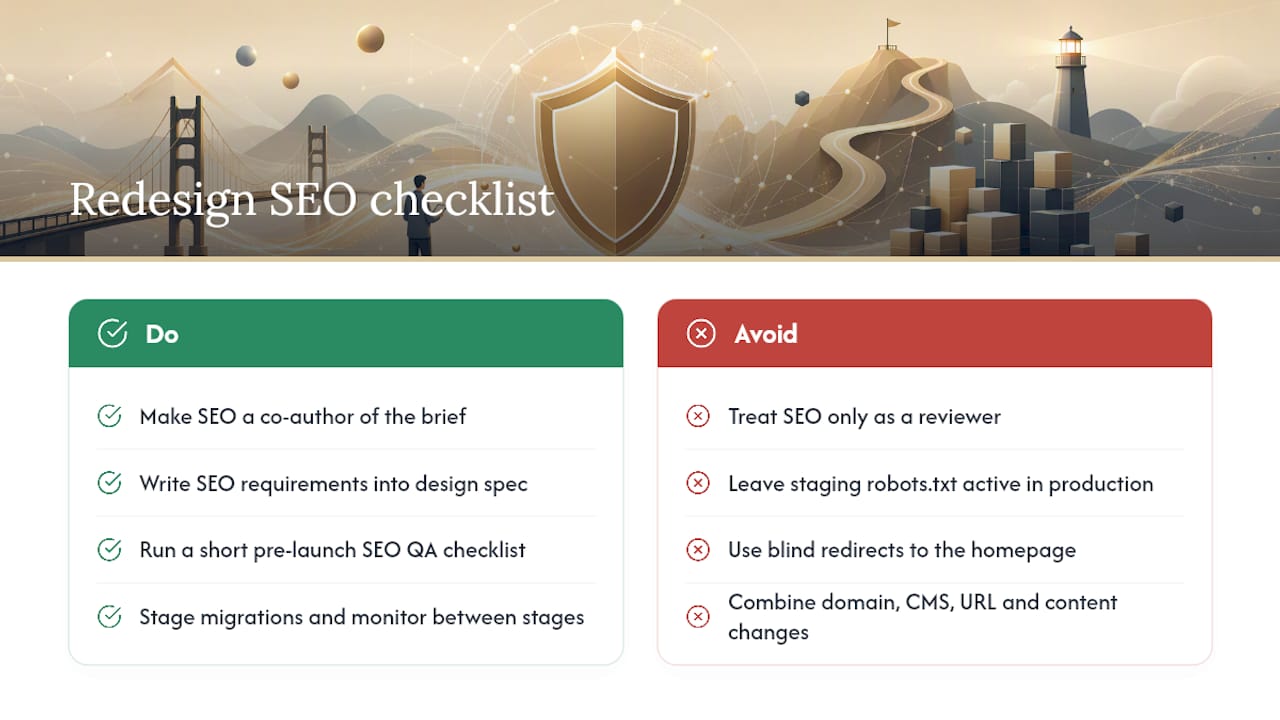
The conventional advice is to “involve SEO early.” That is correct but incomplete. The real problem is that most teams involve SEO as a reviewer, not as a co-author of the brief. By the time an SEO lead sees the wireframes, the template structure is already decided, the URL architecture is baked into the CMS configuration, and changing either one requires a development sprint that the project timeline does not have room for.
The fix is not earlier review. It is SEO requirements written into the design spec before wireframes are approved. That means the H1 placement, the FAQ schema requirements, the internal link module structure, and the URL pattern are all specified in the same document the designer and developer work from. When those requirements live in the brief, they do not get dropped in a design iteration.
The three failure modes that cause the most catastrophic redesign outcomes are all avoidable with a short pre-launch QA plan: staging robots.txt left active in production (which blocks Googlebot from the new site entirely), blind redirects that send dozens of URLs to the homepage (which destroys topical relevance signals), and template regressions that silently remove H1 tags, FAQ schema, or internal link modules from high-value pages. None of these require sophisticated tooling to catch. They require a checklist and someone assigned to run it.
One more thing worth saying plainly: a redesign that also moves domains, swaps CMS platforms, restructures URLs, and rewrites content simultaneously is not a redesign. It is four migrations happening at once. The teams that come out of those projects with rankings intact are the ones that staged each change separately, monitored between stages, and resisted the pressure to ship everything in a single launch. Scope discipline is an SEO strategy.
Common redesign pitfalls like these are exactly what Proxiumdigital’s web design and SEO checklist is built to prevent.
Proxiumdigital can run this process for you
If the checklist above looks like a full-time project on top of running your business, that is because it is. Proxiumdigital is a Michigan-based web design and SEO agency that builds SEO into every stage of a redesign, from the initial brief through the 90-day post-launch audit.

The process covers the full scope: technical SEO audits, URL inventory and redirect mapping, staging QA, launch-day verification, and structured 30/60/90-day monitoring with written performance reports. SEO is not added at the end of a Proxiumdigital project. It is part of the spec from day one, which means fewer late-stage reversions, cleaner template structures, and a site that ranks from launch rather than recovering toward it.
For local service businesses and professional firms in Michigan that cannot afford a ranking drop during a redesign, this integrated approach is the practical alternative to managing a fragmented handoff between a design agency and a separate SEO vendor. Review Proxiumdigital’s web design and SEO solutions or request a migration-readiness audit to see where your current site stands before any work begins.
Useful sources and tools
The following tools and documents are the ones you will actually use to execute this checklist:
- Website Redesign SEO: How To Preserve Organic Traffic (2026) - Shopify
- Move a site with URL changes - Google Search Central
- Site migration SEO guide - Search Engine Land
- [The Complete Website Migration Checklist [SEO-Friendly] — Semrush](https://www.semrush.com/blog/website-migration-checklist/)
- The technical SEO checklist for search engines and AI search - Semrush
- Technical SEO Checklist: The Complete Guide For 2026 | DebugBear
- Share of website traffic coming from mobile devices - Statista
- Site migration SEO checklist (2026, 37 items) - Linkguard
For a broader technical SEO audit checklist covering ongoing optimization beyond the redesign, Proxiumdigital’s SEO optimization services include the structured audit framework used in post-launch monitoring.
FAQ
Does redesigning a website affect SEO?
Yes, a redesign almost always causes some short-term ranking fluctuation. The severity depends on how many URLs change, whether redirects are implemented correctly, and whether technical SEO signals (canonicals, sitemap, robots.txt) are preserved through the transition.
How do I redesign my website without losing SEO?
Preserve high-value URLs where possible, implement 1:1 server-side 301 redirects for every URL that changes, validate crawlability and Core Web Vitals on staging, and monitor Google Search Console and GA4 daily for the first week after launch.
Will I lose Google rankings if I redesign my website?
You may see temporary fluctuations, but permanent ranking loss is preventable. Missing or incorrect redirects and redirect chains are the primary causes of lasting traffic loss. A complete redirect map and pre-launch technical audit eliminate most of the risk.
What is the Google Change of Address tool and when do I need it?
The Change of Address tool in Google Search Console is required when you move your site to a new domain. It forwards domain-level signals for 180 days and requires verified ownership of both the old and new properties before you can submit it.
How long does it take to recover SEO after a redesign?
A well-executed redesign with correct redirects and no major technical errors typically stabilizes within 30–60 days. More complex migrations involving domain changes or significant content restructuring can take 90 days or longer to fully re-stabilize in rankings.