Title Tag Length: The 2026 Pixel-First Guide for SEO Pros

Aim for a title that fits inside roughly 580 pixels, which works out to 50–60 characters, and put your primary keyword in the first 30–40 characters. That single rule covers the vast majority of title optimization decisions you will ever face.
- Pixel target: ~580px on desktop (roughly 50–60 characters)
- Safest zone: 51–55 characters for consistent cross-device visibility
- Keyword placement: primary keyword within the first 30–40 characters
- Truncation: hurts CTR, not rankings; Google still reads the full title
- Bottom line: pixel width governs what users see; character count is a useful proxy, not the real constraint
Table of Contents
- How title tag length actually works in Google Search
- Practical length targets by page type
- Concrete best practices for writing titles that avoid truncation
- Which tools let you check pixel width and preview SERP rendering?
- Worked examples and templates that survive truncation
- How to measure the impact of title changes
- How Proxiumdigital applies title-tag strategy for local clients
- Key Takeaways
- The trade-off nobody talks about enough
- Proxiumdigital’s SEO services handle this for you
- Useful sources
- FAQ
How title tag length actually works in Google Search
Google Search Central is explicit: there is no hard character limit for title tags. Google may truncate what it displays in search results, but it reads and indexes the full text regardless of length. That distinction matters for how you think about optimization. The display problem and the ranking problem are separate.
What actually governs truncation is pixel width, not character count. Google’s desktop SERP container fits roughly 580–600 pixels of title text before cutting off with an ellipsis. Because the font Google uses is proportional, a capital “W” consumes far more horizontal space than a lowercase “i” or the letter “l.” Two titles with identical character counts can render very differently. A title heavy on wide characters like “W,” “M,” and uppercase letters may truncate at 52 characters. A narrow-character title might survive to 63.
Zyppy’s research found that titles in the 51–55 character range had the lowest rewrite rate in their dataset, suggesting that range sits in a practical sweet spot where Google is least likely to intervene.

Mobile is a different story. Google typically shows titles in a narrower range, roughly 480–560 pixels on mobile, though the exact cutoff shifts by device, screen resolution, and layout. In practice, a title that fits cleanly on desktop at 55 characters usually survives on mobile too, but it is worth previewing both views in a pixel-aware tool before publishing.

Moz documents that Google rewrites a meaningful share of titles, not just truncates them. Rewrites happen when Google judges the existing title as too long, too short, keyword-stuffed, or misaligned with the page’s actual content. Shorter, more relevant titles that match the page’s H1 reduce rewrite risk. Truncation, meanwhile, can suppress click-through rate even though it carries no direct ranking penalty.
Practical length targets by page type
Page type shapes what belongs in a title and how much space you actually need. A homepage title serves a different job than a product page or a local service page.
| Page Type | Pixel Target | Character Range | Priority Order |
|---|---|---|---|
| Homepage | 480–560px | 45–55 chars | Brand name, core service, location |
| Product page | 580–600px | 51–55 chars | Product name, key modifier, brand |
| Category page | 580–600px | 51–55 chars | Category keyword, modifier, brand |
| Blog post / guide | 580–600px | 51–55 chars | Primary keyword, benefit, year if relevant |
| Local service page | 580–600px | 51–55 chars | Service + city, intent signal, brand |
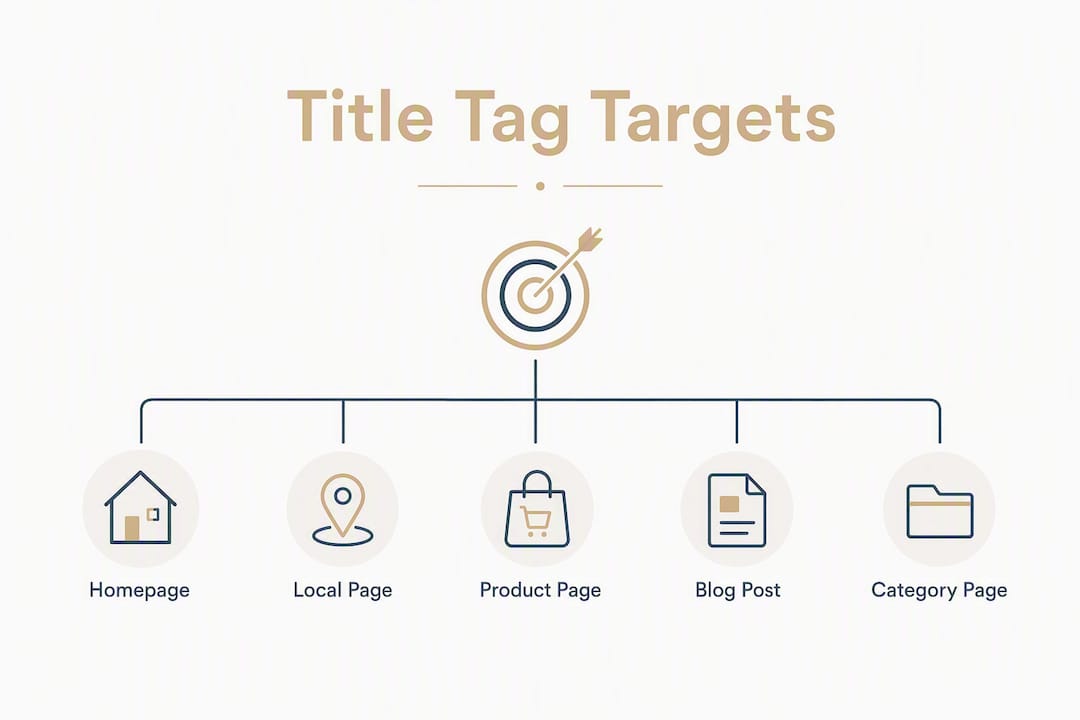
Homepages tend to be brand-forward: “Proxiumdigital: SEO & Web Design in Detroit” fits at 46 characters and leaves no ambiguity. Product pages benefit from leading with the product name and a key modifier before the brand, since users scanning results want to confirm the exact item quickly. Blog posts and informational guides have the most flexibility because readers expect a descriptive title, and a year modifier like “2026” adds click value when the topic is time-sensitive.
Local service pages are worth calling out specifically. Placing the city name early, as in “Detroit HVAC Repair: Fast, Licensed Service,” keeps the geographic signal visible even on a narrow mobile screen. ContentDecoded’s analysis confirms that context matters: informational pages tolerate slightly longer titles when the extra words communicate genuine value, while product and brand pages benefit from tighter, front-loaded titles.
Concrete best practices for writing titles that avoid truncation
The rules below are not theoretical. They reflect what consistently produces visible, clickable titles across page types.
- Front-load the primary keyword. Place it within the first 30–40 characters so it survives truncation on any device and matches the user’s query visually.
- Use “&” instead of “and.” Saves two characters and reads naturally in titles.
- Choose narrow separators. A pipe (|) or colon (:) takes less horizontal space than a dash surrounded by spaces.
- Avoid ALL CAPS. Capital letters are wider in proportional fonts and can push a title over the pixel limit faster than you expect.
- Skip excessive punctuation. Exclamation marks and multiple commas add visual noise without adding click value.
- Place brand name at the end. Unless brand recognition is the primary draw (think Apple or Nike), the brand belongs after the descriptive content, separated by a pipe.
- Add modifiers only when they earn their space. Words like “Guide,” “2026,” “Free,” or “Template” lift CTR on informational queries. On a product page, they usually just eat characters.
- Keep unique titles across every page. Duplicate titles are a technical SEO red flag and increase the chance Google rewrites your title with something generic.
Backlinko’s guidance makes a point worth internalizing: a compelling, early hook beats a technically perfect length every time. If your title is 62 characters but the first 55 are persuasive and keyword-relevant, it will likely outperform a sterile 52-character title that buries the value proposition.
Pro Tip: Before finalizing any title, paste it into a pixel-aware previewer and check the desktop and mobile views. If the truncation cuts mid-word or removes a critical modifier, trim from the end, not the front.
Which tools let you check pixel width and preview SERP rendering?
| Tool | What It Measures | Pixel-Aware | Free | Format |
|---|---|---|---|---|
| Moz Title Preview | Character + pixel estimate | Yes | Yes | Web tool |
| Screaming Frog | Site-wide title audit | Yes (flags over-length) | Freemium | Desktop crawler |
| Yoast SEO (WordPress) | In-CMS SERP snippet preview | Approximate | Yes (plugin) | CMS plugin |
| MRS Digital Meta Length Checker | Character + pixel preview | Yes | Yes | Web tool |
| WebYurt Title Tag Tool | SERP rendering simulation | Yes | Yes | Web tool |
| Google Search Console | Impressions, CTR, rewrite detection | No (performance data) | Yes | Dashboard |
A few practical notes on using these correctly. Moz’s free title preview tool gives a quick pixel estimate and a visual snippet simulation, which makes it useful for one-off checks before publishing. Screaming Frog is the right tool for site-wide audits: it crawls every page, flags titles that exceed recommended lengths, and exports the data so you can prioritize fixes by traffic volume. Yoast’s WordPress plugin shows an approximate SERP preview inside the CMS editor, which catches obvious problems before a post goes live, though its pixel calculation is an estimate rather than a precise measurement.
MRS Digital’s Meta Length Checker and WebYurt’s Title Tag Tool both simulate how a title renders in a Google-style SERP snippet, making them useful for quick visual checks without installing anything. Neither requires an account.
For workflow integration: run Screaming Frog as part of any site audit, use Moz or a dedicated previewer for page-level QA, and keep Yoast active in WordPress as a first-pass check during content creation. Semrush’s guidance also recommends building title length checks into CMS publishing templates so writers see a warning before a page goes live, rather than catching problems after the fact.
Worked examples and templates that survive truncation
The fastest way to internalize the pixel-first rule is to see it applied. Here are before-and-after examples across common page types.
Blog post (informational guide)
- Before: “The Complete and Comprehensive Guide to Title Tag Length for SEO in 2026” (72 chars)
- After: “Title Tag Length: The 2026 SEO Guide” (36 chars)
- Why it works: the keyword lands in the first six characters; the year adds freshness; nothing is wasted.
Local service page
- Before: “Professional Plumbing Services Available in the Greater Detroit Metropolitan Area” (80 chars)
- After: “Detroit Plumber: Licensed, Same-Day Service | Brand” (51 chars)
- Why it works: city and service appear in the first 15 characters, surviving any truncation scenario.
Product page
- Before: “Buy Our Premium Ergonomic Standing Desk with Adjustable Height and Memory Settings” (82 chars)
- After: “Adjustable Standing Desk with Memory Settings | Brand” (53 chars)
- Why it works: the product’s defining feature leads; the brand closes without crowding the description.
Reusable templates by intent:
- Informational guide:
[Primary Keyword]: [Benefit or Year] Guide(target: 40–55 chars) - Local service page:
[City] [Service]: [Differentiator] | [Brand](target: 45–58 chars) - Product page:
[Product Name] [Key Modifier] | [Brand](target: 45–55 chars) - Category page:
[Category Keyword]: [Modifier or Count] | [Brand](target: 48–58 chars)
Include a year only when the topic is genuinely time-sensitive and the year adds click value. For evergreen product pages, a year often signals staleness rather than freshness. Brand text belongs at the end unless you are optimizing for branded queries specifically.
How to measure the impact of title changes
Changing a title without measuring the result is a missed opportunity. Here is a straightforward process for validating whether edits actually improve performance.
- Set a baseline in Google Search Console. Before changing any title, record the current impressions, CTR, and average position for the target query over the prior 28 days.
- Select target pages deliberately. Prioritize pages with high impressions but below-average CTR. Those are the titles where a better hook has the most room to move the needle.
- Apply the change and document the date. Note the exact date of the edit so you can isolate the before-and-after window cleanly.
- Monitor for 2–8 weeks. Two weeks is the minimum for Google to recrawl and for the data to stabilize. Eight weeks gives you a cleaner signal on lower-traffic pages.
- Compare CTR and organic clicks. A meaningful CTR lift on a page with stable or growing impressions is a strong positive signal. If impressions drop simultaneously, check whether Google rewrote your new title.
- Check for Google rewrites. In Search Console, compare the title Google displays in the “Search appearance” report against your HTML title tag. A mismatch means Google substituted its own version, which tells you the new title still needs work.
- Roll back if performance drops. If CTR falls and impressions hold steady after four weeks, revert and test a different angle.
For pages with enough traffic to support it, stagger title edits across a small batch rather than changing everything at once. That way, a site-wide algorithm shift does not contaminate your title-specific results. RankNibbler notes that title tags are a confirmed ranking factor, though a minor one. Their principal effect is on CTR, which means the measurement framework above is exactly the right lens.
Stat to watch: Zyppy’s dataset found that titles in the 51–55 character range had the lowest rewrite rate, suggesting Google is most comfortable leaving those titles alone. If your revised title falls in that range and still gets rewritten, the issue is relevance, not length.
How Proxiumdigital applies title-tag strategy for local clients
For local service businesses in Michigan, title tags are not an abstract SEO exercise. They are often the first line of text a potential customer reads before deciding whether to click. Proxiumdigital’s workflow treats them accordingly.
The process starts with a full site audit using Screaming Frog to surface every title that is over-length, duplicated, or missing entirely. From there, keyword prioritization determines what belongs in the first 30–40 characters for each page type: for a local HVAC company, that might be “Detroit AC Repair” before anything else. For a law firm, it could be the practice area and city before the firm name.
Templates get built into the CMS so that new pages follow the same structure automatically, reducing the chance a future blog post ships with a 90-character title nobody checked. Monthly performance reporting in Google Search Console tracks CTR by page, and titles that underperform relative to their impression volume get flagged for revision in the next cycle.
The local pack connection is worth noting. While title tags do not directly influence local pack rankings, they affect organic CTR on the pages that support local pack listings. A well-optimized title on a service page reinforces the relevance signal and drives clicks that feed into the broader performance picture Proxiumdigital monitors for clients through its web design and SEO process.
Key Takeaways
Keep your title inside 580 pixels (50–60 characters), front-load the primary keyword, and measure CTR in Google Search Console before and after every change.
| Point | Details |
|---|---|
| Pixel-first rule | Target ~580px (50–60 chars); character count is a proxy, not the real constraint. |
| Front-load keywords | Place the primary keyword within the first 30–40 characters to survive any truncation. |
| Per-page-type targets | Homepages: 45–55 chars; product/local/category/blog pages: 51–55 chars. |
| Preview before publishing | Use a pixel-aware tool (Moz, MRS Digital, WebYurt) to confirm rendering on desktop and mobile. |
| Proxiumdigital workflow | Proxiumdigital audits, templates, and monitors titles for Michigan local businesses as part of its monthly SEO retainer. |
The trade-off nobody talks about enough
Most title-length advice treats the 60-character rule as a hard ceiling and stops there. In practice, the more interesting decision is what to cut when you are at 63 characters and everything in the title is doing real work.
The conventional answer is “trim to fit.” The better answer is “trim what matters least.” For a local service page, the city name and the service keyword are non-negotiable. The brand name, if it is not yet well-known in the market, is the first candidate to shorten or drop. For an informational guide, the year modifier is often worth keeping even if it pushes the title to 62 characters, because the freshness signal lifts CTR enough to justify the occasional ellipsis on a narrow screen.
There are also cases where a slightly longer title is the right call. A 63-character title that reads naturally and puts the hook in the first 40 characters will outperform a clipped 55-character title that sounds awkward because a word got cut. Clarity is the job. Pixel fit is the constraint. When they conflict, lean toward clarity and test the result.
Proxiumdigital’s SEO services handle this for you
Title audits are one of the faster wins in SEO, but doing them right across a full site, building templates into a CMS, and then monitoring CTR month over month takes consistent time most business owners do not have.

Proxiumdigital handles the full cycle for local businesses and professional firms in Michigan: site-wide title audits, keyword prioritization by page type, CMS template setup, and monthly Search Console reporting that flags underperforming titles before they cost you clicks. The work is built into the SEO retainer from day one, not treated as a one-time fix. If you want to see what that looks like for your site, review the SEO optimization services or get a full picture of what Proxiumdigital offers and request an audit.
Useful sources
- Google Search Central: Title and link appearance — Google’s official documentation on how title tags are used for display and indexing; the authoritative source for understanding rewrites and truncation behavior.
- Zyppy: The Ideal Title Tag Length for SEO — Data-backed research on optimal character ranges and rewrite rates; the source for the 51–55 character sweet spot finding.
- ContentDecoded: Meta Title Length, Pixel Width vs Character Limits — Clear explanation of why pixel width governs display and how proportional fonts affect rendering.
- Moz: Title Tags — Covers Google rewrite frequency and includes a free title preview tool useful for quick checks.
- Screaming Frog: Page Titles audit documentation — Reference for site-wide title auditing and flagging over-length titles at scale.
- Semrush: What Is a Title Tag? — Practical tips on shortening titles and integrating length checks into CMS workflows.
- Backlinko: Title Tags — Emphasizes readability and persuasion over rigid length targets; useful counterweight to purely technical guidance.
- RankNibbler: What Is a Meta Title? — Practical notes on CTR impact and the distinction between ranking and display effects.
Tools for quick checks:
- Moz Title Preview Tool (free, web-based)
- MRS Digital Meta Length Checker (free, web-based)
- WebYurt Title Tag Tool (free, web-based)
- Screaming Frog SEO Spider (freemium, desktop crawler)
- Yoast SEO plugin (WordPress, in-CMS preview)
FAQ
How long should a title tag be?
Aim for 50–60 characters, which fits inside Google’s roughly 580-pixel desktop display container. For the safest cross-device visibility, keep titles in the 51–55 character range.
What is the maximum character length for a title tag?
Google sets no hard character limit. The practical ceiling is determined by pixel width: titles that exceed roughly 580–600 pixels on desktop get truncated in search results, which can reduce click-through rate.
What happens if a page title is over 60 characters?
Google truncates the visible portion with an ellipsis, cutting off whatever falls outside the pixel container. The full title is still indexed, so rankings are not directly penalized, but users see an incomplete title, which tends to lower CTR.
Why do pixels matter more than character count?
Google’s SERP font is proportional, meaning wide characters like “W” and “M” consume more horizontal space than narrow ones like “i” or “l.” Two titles with the same character count can render at very different pixel widths, so a pixel-aware previewer gives a more accurate picture than a character counter alone.