Service Page SEO: The One Change That Moves Rankings

Service page SEO means optimizing the individual page for one specific service, not your homepage or a generic “Services” list, so it ranks for the exact terms people type when they’re ready to hire. The single highest-impact move: create one focused URL per core service, tied to its own commercial keyword. A dedicated page per service consistently outperforms a catch-all services page for ranking service queries.
If you do nothing else this week, do this:
- Pick one service and its exact commercial keyword (not “services,” but “commercial roof repair” or “estate planning attorney”)
- Write an H1 and title tag that name that exact service
- Add one visible call-to-action above the fold
Pro Tip: Set a timer for 45 minutes and build the skeleton for one page before you touch anything else. A half-finished page for every service beats a polished page for none.
Key Takeaways
Service page SEO works when a page targets one commercial keyword, structures content for skimmability, and places proof next to a clear CTA.
| Point | Details |
|---|---|
| One page per service | Split each core service onto its own URL instead of one general services page. |
| One keyword per page | Place the primary term in the H1, slug, meta title, and opening sentence only. |
| Write real, specific copy | Aim for 600 to 1,000 words using customer language, timelines, and actual process details. |
| Put proof near the CTA | Place reviews, photos, or case snapshots within one scroll of every call-to-action. |
| Track and iterate on a cadence | Review impressions, CTR, and conversions at 30, 60, and 90 days before making changes. |
| Build SEO in from the start | Proxiumdigital designs keyword strategy and page structure together instead of adding SEO after launch. |
Table of Contents
- What Makes Up a High-Converting Service Page?
- How Do You Choose the Right Keyword for a Service Page?
- What Should the Copy on a Service Page Actually Say?
- What Technical SEO Items Actually Move the Needle?
- How Do You Turn Ranked Traffic Into Booked Leads?
- How Should Service Pages Fit Into Your Site Structure?
- Which Schema Markup Actually Helps a Service Page?
- How Do You Track Whether a Service Page Is Working?
- How Proxium Builds Service Pages With SEO Baked In
- The Real Gap in Most Service Page Advice
- Get Service Pages That Rank and Convert, Built Together
- Sources
- FAQ
What Makes Up a High-Converting Service Page?
A service page has three jobs: tell a search engine what it’s about, tell a visitor what they’ll get, and get that visitor to act. Miss any one of those and the page underperforms no matter how good the writing is.
The hero section carries the most weight. It needs an H1 that names the actual service (not a clever tagline), a subhead stating the outcome the customer wants, a visible CTA, and one trust cue, a review count, a certification badge, years in business, right where the eye lands first. Nielsen Norman Group’s research shows 79% of users scan a new page rather than reading it top to bottom, so the hero has to communicate the whole pitch in about four seconds.
Below the hero, structure the body in this order:
- Scope and deliverables — exactly what’s included, in plain language
- Process — the steps from first contact to finished work
- Outcomes — what changes for the customer once the service is done
- Proof — reviews, photos, or case snapshots specific to this service
- Pricing guidance — ranges or starting prices, even if approximate
- FAQ — the objections and questions that come up before booking
Two structural habits separate pages that convert from pages that just rank. First, repeat the CTA at least three times: hero, mid-page after proof, and footer, so no visitor has to scroll backward to act. Second, place proof elements directly above or beside a CTA, never buried in a separate section, since service pages that pair deliverables, process, and proof next to a single clear CTA convert better than pages that scatter these elements.
How Do You Choose the Right Keyword for a Service Page?
One page, one primary keyword, one clear commercial intent. That’s the rule, and most service pages that fail to rank break it by trying to cover three related services on a single URL.
Start in Google Search Console and pull every query already generating impressions for pages that even loosely relate to the service. Cross-reference that with a keyword tool to find long-tail commercial variants; “emergency plumber near me” and “24 hour plumbing repair” are different search intents even though they’d both live on a plumbing repair page. You’re looking for terms with buyer language in them, “hire,” “cost,” “near me,” “same day,” not informational phrasing like “how does” or “why does.”
Once you’ve settled on the primary term, place it in four spots and nowhere else forced:
- The H1
- The URL slug
- The meta title and first line of the meta description
- The first sentence of the body copy
Don’t repeat the exact phrase in every H2 that follows. Search engines and readers both register that as stuffing, and it reads exactly as stiff as it sounds.
Cannibalization is the quiet killer here. If you check your analytics and find two pages both getting impressions for “kitchen remodeling,” you’ve split your own authority. Audit your service pages every few months. Where two overlap, either merge them into one stronger page or split the query intent clearly, one page for full kitchen remodels, a separate page for cabinet refacing, with distinct H1s and no shared keyword focus.
Pro Tip: If you’re unsure whether two services deserve separate pages, ask whether a customer would search for them differently. “Divorce mediation” and “child custody mediation” are different buyer journeys even under the same practice area, so they earn separate pages.
What Should the Copy on a Service Page Actually Say?
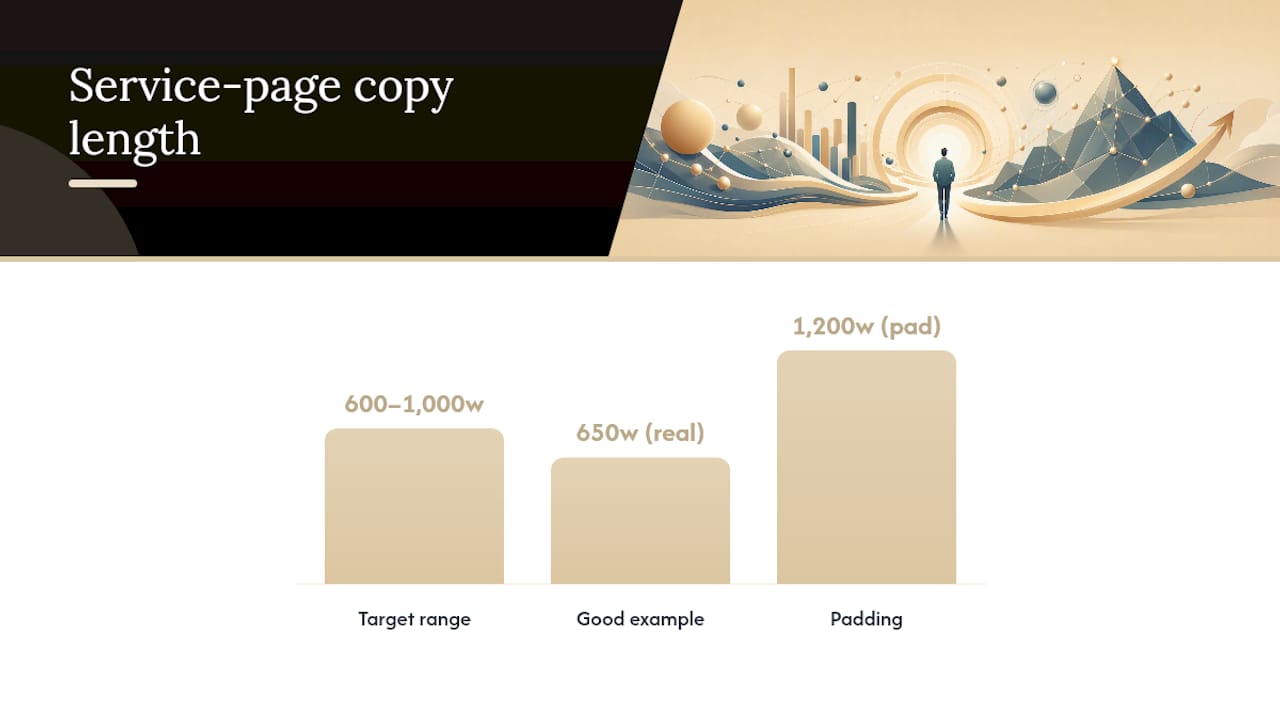
Aim for 600 to 1,000 words of copy that’s actually about this specific job, not generic filler stretched to hit a word count. Agency benchmarks for service pages that rank consistently point to this range, and the reason is simple: search engines and readers both reward specificity, and 1,200 words of padding reads worse than 650 words of real detail.
Real detail means writing the way your customer actually talks about the problem. If you do water damage restoration, don’t write “we address moisture issues.” Write about the musty smell, the warped baseboards, the insurance adjuster visit, and how many days a typical dry-out takes. If you’re a family law attorney, name the timeline: a first consultation, filing, the waiting period your state requires, what a typical settlement conversation looks like. Customers searching for a service already know their symptoms. Mirror that language back to them and you’ve done half the persuasion work before you even mention price.
Proof belongs near the CTA, not in a testimonials page three clicks away. A short case snapshot, “Replaced a failed sump pump and regraded a basement in Ann Arbor, cutting flood risk before the spring thaw,” reads as more credible than five stars with no context. Real project photos and review excerpts that mention the specific service by name do more for conversion than generic praise; BrightLocal’s research on review reliance backs up why specificity in proof outperforms volume.
Pricing is where most service pages go quiet, and that silence costs leads. You don’t need an exact number. A range (“most kitchen remodels in this style run $18,000 to $35,000”) or a “starting from” figure filters out mismatched leads before they ever call, which saves your sales team time and keeps your close rate higher on the calls that do come in.
- Write in the customer’s language, not internal jargon
- Include a real timeline, not just a service description
- Place proof (photos, reviews, case snapshots) within one scroll of the CTA
- Give a pricing range or starting price, even an approximate one
Pro Tip: Read your draft out loud. If it sounds like something a salesperson would actually say on a phone call, it’s doing its job. If it sounds like a brochure, rewrite it.
What Technical SEO Items Actually Move the Needle?
Technical SEO for a service page isn’t about chasing every audit flag. A handful of items do most of the work, and the rest is noise.
- Use a short, descriptive slug that matches the service name (
/kitchen-remodeling, not/services/page-3), and set a self-referencing canonical tag so search engines don’t split authority across duplicate URLs. - Use exactly one H1 per page, naming the service, then structure everything below it with H2s so the page is scannable at a glance.
- Write a meta title under 60 characters and a meta description under 155 that include the primary keyword and a reason to click, a location, a differentiator, or a number.
- Compress and lazy-load images below the fold, and check Core Web Vitals scores in PageSpeed Insights; slow-loading hero images are one of the most common reasons a well-written page still underperforms.
- Test the page on an actual phone, not just a browser’s mobile preview. Mobile devices generate a large share of U.S. website traffic, so a page that looks fine on desktop but forces pinch-zooming on mobile is losing leads daily.
Round out the checklist with the boring but necessary steps: confirm the page is in your XML sitemap, check Search Console’s index coverage report to make sure it’s not accidentally marked “noindex,” and verify it loads at a single canonical URL without redirect chains. None of this is glamorous. All of it is the difference between a page that’s technically able to rank and one that’s fighting itself. A deeper walkthrough of these fundamentals lives in Proxiumdigital’s plain-English guide to technical SEO.
How Do You Turn Ranked Traffic Into Booked Leads?
Ranking a page and converting a visitor are two different skills, and a lot of service pages nail the first while quietly failing the second.
Match your CTA type to how the visitor is likely to behave. A locksmith or emergency electrician needs a phone number they can tap immediately, front and center, because that visitor is often standing in a driveway with a problem right now. A consulting firm or a custom home builder needs a quote form instead, since that buyer wants to feel heard before they commit to a call. Booking widgets sit in between, useful for services with a defined appointment slot, like a dental cleaning or a home inspection.
Whatever form you use, cut every field that isn’t essential. Name, phone or email, and a one-line description of the job is often enough; a ten-field form before someone even talks to a human is a proven way to lose leads who’d have converted with three fields.
Trust elements need to sit at decision points, not just at the top of the page. A review badge next to the form, a “licensed and insured” line right where someone’s about to type their phone number, a case metric (“47 roofs replaced in Wayne County this year”) near the pricing section. Each of these does its work exactly where the hesitation happens, not two scrolls away.
- Match CTA type (call, form, booking) to how urgently the customer needs the service
- Cut contact forms down to the fewest fields that still qualify the lead
- Place trust badges and reviews at the exact point of hesitation, not just at the top
Pro Tip: Add one pricing tier or sample package even if it’s approximate. A lead who sees “kitchen refresh packages start around $8,000” self-selects before calling, which means the calls you do get close at a much higher rate.
How Should Service Pages Fit Into Your Site Structure?
Service pages don’t live in isolation. They sit inside a hierarchy: your homepage or a services hub links out to each individual service page, and each service page links sideways to closely related pages and down to supporting content like blog posts or case studies.
Your homepage or main services hub should link to every core service page using descriptive anchor text, “commercial roof repair,” not “click here” or “learn more.” A solid internal linking structure reinforces which pages matter most to search engines and helps visitors self-navigate to the exact service they need.
Location pages deserve their own separate URLs only when you genuinely serve distinct areas with different content, service availability, or local proof, not as a way to multiply thin pages targeting “[service] + [city]” with nothing but a swapped city name. That’s the kind of doorway content search engines have gotten very good at spotting and discounting.
- Link from your homepage or hub to every service page with descriptive anchor text
- Cross-link closely related services to each other, but don’t force unrelated services together
- Create separate location pages only when the content genuinely differs by area
- Support each service page with a relevant blog post or case study, linked both ways
Which Schema Markup Actually Helps a Service Page?
Structured data doesn’t move rankings directly, but it helps search engines parse exactly what your page offers, which matters more as AI-driven answer engines summarize search results.
Add Service schema with the service name, description, and provider fields filled in accurately. If you’re a genuinely local business, layer in LocalBusiness schema, but only when the page truly represents a local operation; misusing location schema on a page that isn’t location-specific can create a mismatch search engines flag rather than reward. Add FAQPage schema around the same FAQ section already on your page, three to five real questions, not invented filler just to have markup.
- Add
Serviceschema with accurate name, description, and provider details - Layer
LocalBusinessschema only when the page is genuinely tied to a physical service area - Mark up your FAQ section with
FAQPageschema using the same questions visitors see - Validate every schema block with Google’s Rich Results Test before publishing, then confirm it’s recognized in Search Console
How Do You Track Whether a Service Page Is Working?
Five numbers tell you almost everything: impressions and average position in Search Console, click-through rate on that query, sessions landing on the page, and your conversion rate once they arrive.
- Set up GA4 events on every CTA, phone clicks, form submissions, booking widget completions, so you’re measuring actions, not just page views.
- Run a 30/60/90 review cadence: at 30 days, check indexing and early impressions; at 60, check ranking movement and CTR; at 90, check conversion rate and decide whether to rewrite the hero or adjust pricing language. SEO changes typically take weeks to months to show ranking movement, so judging a page at day 10 almost always leads to a premature rewrite.
- Test one variable at a time: swap the hero headline, change the CTA button text from “Get a Quote” to “Get My Free Estimate,” or adjust how pricing is phrased, then compare conversion rate over a comparable traffic window before declaring a winner.
How Proxium Builds Service Pages With SEO Baked In
Most agencies hand you a website, then hand you off to a separate SEO vendor who has to reverse-engineer structure the designer never considered. Proxiumdigital builds the SEO into the page from the first wireframe, which means the H1, the URL structure, and the page speed budget are decided alongside the visual design, not bolted on afterward.
The gap between a page that looks good and a page that ranks and converts almost always comes down to sequencing: was the keyword strategy part of the build, or was it patched in after launch? Pages built with SEO first tend to load faster and target intent more precisely because there’s no legacy structure to work around.
That sequencing shows up in practical ways: fewer redirect chains, cleaner heading hierarchies, and a CTA placement that was tested during design rather than added as an afterthought. You don’t need to hire an agency to borrow the lesson, though. Decide your keyword and page goal before you open your CMS, not after the page is half built, and you’ll avoid the most common source of expensive rework:
- Lock the primary keyword and H1 before writing any copy
- Design proof and CTA placement into the wireframe, not as a final step
- Treat page speed as a design constraint from day one, not a post-launch fix
The Real Gap in Most Service Page Advice
Most service page guidance treats SEO and conversion as two separate projects: rank first, then worry about persuasion. That sequencing is backward. A page that ranks for “commercial HVAC repair” but buries its CTA below three paragraphs of throat-clearing copy has wasted the ranking. The traffic shows up and leaves.
The conventional wisdom also overrates word count and underrates specificity. I’ve seen plenty of 1,500-word service pages that say almost nothing a customer couldn’t guess, and plenty of 700-word pages that convert at a far higher rate because every sentence names a real detail, a timeline, a price range, a specific outcome. Depth isn’t length. It’s how much a stranger learns about what actually happens when they hire you.
If you take one thing from this, prioritize the keyword-to-page mapping before you touch copy or design. A gorgeous page built around the wrong intent, or worse, three services crammed onto one URL, can’t be fixed with better sentences. Fix the structure first. Everything else, proof, pricing clarity, CTA placement, is easier to get right once the page has a single, clear job.
Get Service Pages That Rank and Convert, Built Together
Most businesses end up choosing between a designer who makes the page look sharp and an SEO vendor who tries to fix it after launch, patching in keywords and speed fixes on a structure that was never built for either. Proxiumdigital skips that handoff entirely: the keyword strategy, page structure, and design happen in the same workflow, so the page that goes live is already built to rank and convert instead of needing a second round of surgery six months later.
That approach fits exactly the kind of page this article walks through, one focused service, one clear keyword, proof placed where it counts, and a CTA that doesn’t make a visitor hunt for it. If you’re a local service business, a professional firm, or a growing brand in Michigan trying to get more of the right traffic to book instead of bounce, Proxiumdigital’s SEO optimization services apply this exact structure to your existing pages or a new build from scratch. Check the pricing page for package guidance, or reach out to scope which service pages need the most work first.
Sources
- How to create service pages that rank and convert
- How Users Read on the Web
- Share of website traffic coming from mobile devices in the U.S. — Statista
- How to Write a Service Page That Ranks on Google — Northwest
FAQ
What are service pages in SEO?
A service page is a dedicated URL targeting one specific service a business offers, built to rank for commercial-intent searches and convert visitors into leads, distinct from a blog post or a general “Services” overview page.
How do I rank a service page?
Give the page a single focused keyword, place it in the H1, URL, and meta title, write genuinely specific copy about that one service, and back it with proof and technical fundamentals like fast load times and mobile usability.
What are the four types of SEO?
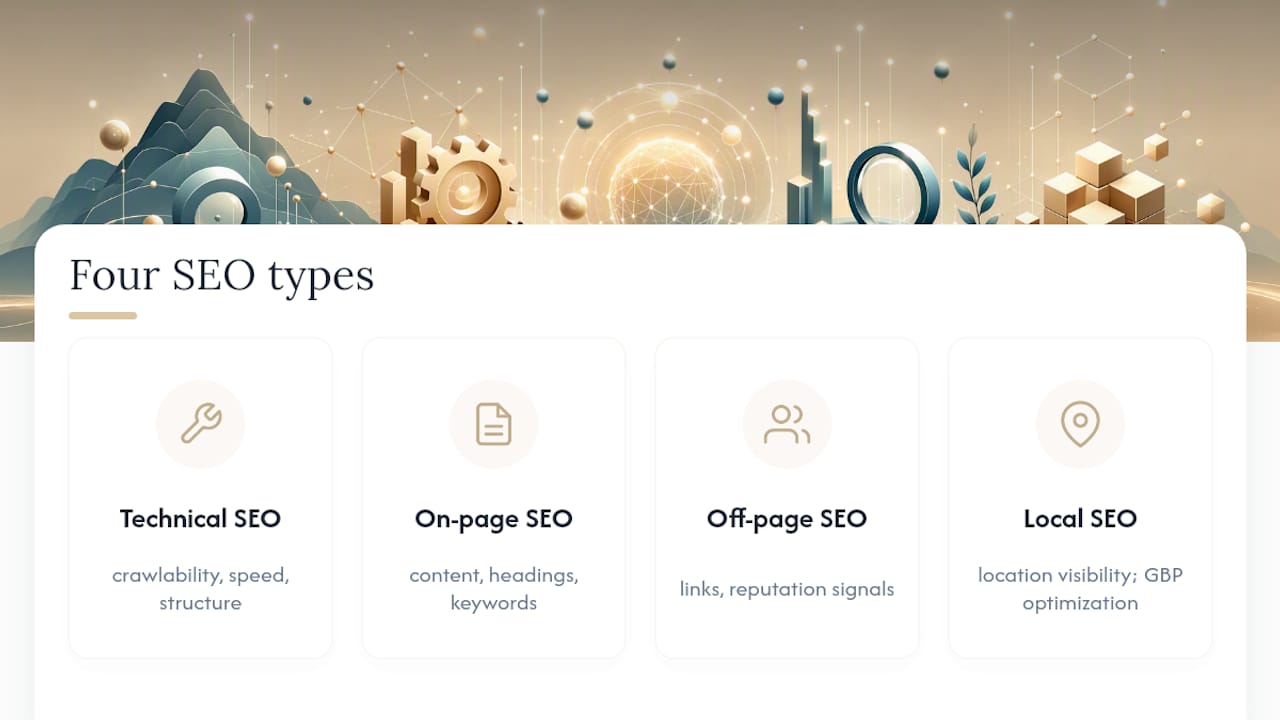
The four common categories are technical SEO (crawlability, speed, structure), on-page SEO (content, headings, keywords), off-page SEO (links and reputation signals), and local SEO (location-specific visibility like Google Business Profile optimization).
What is the 80/20 rule for SEO?
Applied to service pages, it means a small set of actions, one page per service, one clear keyword, a strong hero and CTA, drives most of your ranking and conversion results, while chasing every minor technical fix delivers diminishing returns.
Do service pages need their own FAQ section?
Yes. A short FAQ of three to five real questions before the final CTA answers objections that would otherwise stop someone from converting, and it doubles as content for FAQ schema markup.