SEO-Friendly Web Design: A Small Business Playbook

An SEO-friendly website is one search engines can crawl and index without friction, and that real users actually want to stay on. If you’re starting from zero or auditing an existing site, do these five things first: (1) confirm Google can index your key pages in Google Search Central; (2) check your site on a phone and fix any layout that breaks; (3) compress your hero image to under 200KB; (4) make sure every page has exactly one H1 tag; (5) add HTTPS if you haven’t already.
Whether you DIY or hire help depends on one question: do you have a developer who thinks about SEO before writing a single line of code? If not, the sections below give you the playbook either way.
Key Takeaways
An SEO-friendly website requires correct technical foundations, mobile-first responsive design, and content that search engines can read and rank, all built together from the start rather than patched in afterward.
| Point | Details |
|---|---|
| Mobile-first is mandatory | Google ranks the mobile version of your site; responsive design is the baseline, not a bonus. |
| Core Web Vitals are design constraints | Target LCP under 2.5 seconds, and INP around 200 milliseconds before a template goes live. |
| Build SEO in, don’t bolt it on | Sites designed with SEO from day one cost far less to maintain than retrofitted ones. |
| Five metrics to track | Monitor organic traffic, index coverage, Core Web Vitals, key rankings, and engagement signals monthly. |
| Proxiumdigital’s approach | Proxiumdigital integrates SEO into architecture, components, and pre-launch QA so sites rank from the start. |
Table of Contents
- What does SEO-friendly web design actually mean?
- Why SEO-friendly design matters for your small business
- What are the best practices for SEO-friendly web design?
- Technical implementation checklist
- How design systems make SEO repeatable across your site
- How do you measure whether your design changes improved SEO?
- Common design mistakes that cancel out SEO gains
- What’s a realistic timeline and cost for SEO-friendly design work?
- How Proxiumdigital integrates SEO into web design from the start
- The case for treating SEO as a design constraint, not an afterthought
- Proxiumdigital builds websites that rank from day one
- Sources
- FAQ
What does SEO-friendly web design actually mean?
SEO-friendly web design means building a site where every design and code decision makes it easier for search engines to find, understand, and rank your pages, while also making it faster and clearer for the people who land on them. Those two goals are not in tension. They reinforce each other.
The practical split looks like this. On one side, you have crawlability and indexability: can Googlebot reach your pages, read your content, and understand what each page is about? On the other, you have user-first design: does the page load fast, display correctly on a phone, and answer the visitor’s question without making them hunt?
A few concrete contrasts make this tangible:
- Visible HTML text vs. text in images. A paragraph of body copy in a
<p>tag is readable by crawlers. The same words baked into a JPEG are invisible to them. - Crawlable links vs. JavaScript-only navigation. An
<a href="/services">link is followed by Googlebot. A button that fires a JS event to load a page may never be crawled at all. - Semantic heading hierarchy vs. styled
<div>tags. An<h1>followed by<h2>subheadings tells crawlers exactly how your content is organized. A<div class="big-text">tells them nothing.
The key insight most small business owners miss: content alone does not produce SEO results. Design, code, infrastructure, and content all have to work together. A beautifully written service page that loads in 8 seconds on mobile, sits behind a JavaScript wall, and has no internal links pointing to it will rank nowhere.
Why SEO-friendly design matters for your small business
A site built with SEO in mind from the start does three things for a small business: it gets found without paid ads, it converts visitors who arrive, and it costs far less to maintain than a site that needs constant retrofitting.
The ranking mechanics are straightforward. Search engines use crawl data to decide which pages to index and how to rank them. If your pages are slow, broken on mobile, or hard to crawl, they either don’t appear in results or they appear lower than competitors whose sites are technically cleaner. Speed and mobile layout directly affect where you land.
Mobile devices account for a significant share of website traffic, which is why Google’s mobile-first indexing evaluates the mobile version of your site as the primary signal for ranking. A site that looks great on desktop but breaks on a phone is being graded on the broken version.
The conversion angle is just as direct. A page that loads in under 2.5 seconds, answers the visitor’s question immediately, and has a clear next step converts better than one that doesn’t. SEO-friendly design practices, fast load times, readable hierarchy, and clean layout, produce those outcomes as a byproduct.
The cost argument is the one most owners learn the hard way. Retrofitting SEO onto a poorly built site means paying a developer to undo decisions that were baked into the original build: restructuring navigation, replacing image-text with live text, adding schema markup, fixing redirect chains. Building SEO into the design process from day one reduces that technical debt significantly. The work you do in month one of a build costs a fraction of what it costs to fix in month eighteen.
What are the best practices for SEO-friendly web design?
The practices below are ordered by impact. Start at the top and work down.
Mobile-first responsive layout
Mobile-first indexing means the mobile version of your site is what search engines primarily evaluate, so responsive design is not optional. Build layouts that work at 375px wide before you design for desktop. Test on real devices, not just browser resize tools.
Semantic HTML and heading hierarchy
Use one <h1> per page with clear, descriptive text representing the primary topic. Follow it with <h2> subheadings and <h3> sub-subheadings in logical order. Use <nav>, <main>, <article>, <section>, and <footer> tags so crawlers understand your page structure without guessing.
Flat site architecture
Every important page should be reachable within three clicks from the homepage. Deep hierarchies bury pages from crawlers and users alike. A flat structure also concentrates link equity where it matters most.
Crawlable navigation
All navigation links must be standard <a href> elements. Avoid menus that rely entirely on JavaScript to render links. If a crawler can’t follow the link, the page it leads to may never be indexed.
Internal linking
Link between related pages using descriptive anchor text. “Learn more about our plumbing services” beats “click here” every time, for both crawlers and users. A good internal link structure distributes authority across your site and helps Google understand which pages are most important.
Image optimization
Use modern formats like WebP or AVIF. Set explicit width and height attributes on every image to prevent layout shift. Add descriptive alt text. Use srcset to serve appropriately sized images to different screen sizes. WP Smush and EWWW Image Optimizer automate most of this on WordPress sites.
Core Web Vitals performance
Aim for LCP, CLS, and INP values within generally accepted performance thresholds for good user experience. These thresholds are practical design constraints, not just audit scores. Treat them as a budget: if a design decision would push LCP above 2.5 seconds, the decision needs to change.
Pro Tip: *Set your Core Web Vitals targets in your design brief before a single component is built.
Metadata: title tags and meta descriptions
Every page needs a unique, concise title tag that includes the target keyword for that page. Meta descriptions don’t directly affect rankings, but they affect click-through rates, which do. Write them like ad copy: specific, benefit-led, and under 160 characters.
Structured data
Add schema markup for the page types that benefit most: LocalBusiness, FAQPage, BreadcrumbList, and Service schemas are high-value for small business sites. Schema helps Google display rich results, which increases click-through rates from the SERP.
HTTPS
Every site must run on HTTPS. Google confirmed it as a ranking signal years ago. Beyond rankings, it’s a trust signal for visitors. If your site still runs on HTTP, fix this before anything else.

Sitemaps and robots.txt
Submit an XML sitemap to Google Search Console so crawlers know which pages exist. Keep your robots.txt file clean: never accidentally block CSS, JavaScript, or pages you want indexed.
Canonical tags
Use <link rel="canonical"> on every page to tell Google which version of a URL is the authoritative one. This prevents duplicate content from splitting your ranking signals across multiple URLs.
Content structure
Lead each page with a direct answer to the visitor’s question, then support it with detail. A quick-answer block at the top of a service page, followed by supporting sections, matches both user intent and how featured snippets are selected.
Technical implementation checklist
Hand this list to your developer, or work through it yourself if you manage your own site.
- Check robots.txt. Open
yourdomain.com/robots.txtand confirm it does not block Googlebot from crawling your key pages, CSS files, or JavaScript files. - Generate and submit a sitemap. Create a
sitemap.xmlthat lists all indexable pages. Submit it in Google Search Console under Sitemaps. Most CMS platforms (WordPress, Shopify) generate one automatically. - Add canonical tags. Place a self-referencing canonical tag on every page. For paginated content, canonical the first page or use
rel="next"andrel="prev"where appropriate. - Set up 301 redirects. Any URL that has moved permanently needs a 301 redirect from the old address to the new one. A chain of more than two redirects slows crawl and loses link equity.
- Force HTTPS. Redirect all HTTP traffic to HTTPS at the server level. Confirm there are no mixed-content warnings in Chrome DevTools.
- Audit status codes. Crawl your site with Screaming Frog or a similar tool. Fix all 4xx errors and resolve any unintentional 5xx responses.
- Make pagination crawlable. If your site has paginated content (blog archives, product listings), use HTML links for page navigation. Infinite scroll without a crawlable fallback hides content from Google.
- Handle filters and facets carefully. E-commerce or directory sites with URL-generating filters can create thousands of near-duplicate pages. Use canonical tags or
robots.txtdisallow rules to prevent index bloat. - Avoid client-only rendering for key content. If your site uses a JavaScript framework, confirm that critical content is server-side rendered or statically generated. Use Google’s URL Inspection tool in Search Console to see what Googlebot actually renders.
- Enable lazy loading for below-fold images. Add
loading="lazy"to<img>tags that appear below the fold. Never lazy-load the hero image or LCP element. - Set font-display: swap. Add this CSS property to your
@font-facedeclarations so text renders immediately with a fallback font while custom fonts load. - Enable HTTP/2 and Brotli compression. Ask your host or check your server config. Both reduce page load time with minimal effort.
- Compress images before upload. Target under 200KB for hero images, under 100KB for supporting images. Use Squoosh, TinyPNG, or an automated plugin.
What a marketing owner can handle: steps 1, 2, 5, 10, and 13. Everything else is developer territory unless you’re comfortable in a server environment. For a deeper look at what these items involve, technical SEO explained in plain English covers the concepts without assuming a development background.
Embedding SEO requirements into templates and design systems from the start reduces technical debt and makes pages crawlable and fast at launch, rather than requiring expensive fixes after the fact.
How design systems make SEO repeatable across your site
A design system is a library of reusable components: buttons, cards, headings, image blocks, accordions. For SEO, the value of a design system is that it enforces correct patterns at the component level. Every new page built from those components inherits the right semantics automatically.
Design systems help enforce SEO-friendly patterns by providing pre-vetted components that include proper heading structures, semantic HTML, and accessibility features. Without a system, individual developers make individual decisions, and those decisions drift over time. With one, the heading component always outputs an <h2> in the right place, the image component always includes alt and width/height attributes, and the FAQ accordion always renders its content in the DOM rather than hiding it behind a JavaScript toggle.
Specific components worth standardizing for SEO:
- Heading component: enforces one
<h1>per page, correct<h2>/<h3>nesting, no skipped levels. - Image component: requires
alttext, setswidthandheight, outputs WebP with a fallback, appliesloading="lazy"to non-hero images. - FAQ/accordion component: renders question and answer text in the HTML on page load, not injected by JavaScript after a click. This keeps content crawlable.
- Breadcrumb component: outputs
BreadcrumbListschema automatically, so every page that uses it gets structured data for free. - Card and list components: use
<a href>links, not JavaScript click handlers, so every linked item is crawlable.
W3C WCAG accessibility standards overlap significantly with SEO best practices: readable heading structure, sufficient color contrast, keyboard-navigable elements, and descriptive link text all improve both accessibility scores and how crawlers interpret your content. Codify WCAG AA compliance as an acceptance criterion in your design system, and you get SEO improvements as a side effect.
Pro Tip: *Before any new template goes to production, run a three-step QA: crawl the staging URL with Screaming Frog to catch broken links and missing metadata, run Lighthouse on mobile to check Core Web Vitals, and run an automated accessibility check with axe DevTools.
For teams looking to standardize their design and SEO workflows, agency management tools can help document component rules and track QA steps across projects.
How do you measure whether your design changes improved SEO?
Track these five metrics after any significant design change:
- Organic traffic (Google Search Console or Google Analytics 4): look for a sustained upward trend over 60–90 days, not week-to-week noise.
- Index coverage (Google Search Console, Coverage report): the number of valid indexed pages should increase; errors and warnings should decrease.
- Core Web Vitals (PageSpeed Insights field data): LCP, CLS, and INP scores for your key pages, measured against the thresholds above.
- Key page rankings (Semrush Position Tracking): track 10–20 target keywords and watch for movement after changes go live.
- Engagement signals (GA4): bounce rate, session duration, and conversion events tell you whether users are responding to the design, not just whether crawlers are.
Using the tools
Google Search Console is the first place to check after any site change. The Coverage report shows which pages are indexed and which have errors. The Performance report shows which queries drive clicks and impressions. Run the URL Inspection tool on any page you’re unsure about to see exactly what Google renders.
PageSpeed Insights / Lighthouse gives you both lab data (simulated) and field data (real user measurements from the Chrome User Experience Report). Lab scores are useful for development; field data is what Google actually uses for ranking. A Lighthouse score of 90+ in lab conditions does not guarantee good field CWV, so check both.
Screaming Frog crawls your site the way Googlebot does. Use it to find broken links, missing title tags, duplicate metadata, redirect chains, and pages blocked by robots.txt. Run it monthly on live sites and before every major launch.
Semrush tracks keyword rankings over time and shows how your visibility compares to competitors. Its Site Audit tool also surfaces technical issues that Screaming Frog might miss, particularly around internal linking and structured data.
Real device testing catches issues that desktop browser emulation misses. Test on an actual Android and iPhone at least once per quarter, or use BrowserStack for broader device coverage.
Reporting cadence: run Lighthouse and check GSC coverage weekly during active development. Monthly, pull a full performance report covering organic traffic, CWV field data, index coverage, and ranking movement. That cadence gives you enough signal to catch problems early without drowning in data.
Common design mistakes that cancel out SEO gains
Most SEO problems on small business sites trace back to a short list of avoidable decisions. Here’s what to look for, and what to do about each.
Heavy JavaScript-only navigation. If your menu renders entirely through JavaScript and uses click handlers instead of <a href> links, Google may never crawl the pages behind it. Fix: rebuild navigation with standard HTML links, or add a server-rendered fallback.
Important content hidden behind tabs or accordions without server-rendered HTML. If the text only appears in the DOM after a user clicks, crawlers may not see it. Fix: render the content in the HTML on load; use CSS to show/hide it visually. For more on this and related issues, common web design mistakes that hurt rankings covers the most frequent offenders in detail.
Text in images. Hero banners, service descriptions, and testimonials baked into image files are invisible to crawlers. Fix: use live HTML text, styled with CSS.
Fix: write genuinely unique content for each page, or use canonical tags to consolidate signals.
Robots.txt or noindex tags blocking key pages. This happens more often than you’d expect, usually left over from a staging environment. Fix: audit your robots.txt and check meta robots tags on every page you want indexed.
Infinite scroll without crawlable pagination. Google can’t paginate through infinite scroll. Fix: add numbered page links or a “load more” button that generates a new URL.
Uncompressed images and fonts. A 4MB hero image or an unsubsetted font file adds seconds to load time. Fix: compress images before upload, subset fonts to the characters you actually use, and set font-display: swap.
No canonical tags on similar pages. Without canonicals, Google chooses which version of a URL to index, and it may not choose the one you want. Fix: add self-referencing canonical tags to every page.
What’s a realistic timeline and cost for SEO-friendly design work?
Quick fixes take days. A full redesign takes months. Here’s how to think about scope and budget.
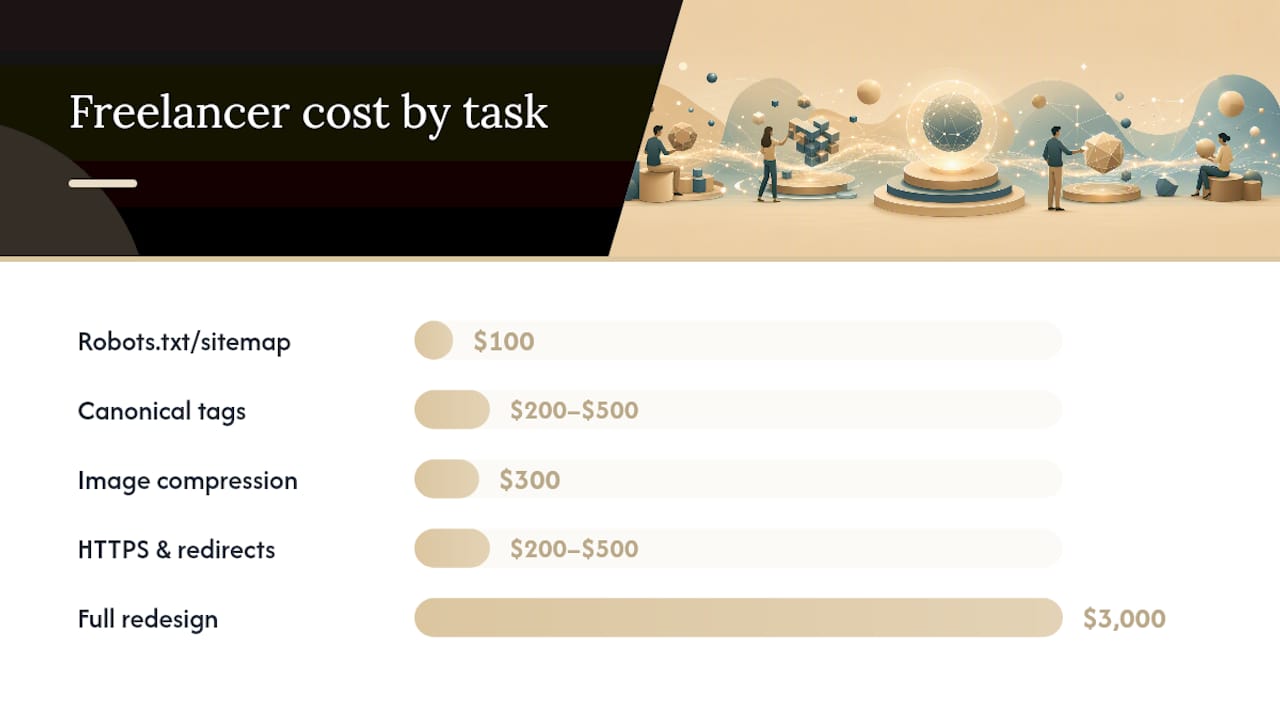
| Task | Time Estimate | DIY Effort | Freelancer Cost | Agency Cost |
|---|---|---|---|---|
| Fix robots.txt / sitemap | 1–2 hours | Low | $100 | $200–$500 |
| Add canonical tags site-wide | 2–4 hours | Medium | $200–$500 | $400 |
| Image compression and alt text | 4–8 hours | Low | $300 | $500 |
| HTTPS setup and redirects | 2–6 hours | Medium | $200–$500 | $400 |
| Template/metadata updates | 1–3 days | Medium | $500 | $1,000 |
| Full SEO-focused redesign | 6–12 weeks | High | $3,000 | $8,000 |
For realistic SEO timelines, expect meaningful ranking movement 3–6 months after technical fixes go live, assuming content and links are also addressed. A full redesign built with SEO from the start tends to see faster initial traction than a retrofit because the architecture is correct from day one.
Month 1 priorities: robots.txt, sitemap, HTTPS, canonical tags, image compression, and one H1 per page. These are the highest-impact, lowest-cost fixes and they unblock everything else.
Months 2–6: metadata updates, schema markup, Core Web Vitals improvements, internal linking audit, and content structure improvements on key pages.
Ongoing maintenance matters too. A site that ranks well in month six can lose ground by month twelve if Core Web Vitals degrade as new content is added, or if a plugin update breaks something. Monthly performance reporting and quarterly technical audits are what separate sites that hold rankings from ones that don’t. Website management plans that include monitoring and reporting handle this without requiring the business owner to track it manually.
Pro Tip: Get a pricing estimate before scoping a redesign. Knowing the cost bands for your market helps you decide whether a targeted template update or a full rebuild makes more financial sense for your current traffic levels.
How Proxiumdigital integrates SEO into web design from the start
Proxiumdigital’s core claim is straightforward: SEO is not added to a website after it’s built. It’s built into the architecture, the components, and the QA process from the first conversation.
The workflow runs in four stages. In discovery, keyword research and competitive analysis inform the information architecture before any wireframe is drawn. Page types, URL structures, and content hierarchies are decided with ranking intent in mind, not retrofitted later. In the design and component phase, heading rules, image requirements, schema types, and performance budgets are codified into the design system so every template inherits them automatically.
Before launch, every site goes through a pre-production validation sequence: a full crawl to catch broken links and metadata gaps, a Lighthouse audit on mobile to verify Core Web Vitals targets, and an accessibility check against WCAG AA standards. Problems caught here cost a fraction of what they cost post-launch.
After launch, monthly performance reporting covers organic traffic trends, index coverage, Core Web Vitals field data, and keyword ranking movement. The goal is not a one-time deliverable but a site that improves over time as data comes in.
The business outcome this produces: local service businesses and professional firms that launch with Proxiumdigital start with a technically sound foundation rather than spending their first year fixing structural problems. Proxiumdigital’s integrated services cover the full scope, from initial build through ongoing optimization.
The case for treating SEO as a design constraint, not an afterthought
Most small business owners encounter SEO as a problem to fix, not a principle to build around. A site gets built, it doesn’t rank, and then someone is hired to “do SEO” on a foundation that was never designed to support it. That sequence is expensive and slow.
The practical checklist in this article reflects a different premise: every design decision is also an SEO decision. The choice of navigation pattern, image format, heading structure, and page template all affect whether Google can read and rank your content. Treating those decisions as purely aesthetic, and leaving SEO for later, is what creates the technical debt that costs so much to unwind.
The integrated approach, where SEO requirements are set before wireframes are drawn and validated before launch, consistently produces better results faster than the retrofit approach. Not because it’s more sophisticated, but because it’s cheaper to build something right the first time.
Proxiumdigital builds websites that rank from day one
Small business owners in Michigan who want a site that works for search engines and for real visitors have one practical option: work with a team where the designer and the SEO strategist are the same conversation, not two separate vendors pointing fingers at each other.
Proxiumdigital builds custom websites with SEO baked into every layer, from the URL structure and heading hierarchy to the image pipeline and schema markup. Every project includes:
- Keyword-informed information architecture before design begins
- Component-level SEO rules built into the design system
- Pre-launch crawl, Core Web Vitals audit, and accessibility check
- Sitemap submission and GSC setup at launch
- Monthly performance reporting covering traffic, rankings, and Core Web Vitals
If you’re ready to stop guessing whether your site is working, see what’s included in Proxiumdigital’s web design and SEO services or review current pricing for Metro Detroit businesses.
Sources
For auditing and learning, these resources cover the ground this article maps.
Google Search Central is the authoritative source for how Google crawls, indexes, and ranks pages. The documentation on mobile-first indexing, structured data, and Core Web Vitals comes directly from the source.
PageSpeed Insights / Lighthouse measures real-user Core Web Vitals field data alongside lab scores. Run it on your homepage and your highest-traffic service page first.
Semrush tracks keyword rankings, surfaces technical issues, and benchmarks your visibility against competitors. The Site Audit tool is particularly useful for ongoing monitoring.
Screaming Frog crawls your site the way Googlebot does and surfaces broken links, missing metadata, redirect chains, and blocked resources. The free version handles up to 500 URLs, which covers most small business sites.
W3C WCAG provides the accessibility standards that overlap heavily with SEO best practices. Targeting WCAG AA compliance improves both.
Run the checklist in this article before diving into any of these tools. Knowing what to look for makes the audit data far more useful.
FAQ
What kind of website is best for SEO?
A website built on a platform that outputs clean HTML, supports custom metadata, generates XML sitemaps, and allows full control over URL structure is best for SEO. WordPress and Shopify both meet these criteria for most small businesses, provided they’re configured correctly and not overloaded with performance-heavy plugins or themes.
What does an SEO-friendly site structure look like?
An SEO-friendly site structure is flat (key pages reachable within three clicks from the homepage), uses descriptive URLs, organizes content in a logical hierarchy reflected by heading tags, and connects related pages through internal links with descriptive anchor text.
Does responsive design help SEO?
Yes, directly. Google uses mobile-first indexing, meaning the mobile version of your site is the primary version evaluated for ranking. A responsive design that adapts correctly to small screens is the baseline requirement for competitive rankings.
How long does it take to see results from SEO-friendly design changes?
Technical fixes like HTTPS, canonical tags, and sitemap submission can produce indexing improvements within days to weeks. Ranking improvements from those fixes typically become visible over 3–6 months, as Google recrawls and reassesses your pages.
Can Proxiumdigital help if my existing site has SEO problems?
Yes. Proxiumdigital offers technical SEO audits and optimization services for existing sites, as well as full redesigns where SEO is built into the new architecture from the start.