Lift CTR 5.8% With Meta Descriptions for SEO: Templates and Tests

Meta descriptions don’t move rankings, but they sell the click once you’ve earned a spot on the page. The single move that matters most: write a unique, intent-matching description for every important page, close it with a clear call to action, and track the results in Google Search Console. Skip that step and Proxium’s own audits routinely find pages losing clicks to a competitor with a weaker ranking but a sharper snippet.
TL;DR:
- Frequent Google snippet rewrites indicate your meta description is too narrow, vague, or keyword-stuffed, requiring broader, intent-matching copy.
- Writing unique, benefit-led descriptions with clear calls to action can increase click-through rates by up to 5.8 percent on page one results.
- Keep meta descriptions within 150-160 characters on desktop and 110-130 on mobile, prioritizing key words and CTA at the beginning.
- For large sites, use programmatic templates with benefit, key detail, and action to ensure consistency and better truncation performance.
- Technical issues like blocked snippets or incorrect canonical tags can silently suppress your meta descriptions, regardless of copy quality.
Table of Contents
- What a Meta Description Actually Is and How Snippets Get Built
- When Google Rewrites Your Snippet and What That Means
- Best Practices and Templates You Can Copy Today
- Length Rules That Actually Protect Your CTA
- Adding a Meta Description Across HTML, WordPress, and Shopify
- Measuring Whether Your New Descriptions Actually Work
- Common Mistakes That Quietly Cost You Clicks
- How Proxium Approaches Metadata for Client Sites
- How Meta Descriptions Behave Differently Across Search Engines
- What Strong Meta Descriptions Look Like by Industry
- When to Prioritize This Work and When to Batch It
- Get a Meta Description Audit Without Doing It Yourself
- Sources
- FAQ
What a Meta Description Actually Is and How Snippets Get Built
A meta description is a snippet of HTML that sits in the <head> of a page, invisible to visitors but readable by search engines. It looks like this in raw code: <meta name="description" content="Your summary here.">. It never touches the visible page, only the code behind it.
The snippet you see under a headline in Google’s results isn’t always that tag. Google builds snippets primarily from page content and only pulls your meta description when it decides that text better matches the query than anything it can pull from the body copy. So writing one is a bet, not a guarantee, but a bet worth making every time.
Here’s why it still pays off:
- A written description gives you control over the pitch instead of leaving Google to stitch together a sentence fragment.
- It’s the one place you can speak directly to the searcher’s intent before they’ve even clicked.
- Pages without one often show a rewritten snippet pulled from the least flattering paragraph on the page.
When Google Rewrites Your Snippet and What That Means
Google doesn’t use your written meta description on every single search. Sometimes the query a person types doesn’t match the framing you wrote, so Google’s systems reassemble a snippet from the page body that answers that specific search more directly.
Rewrite Rate as a Diagnostic: Industry observation puts Google’s rewrite frequency high enough that a rewritten snippet should never be read as random. Moz’s guidance on meta descriptions treats frequent rewrites as a signal your copy isn’t matching the range of queries actually landing on the page.
If you’re seeing consistent rewrites on a page, don’t shrug it off. Check whether your description is too narrow for the range of queries the page ranks for, too vague to beat the body copy, or stuffed with keywords instead of written like a pitch. The fix usually isn’t a better sentence, it’s a broader one that covers the actual intent variations Search Console shows you under that page’s query report.
Best Practices and Templates You Can Copy Today
Treat the meta description like a thirty-word elevator pitch, not a summary. Yoast’s guidance frames it exactly that way: persuade first, describe second.
Three habits separate descriptions that pull clicks from ones that get ignored:
- Front-load the benefit and the keyword. Readers and Google both scan left to right, and truncation cuts off the end first.
- Use an active verb and one specific call to action. “Get,” “book,” “compare,” and “see” outperform passive framing like “this page covers.”
- Write a unique description for every page that matters. Duplicate descriptions across a site tell Google (and readers scanning multiple tabs) that the pages are interchangeable, even when they aren’t.
For large catalogs, hand-writing hundreds of descriptions isn’t realistic. Build a programmatic template with three variable slots: a benefit statement, a key spec like price or size, and a short CTA. Those three elements survive truncation better than anything else you could include.
Here are six templates worth adapting:
- Blog post: “Learn [specific benefit] with [number] proven steps, backed by [credibility marker]. Read the full breakdown now.”
- Product page: “[Product name] delivers [key benefit] at [price/spec detail]. Shop now with free [shipping/return] on every order.”
- Category page: “Browse [number]+ [category] options built for [use case]. Compare styles, prices, and sizes in one place.”
- Service page: “Get [service] from [location]-based experts who [differentiator]. Request a free quote in minutes.”
- FAQ entry: “Find out [specific question] and what it means for [audience]. Get the straight answer here.”
- Landing page: “[Offer] for [audience], with [specific proof point]. Claim your [discount/consultation/trial] before it ends.”
Each one leads with the payoff, not the topic label. That’s the difference between a snippet that gets skimmed and one that gets clicked.
Length Rules That Actually Protect Your CTA
Character counts are a rough proxy. Search results truncate by pixel width, not letter count, so a description full of wide capital letters clips sooner than one built from narrow lowercase text. Neil Patel’s analysis of snippet display makes the same point: front-loading matters more than hitting an exact number.
Working targets that hold up in practice:
- Aim for roughly 150 to 160 characters on desktop before truncation risk climbs.
- Aim for roughly 110 to 130 characters on mobile, where screen width shrinks the visible snippet further.
- Put your most important words and your CTA inside the first 110 to 120 characters no matter which device you’re optimizing for.
Pro Tip: Preview your snippet in a SERP simulator before publishing, not after. Tools built into Yoast or Moz’s snippet checker show the actual clipped version, which almost always looks different from what you pictured while typing.
Adding a Meta Description Across HTML, WordPress, and Shopify
The raw HTML never changes: <meta name="description" content="Your 150 character pitch goes here."> sits inside the <head> tag, following the standard documented by MDN. Every CMS is really just a friendlier interface on top of that same line of code.
- WordPress with Yoast: Use the snippet editor beneath each post or page to write the description and preview the pixel cutoff live. The bulk editor lets you scan every page’s description at once, which is the fastest way to catch duplicates.
- Shopify: Edit the “Search engine listing preview” field on each product or collection page. Shopify caps the field length, so front-loading matters even more there.
- Programmatic templates: Build the variable slots once (benefit, spec, CTA), then QA a sample batch before rolling out site-wide.
Before you publish any batch of changes, run a quick QA pass: confirm the page isn’t blocked by robots.txt, check that the canonical tag points where you expect, and make sure no nosnippet tag is quietly telling Google to ignore your work entirely.
Measuring Whether Your New Descriptions Actually Work
Search Console’s Performance report is where the real answer lives. Pull clicks, impressions, and CTR for the specific pages and queries you touched, comparing the weeks before and after your edit.
- Export baseline numbers for the target pages before you change anything.
- Change only the meta description. Leave the title tag and body copy untouched so you’re isolating one variable.
- Wait at least two to four weeks before drawing conclusions. Ranking volatility inside a shorter window will confuse your read on what the new copy actually did.
- Compare CTR by query, not just by page. A description tuned for one search intent can lift CTR sharply for that query while doing nothing for a different one landing on the same URL.
A well-optimized description can lift CTR by up to 5.8% compared to pages with no description at all, a meaningful gain when you’re already ranking on page one. If your change produces nothing after a full month, the copy probably isn’t the problem. Check whether a ranking shift or a title tag change happened in the same window and muddied your test.
Common Mistakes That Quietly Cost You Clicks
Most meta description problems trace back to a handful of repeat offenders:
- Duplicate descriptions across pages. This erases the one advantage a written description gives you: a distinct reason to click this result over the next one.
- Keyword stuffing. A description that reads like a list of search terms instead of a sentence gets ignored by readers and often triggers a Google rewrite anyway.
- Vague copy that doesn’t match the page. If the description promises something the content doesn’t deliver, Google’s systems tend to override it in favor of a more accurate excerpt from the body.
- Technical misconfigurations. A stray
nosnippettag, an incorrectrobots.txtrule, or a canonical tag pointing to the wrong URL can quietly suppress your snippet entirely, no matter how good the copy is. Audit these whenever a page’s snippet behaves oddly.
Fixing the copy issues takes minutes per page. Fixing a technical misconfiguration takes one crawl audit, but only if you know to look for it.
How Proxium Approaches Metadata for Client Sites
An integrated SEO approach builds optimization into a site from the first line of code instead of bolting it on after launch, which keeps metadata decisions out of the gap between separate web design and SEO vendors. That integrated workflow covers a technical audit of existing descriptions, a template library built for the client’s specific page types, and a programmatic rollout plan for larger catalogs.
Deliverables typically include a full metadata audit, custom templates matched to service or product pages, and monthly reporting that tracks click-through rate movement. Case studies and further detail on the agency’s approach are available through SEO optimization services.
How Meta Descriptions Behave Differently Across Search Engines
Google is the platform most guidance targets, but it isn’t the only one reading that tag. Bing tends to lean on the written meta description more consistently than Google does, rewriting it less aggressively when the copy reasonably matches the page. That makes a well-written description a slightly safer bet if a meaningful share of your traffic comes through Bing or Microsoft’s ecosystem, including Copilot’s web results.
Social platforms handle the tag differently again. Facebook and LinkedIn typically pull from Open Graph tags (og:description) rather than the standard meta description when generating a link preview, which means a page shared often on social needs both tags written, not just one. Twitter, now X, follows a similar pattern through its own card metadata, falling back to the standard description only when a dedicated tag is missing.
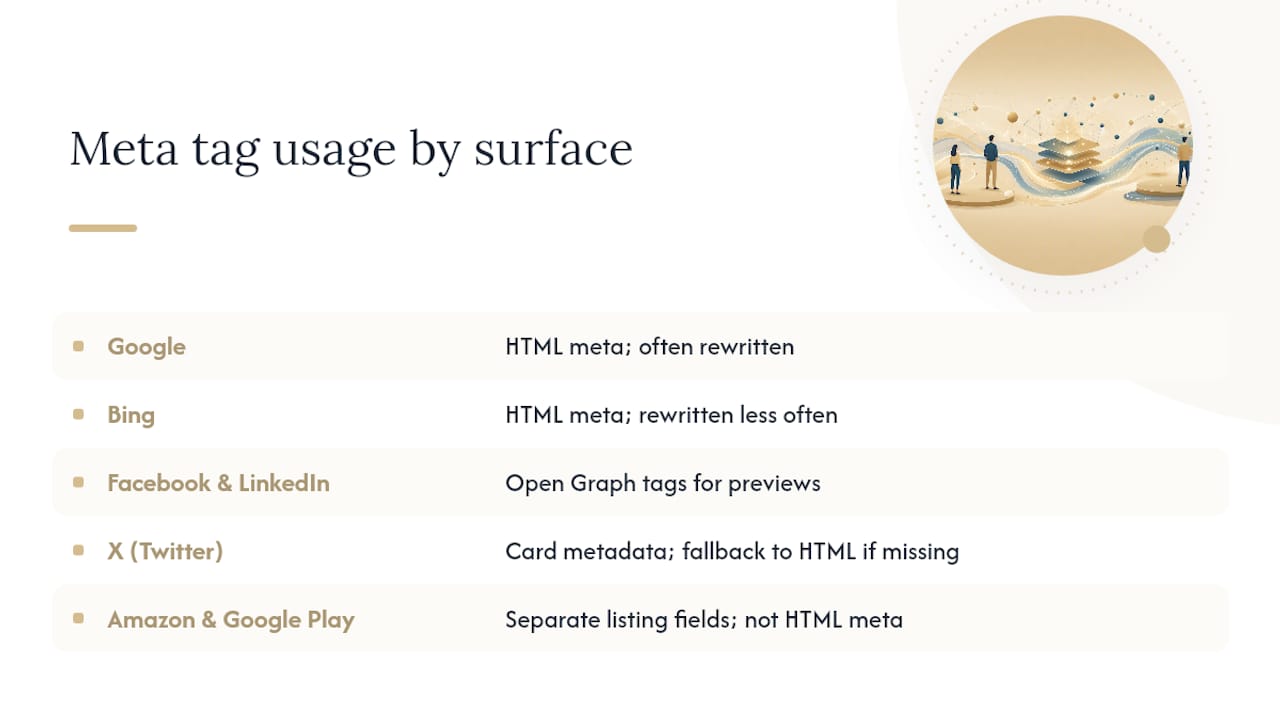
E-commerce and app-store contexts add another layer. Amazon’s product listings and Google Play’s app descriptions aren’t governed by HTML meta tags at all. They’re separate fields with their own character limits and their own algorithms deciding relevance, closer to a product listing than a webpage snippet.
The practical takeaway: write your HTML meta description for Google and Bing first, since that’s where organic search traffic concentrates, but check whether your CMS or platform pulls a separate field for social sharing before assuming one tag covers every surface your content appears on.
What Strong Meta Descriptions Look Like by Industry
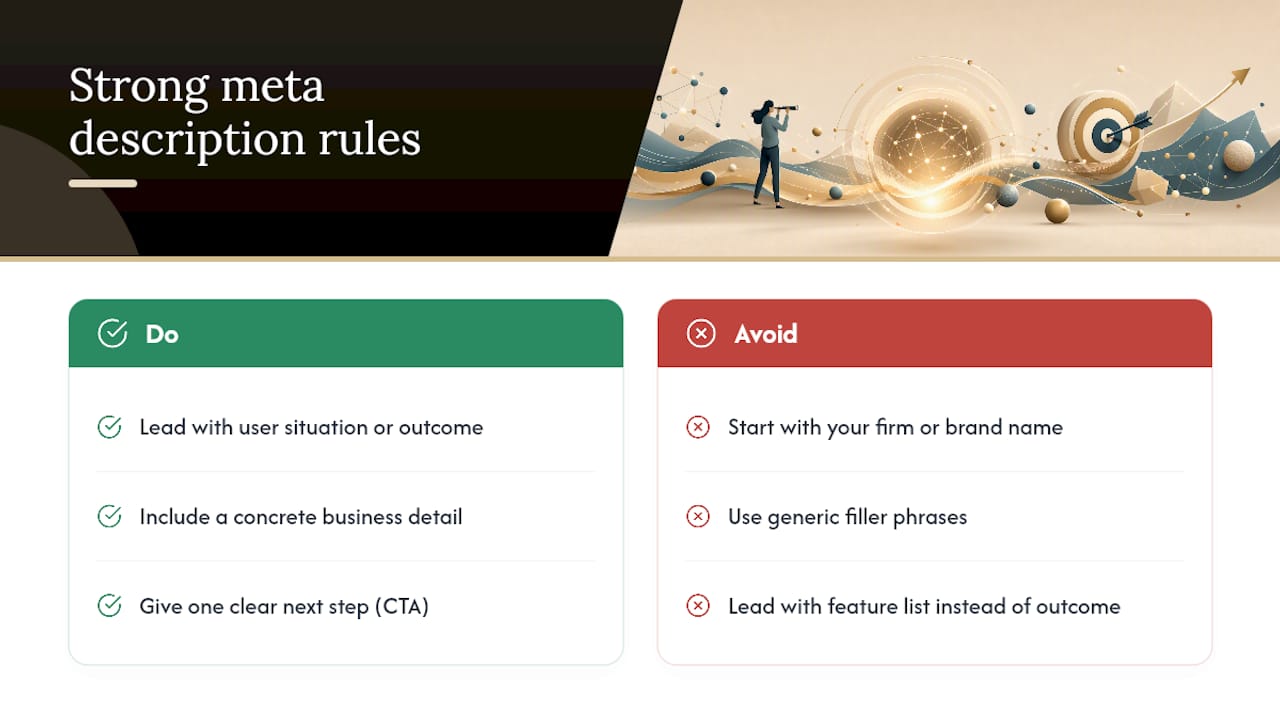
A law firm’s service page description works best when it names the practice area and location, then closes with a low-friction ask: “Facing a DUI charge in Wayne County? Our defense attorneys offer free case reviews. Call today to protect your record.” That structure leads with the searcher’s actual situation, not the firm’s name.
A local HVAC company selling a service page benefits from urgency paired with a concrete detail: “Furnace stopped working? Same-day repair across Metro Detroit, upfront pricing, no hidden fees. Book your appointment online in under two minutes.” The specific service area and the “same-day” promise both do real work here.
An e-commerce product listing needs the spec and the differentiator up front: “Waterproof hiking boots rated for 30 below, with a lifetime sole warranty. Free returns on every pair, ships in 2 days.”
A SaaS landing page tends to perform better leading with the outcome instead of the feature list: “Cut invoice processing time by half without changing your accounting software. See how it works in a 5 minute demo.”
A blog post aimed at informational search does best naming the specific question it answers rather than a broad topic label: “How long should a meta description be in 2026? Get the exact character and pixel targets that survive truncation on mobile and desktop.”
Notice what all five share: a concrete detail specific to that business or page, one clear next step, and zero generic filler about “quality service” or “years of experience.” That’s the pattern worth copying regardless of industry.
When to Prioritize This Work and When to Batch It
Start with your highest-impression pages and anything tied to commercial intent, since that’s where a CTR lift compounds fastest into revenue. A high-priority service or product page deserves five to fifteen minutes of focused writing, not a template variable. Everything else, especially large catalogs, gets the programmatic treatment covered earlier. When clients ask where to start, I point them at Search Console’s impression data first, then hand over the same checklist and audit process this article walks through.
— Bryan
Get a Meta Description Audit Without Doing It Yourself
This approach offers an alternative to hiring separate web design and SEO vendors for a job that really needs one coordinated hand. Since metadata gets built into the site from day one instead of patched on afterward, clients skip the back-and-forth of a developer and an SEO consultant arguing over who owns the <head> tag.

A typical engagement starts with a full metadata audit across every important page, moves into a template library matched to the client’s actual page types (service pages, product listings, location pages), and finishes with a programmatic rollout for any catalog too large to hand-write. Monthly reporting tracks the CTR movement covered earlier in Search Console, so clients see the actual click impact rather than guessing at it.
For readers ready to move past the DIY checklist, the fastest next step is booking a metadata audit through SEO optimization services, or reviewing current pricing and packages to see what a managed rollout costs for a site your size.
Sources
- How to write meta descriptions | Google Search Central
- How to create a good meta description — Yoast
FAQ
How Do I Check My Site’s Meta Descriptions for SEO?
Search Console’s Performance report shows which pages generate clicks and impressions, but for the actual snippet text, crawl your site with a tool like Yoast’s bulk editor or view the page source and search for <meta name="description">.
Are Meta Descriptions Still Important for SEO?
Yes, though not as a ranking factor. Google confirms it builds snippets primarily from page content, but a well-written description can lift CTR by up to 5.8%, which matters even without a direct ranking effect.
What Should I Put in My Meta Description?
Lead with the specific benefit or answer the page delivers, include your target keyword naturally near the front, and close with one clear call to action like “book now” or “get the full guide.”
How Long Should an SEO Meta Description Be?
Aim for roughly 150 to 160 characters on desktop and 110 to 130 on mobile, but prioritize putting your most important words and CTA within the first 110 to 120 characters, since pixel width truncates before an exact character count does.