Internal Linking Strategy: A Practical Guide for SEOs

An internal linking strategy is a deliberate plan to connect your site’s pages so link equity and crawl paths flow to the pages that matter most. Start today with three actions: map your pillar pages, fix orphan pages, and add contextual links from your highest-authority pages to underperforming targets.
Quick-start checklist (run this in under an hour):
- Identify your 3–5 pillar pages (the pages you most want to rank)
- Pull a crawl report in Screaming Frog or Semrush and flag any page with zero inbound internal links
- Open Google Search Console’s Internal Links report and note which pages receive the fewest links
- Pick your top 3 high-traffic pages and add one contextual link from each to a priority target page
- Check that every page is reachable within three clicks from the homepage
Pro Tip: Run a quick site:yourdomain.com search in Google and look for pages that don’t appear in the index at all. Those are your highest-priority orphan candidates.
Key Takeaways
A well-executed internal linking strategy moves equity from your strongest pages to your highest-priority targets, reduces orphan pages, and gives crawlers a clear map of your site’s most important content.
| Point | Details |
|---|---|
| Start with orphan pages | Fix zero-inlink pages first; they recover lost equity immediately with minimal effort. |
| Use contextual links | In-body links with descriptive 2–6 word anchors pass the strongest topical signal. |
| Track on a 30/60/90 schedule | Indexing fixes appear within days; ranking lifts typically take 4–12 weeks. |
| Audit quarterly | New content creates new orphan pages; a quarterly crawl keeps the link graph clean. |
| Proxiumdigital builds it in | Proxiumdigital embeds internal-link architecture into every Michigan site build and monthly SEO retainer. |
Table of Contents
- What internal links are and how they differ from external links
- Types of internal links and when each one earns its place
- Why internal linking matters for SEO and user experience
- A step-by-step internal linking strategy workflow you can implement
- How to audit your internal links and which tools to use
- Anchor text rules and the internal-linking mistakes that hurt rankings
- A compact implementation checklist and ready-to-use link templates
- KPIs to track and how to measure the impact of internal linking
- How Proxiumdigital implements internal linking during a site build
- What most sites get wrong about internal linking
- Proxiumdigital handles the internal-link work so you don’t have to
- Sources
- FAQ
What internal links are and how they differ from external links
Internal links are hyperlinks that point from one page to another page on the same domain. They are the crawl paths Google uses to discover, interpret, and assign relative importance to your content. Without them, even well-written pages can sit invisible in the index.
Google Search Central is explicit: every important page on your site should have at least one internal link pointing to it, and those links should be crawlable HTML anchors, not JavaScript-rendered or hidden behind forms.
External links work differently. They are earned signals from other domains, and you control neither the anchor text nor the timing. Internal links are the opposite: you control the anchor, the placement, the destination, and the volume. That control is the strategic advantage.
Think of your site’s link graph as a road network. The homepage is the highway interchange. Pillar pages are the main roads. Cluster pages are the side streets. Crawlers follow those roads in sequence: homepage → pillar → cluster. Pages that sit off the main roads, reachable only after four or five clicks, get visited less often and accumulate less equity. Yoast and Semrush both treat this crawl-path logic as the foundation of any internal-link audit.
Types of internal links and when each one earns its place
Not all internal links carry the same weight. The type you choose determines how much topical signal it sends and how much equity it passes.
Contextual (in-text) links sit inside the body copy of a page, surrounded by relevant text. These pass the strongest topical relevance signal because the surrounding content tells Google what the destination page is about. Prioritize these above all other types.
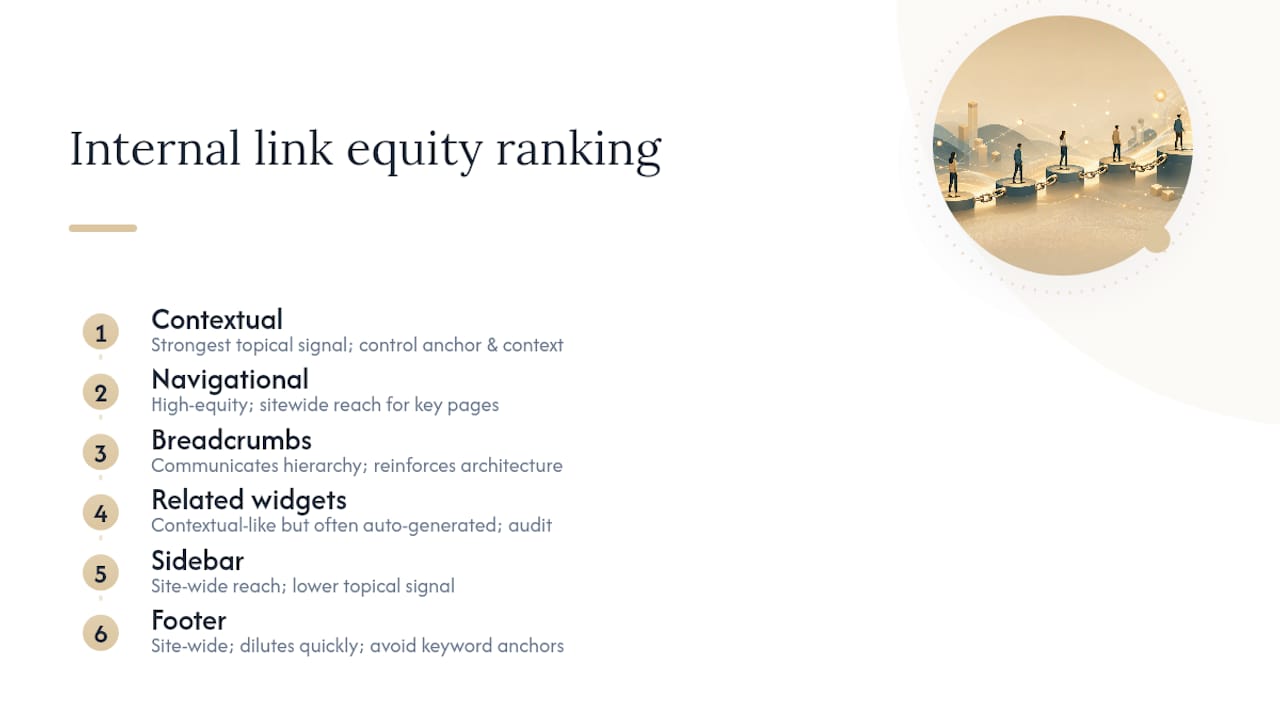
Navigational links live in the main menu or header. They reach every page on the site, which makes them high-equity carriers for the pages they point to. Reserve navigation slots for your most commercially important pages.
Footer links appear site-wide, which means they accumulate fast but dilute quickly. A footer link to your contact page or privacy policy is fine. A footer packed with keyword-rich anchor links to every service page is a red flag, both for users and for search engines.
Sidebar links function similarly to footer links: site-wide reach, lower topical signal. They work best for “related posts” or category navigation on blogs, not for passing equity to target pages.
Breadcrumb links communicate hierarchy. A breadcrumb trail like Home → Services → SEO Optimization tells crawlers the relationship between pages and reinforces the site’s architecture. Use them on every page below the top level.
Related-content widgets (the “You might also like” blocks) are contextual in spirit but often auto-generated by CMS plugins. Audit them periodically; they can create low-value link patterns if the algorithm surfaces irrelevant matches.
Image links use the alt text as the anchor signal. If you link an image to another page, write a descriptive alt tag that reflects the destination’s topic, not just the image’s visual content.
The practical rule: spend most of your effort on contextual links. They are the only type where you can control anchor text, placement, and surrounding context simultaneously.
Why internal linking matters for SEO and user experience
Internal links shape four things that directly affect your rankings: crawlability, indexing, link equity distribution, and topical authority. Fix any one of them and you’ll likely see movement. Fix all four and the compounding effect is significant.
Crawlability and indexing come first. Googlebot follows links. A page with no inbound internal links may never get crawled, or may get crawled so infrequently that fresh content sits unindexed for weeks. Google’s own guidance frames internal links as the primary mechanism for cross-referencing content and signaling which pages matter.
PageRank distribution is the equity side of the equation. Every page on your site has some authority. Internal links transfer a portion of that authority to the pages they point to. High-traffic pages, pages with strong external backlinks, and your homepage are your equity sources. Point them at the pages you want to rank, and those pages accumulate authority they couldn’t earn on their own.
Topical authority is where the pillar-cluster model comes in. Backlinko’s internal linking guide explains the pattern clearly: a pillar page covers a broad topic, cluster pages cover subtopics in depth, and the links between them signal to Google that your site has comprehensive coverage of the subject. That signal increasingly matters as search systems interpret on-site relationships more like a knowledge graph than a simple link count.
The business outcome is straightforward. Practitioners who apply a structured pillar-cluster approach report traffic improvements in the 20–40% range when other factors remain constant. That’s not a guarantee, but it’s a consistent enough signal to treat internal linking as a priority, not an afterthought.
A step-by-step internal linking strategy workflow you can implement
The workflow runs in eight steps: map your architecture, identify pillars and clusters, crawl the site, find authority pages and orphan pages, prioritize by business value, add contextual links, clean navigational links, and schedule maintenance. Siteimprove’s 8-step blueprint covers this sequence in operational detail.
-
Map your site architecture. Draw or diagram the hierarchy: homepage at the top, main category/pillar pages one level down, cluster pages below those. Every page should have a logical home in that tree.
-
Identify pillar pages and topic clusters. Pillar pages target broad, high-volume keywords. Cluster pages target specific subtopics. A law firm might have “Personal Injury Law” as a pillar and “Car Accident Claims,” “Slip and Fall Cases,” and “Medical Malpractice” as clusters.
-
Run a full site crawl. Use Screaming Frog or Semrush to pull every URL, its inlink count, its click depth from the homepage, and its HTTP status code. Export the data.
-
Flag authority pages and orphan pages. Authority pages have strong external backlinks or high organic traffic. Orphan pages have zero inbound internal links. Both lists are your action items.
-
Prioritize by business value. Not every page deserves equal attention. Rank your target pages by revenue potential, conversion rate, or strategic importance. Link to the highest-value pages first.
-
Add contextual links with descriptive anchors. Aim for roughly 3–10 contextual internal links per 1,000 words of body content. Each anchor should be 2–6 words, descriptive of the destination, and varied across pages. Don’t point five different pages at the same target using the exact same anchor phrase.
-
Clean navigational and footer links. Remove keyword-stuffed footer links. Keep navigation tight: only the pages that genuinely deserve site-wide visibility.
-
Schedule maintenance. Every time you publish new content, add at least two internal links from existing pages to the new page, and add at least one link from the new page back to a relevant pillar.
Pro Tip: Use Google Search Console’s Internal Links report alongside a site:yourdomain.com “topic keyword” search to find existing pages that mention a topic but don’t yet link to your target page. Those are your fastest wins.
How to audit your internal links and which tools to use
Run a crawl, inspect inlinks, outlinks, status codes, and anchor-text distribution, then prioritize fixes by business value. That’s the audit in one sentence. Here’s how each tool contributes.
| Tool | Primary audit function | Key metric to pull |
|---|---|---|
| Screaming Frog | Full-crawl topology, inlink counts, anchor text | Inlinks per URL, click depth, status codes |
| Semrush | Internal Link Distribution, Internal LinkRank (ILR) | ILR score, pages with few inlinks |
| Google Search Console | Internal links report, indexing status | Internal link count per page, coverage errors |
| Yoast (WordPress) | On-page link suggestions, orphan-page detection | Cornerstone content link gaps |
Semrush’s internal link audit is particularly useful for identifying pages with weak Internal LinkRank, which functions as a triage signal: pages with low ILR and high business value are your first fix. Search Engine Land’s tool guide recommends combining Screaming Frog for full-crawl topology with Semrush for ILR and Google Search Console to validate indexing changes after fixes.
Audit checklist:
- Pages with zero inbound internal links (orphan pages)
- Pages more than three clicks from the homepage
- Internal redirects (links pointing to 301s instead of the final URL)
- Broken internal links (404 status)
- Anchor text that is generic (“click here,” “read more”) or over-optimized (exact-match phrase repeated across 20+ pages)
- Pages with excessive inbound links that dilute equity across too many destinations
- Pages with strong external backlinks that aren’t passing equity internally
One note on PageRank sculpting: Google no longer recommends using rel=“nofollow” on internal links to conserve or redirect equity. Adding nofollow to an internal link removes it as a signal entirely. Don’t do it.
Also worth checking: your hosting environment. Hosting quality directly affects crawl speed and frequency, which means a slow or unreliable server can undercut even a well-structured internal-link graph by limiting how often Googlebot visits.
Anchor text rules and the internal-linking mistakes that hurt rankings
Descriptive, natural anchor text in the 2–6 word range is the standard. Yoast’s internal linking guide is clear on this: anchors should tell both users and search engines what the destination page covers. “Personal injury attorney Michigan” is better than “click here.” “SEO audit checklist” is better than “this post.”
Common mistakes and how to fix them:
- Orphan pages: Fix by adding at least two contextual links from topically related pages. Use Yoast’s cornerstone content feature or Semrush’s ILR report to identify them.
- Exact-match anchor stuffing: If 15 pages all link to your “SEO services” page using the anchor “SEO services Michigan,” vary the phrasing. Use “local SEO for Michigan businesses,” “search optimization services,” or “our SEO approach” across different pages.
- One anchor pointing to multiple destinations: Linking “SEO audit” to three different pages confuses crawlers about which page covers the topic. Pick one destination per anchor concept.
- Excessive footer/sitewide links: A footer with 40 keyword-rich links passes almost no equity per link and signals low editorial quality. Cut it to the 6–8 links users genuinely need.
- Internal redirects: Links that point to a 301 redirect waste a crawl step. Update them to point directly to the final URL.
- Broken internal links: A 404 on an internal link stops equity flow and frustrates users. Screaming Frog flags these in every crawl.
The remediation priority: fix broken links and orphan pages first (they cost you nothing to fix and recover lost equity immediately), then address anchor-text patterns, then clean up footer and sitewide links.
A compact implementation checklist and ready-to-use link templates
Week 1 (patch critical issues):
- Run a Screaming Frog crawl and export all URLs with zero inlinks
- Fix all broken internal links (update or redirect)
- Update internal redirects to point to final URLs
- Add at least one contextual link to each orphan page from a topically related page
- Remove or consolidate excessive footer links
Month 1 (build the structure):
- Map pillar pages and cluster pages for your top 3 topic areas
- Add 2–3 contextual links from each pillar page to its cluster pages
- Add 1–2 links from each cluster page back to its pillar
- Audit anchor text across your top 20 pages and vary any repeated exact-match phrases
- Add breadcrumb navigation to all pages below the homepage level
Month 3 (scale and maintain):
- Expand pillar-cluster linking to all major topic areas
- Add internal-link tasks to every content brief going forward
- Run a monthly crawl check for new orphan pages and broken links
- Review Google Search Console’s Internal Links report for pages losing inlinks
- Audit click depth for all new pages published in the quarter
Ready-to-use anchor templates:
- Pillar → cluster: “car accident claims in Michigan” (links to cluster page)
- Cluster → pillar: “personal injury law overview” (links back to pillar)
- Service → case study: “how we helped a Detroit law firm rank locally” (links to case study)
- Blog → service: “our SEO optimization services” (links to service page)
- New content → existing authority page: “site architecture best practices” (links to established guide)
Workflow integration tip: Add a “Required internal links” field to every content brief. List 2–3 pages the writer must link to and 1–2 suggested anchor phrases. This removes the guesswork and keeps the link graph growing with every publish.
KPIs to track and how to measure the impact of internal linking
The primary signals are crawl and indexing changes, organic traffic and rankings for target pages, internal inlink distribution, and conversions on prioritized pages. Track them on a 30/60/90-day cadence.
| KPI | Tool | What to watch |
|---|---|---|
| Indexed pages | Google Search Console (Coverage) | Increase in indexed URLs after fixing orphan pages |
| Organic sessions (target pages) | Google Analytics / GSC | Session growth on pages that received new inlinks |
| Ranking positions | Semrush / GSC Performance | Position changes for target keywords on linked pages |
| Internal inlink count | Semrush / Screaming Frog | Pages moving from low to adequate inlink counts |
| Crawl frequency | GSC Crawl Stats | Googlebot visiting target pages more frequently |
| Conversions (linked pages) | Google Analytics | Goal completions on pages prioritized for linking |
Reporting schedule:
- Day 1–30: Focus on technical fixes (broken links, orphan pages, redirects). Watch GSC Coverage for indexing improvements. These often appear within days of fixes going live.
- Day 31–60: Check organic sessions and ranking positions for target pages. Early movers are usually pages that were previously orphaned or had very few inlinks.
- Day 61–90: Assess ranking lifts and conversion changes on pillar pages. Ranking improvements from internal linking typically take 4–12 weeks, depending on crawl frequency and external competition.
Practitioners who apply a structured pillar-cluster approach report traffic improvements in the 20–40% range when other factors remain constant. Use that as a benchmark, not a guarantee. Attribution is imperfect: isolate internal-linking changes by noting the exact dates you made updates and comparing traffic trends before and after.
How Proxiumdigital implements internal linking during a site build
When Proxiumdigital builds a site for a Michigan service business, internal linking isn’t a post-launch task. It’s part of the architecture from day one.
Here’s the workflow used on a recent site build for a Michigan professional services firm:
-
Architecture audit (pre-build). Before writing a line of code, the team mapped the client’s service areas and identified five pillar pages (one per core service) and 12 cluster pages (specific subtopics and local service areas).
-
Pillar-cluster linking policy. Every cluster page was required to link back to its parent pillar using a descriptive anchor. Every pillar page linked to all of its clusters in the body copy, not just the navigation.
-
Anchor-text policy in the CMS. Content templates included a “required internal links” field. Writers couldn’t publish a page without completing it. This enforced the link graph at the content-production level.
-
Breadcrumb implementation. Breadcrumbs were added site-wide using structured data markup, reinforcing hierarchy for both users and crawlers.
-
Post-launch crawl. Within 48 hours of launch, the team ran a Screaming Frog crawl to verify zero orphan pages, all click depths within three clicks, and no internal redirects.
Before/after snapshot (internal data, ranges): The client’s previous site had 14 orphan pages and an average click depth of 4.2 for service pages. After the rebuild, orphan pages dropped to zero and average click depth for service pages fell to 1.8. GSC showed a measurable increase in indexed pages within the first two weeks.
Pro Tip: Build your internal-link policy into the CMS template before you publish a single page. Retrofitting links across 80 existing pages is far more expensive than enforcing the habit from the start.

Two proprietary habits Proxiumdigital applies on every build: first, every new blog post must link to at least one service page using a natural anchor (not a banner or sidebar widget). Second, the team runs a quarterly link audit as part of the website management retainer, catching new orphan pages before they accumulate. For more on how design decisions affect rankings, the Proxiumdigital blog covers web design mistakes that hurt Google rankings in detail.
What most sites get wrong about internal linking
The conventional wisdom says “add more internal links.” That’s not wrong, but it misses the actual problem. Most sites don’t have a link-volume problem. They have a link-distribution problem.
The pages that need equity most, the ones targeting competitive keywords or sitting deep in the site, rarely get links from the pages that have equity to give. High-traffic blog posts link to other blog posts. Service pages link to nothing. The homepage links to the navigation and stops there.
The fix isn’t adding 50 links across your site. It’s identifying your three or four highest-authority pages and pointing them at your three or four highest-priority targets. That’s it. The ROI on that single action usually exceeds months of broader link-building work.
There’s also a maintenance problem that almost no one talks about. Sites grow. New pages get published. Old pages get updated or deleted. The link graph drifts. Pages that were well-linked six months ago become orphans when the pages pointing to them get restructured. A quarterly crawl audit isn’t optional; it’s the minimum viable maintenance cadence for any site publishing content regularly.
The other underrated habit: treating anchor text as editorial copy, not an SEO variable. The best anchors read naturally in the sentence. They describe the destination without sounding like a keyword list. When you write anchor text that a real reader would actually click, you’re also writing anchor text that sends a clean relevance signal.
Proxiumdigital handles the internal-link work so you don’t have to
Running a full internal-link audit, mapping pillar-cluster architecture, and maintaining the link graph as your site grows takes consistent time and technical attention. For Michigan service businesses and professional firms, that’s time better spent on clients.
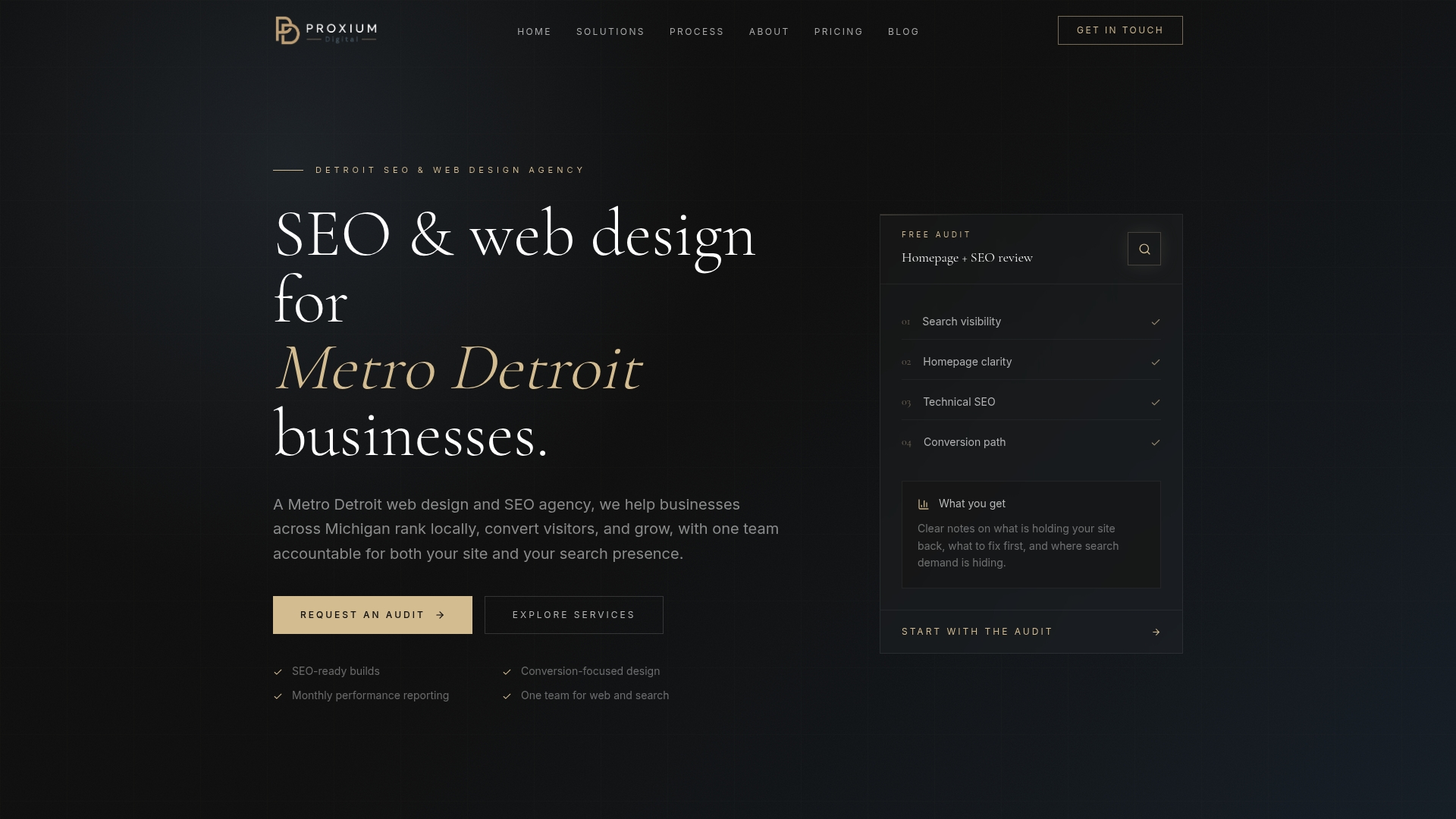
Proxiumdigital’s SEO optimization services include a full internal-link audit, pillar-cluster architecture planning, and ongoing link maintenance as part of every monthly retainer. The SEO is built into the site from the start, not bolted on later. If you want to see exactly what’s included and what it costs, the solutions page has the full breakdown. Reach out for a no-pressure conversation about your site’s current link structure.
Sources
The best starting points are Google Search Central for crawl and link fundamentals, Semrush for ILR and inlink distribution reports, Screaming Frog for full-crawl topology, Yoast for on-page suggestions in WordPress, and Backlinko and Siteimprove for strategic frameworks.
Quick tool-to-job mapping: use Screaming Frog when you need a complete picture of your link graph and status codes; use Semrush when you need to prioritize which pages to fix by equity and business value; use Google Search Console to validate that indexing actually improved after your changes; use Yoast for real-time on-page link suggestions as you write.
- SEO Link Best Practices for Google | Google Search Central | Documentation | Google for Developers
- Internal linking for SEO: Why and how? • Yoast
- Internal Links: Ultimate Guide + Strategies - Semrush
- Internal Linking Strategy: How to Structure Links for SEO | Backlynk
- Your Internal Linking Blueprint For Better SEO
FAQ
What is an internal linking strategy?
An internal linking strategy is a deliberate plan for connecting pages on your own domain so that link equity, crawl paths, and topical relevance signals flow to the pages that matter most for rankings and conversions.
What is an example of internal linking?
A law firm’s pillar page on “Personal Injury Law” linking to a cluster page on “Car Accident Claims in Michigan” with the anchor text “car accident claims” is a textbook contextual internal link.
How do you add an internal link correctly?
Use a standard HTML anchor tag pointing to the final URL (not a redirect), write descriptive anchor text of 2–6 words that reflects the destination page’s topic, and place the link inside relevant body copy where it adds value for the reader.
What are the two main ways to classify internal links?
Internal links are most commonly classified by placement (contextual/in-text vs. navigational/structural) and by function (equity-passing links that support rankings vs. utility links like breadcrumbs and footer links that support navigation).
How long does it take to see results from internal linking changes?
Technical fixes like resolving orphan pages and broken links often show indexing improvements within days. Ranking improvements for target pages typically take 4–12 weeks, depending on crawl frequency and how competitive the target keywords are.