Cut Bounce: Homepage SEO with a 50–80 Word AEO Answer Block

The single best thing you can do for homepage SEO is pair a hero headline that names your outcome, your audience, and your primary keyword with a page that loads fast enough to keep people around long enough to read it. AI-driven search and branded queries are sending more visitors straight to homepages, and those visitors decide in seconds whether to stay. Everything else in this guide, from schema markup to internal links, supports that one move. Below is the full checklist for getting there.
TL;DR:
- Most homepages must load within 2.0 seconds on mobile to meet Google’s Core Web Vitals and support quick visitor decisions.
- The hero headline should clearly state the outcome, target audience, and include a short proof, with primary keywords in H1 and early in the text.
- Optimize metadata by using a concise title tag with the main keyword near the front and a meta description that matches search intent, avoiding vague slogans.
- Trust signals such as client logos, reviews, and measurable outcomes should be visible above the fold to build credibility quickly for AI and human visitors.
- Technical SEO essentials include proper schema markup, correct canonical tags, valid hreflang if applicable, and fast server response times to prevent ranking drops.
Table of Contents
- Homepage SEO Best Practices Start With Your Hero Message
- Title Tags, Meta Descriptions, and Homepage Content SEO Tips
- Above-the-Fold UX and Core Web Vitals for the Homepage
- Trust Signals That Belong Above the Fold
- Internal Linking and the Decision-Flow Homepage
- The Technical SEO Checklist Every Homepage Needs
- Measuring What Actually Works After You Ship Changes
- Publisher Perspective: How Proxiumdigital Treats the Homepage
- Get Your Homepage Fixed by People Who Build for Both Search and Speed
- Sources
- FAQ
Homepage SEO Best Practices Start With Your Hero Message
Before touching a plugin or a meta tag, decide what your homepage is actually for. Most homepages fail not because they lack keywords, but because they try to speak to everyone and end up saying nothing specific to anyone.
Start with keyword selection. If your business already has name recognition, your homepage can afford to lean on branded terms. If you’re newer or competing in a crowded local market, target a non-branded, high-intent category term instead, something like “commercial roofing contractor” rather than just your company name. Homepage relevance is rising again because AI tools and branded searches are routing more traffic to homepages than they did a few years ago, which means the page needs to work harder as a landing page, not just a digital business card.
Once you’ve picked your target, build the hero around a simple formula:
- Name the outcome. What does the visitor get? Not “solutions” or “services,” the actual result.
- Name the audience. Who is this for? A homeowner in your metro area, a mid-size law firm, a specific vertical.
- Add short proof. A number, a timeframe, or a credential that makes the claim credible in under six words.
Place your primary keyword in the H1 and again naturally within the first 100 words. That’s not superstition, it’s how both search engines and AI summarization tools decide what your page is about within the first few lines.
Then write what’s known as an AEO answer block, a tight 50 to 80 word paragraph near the top of the page that states your company name, what you do, who you serve, and the outcome you deliver. Design Key’s research on homepage conversion found that a clear, extractable answer block early in the page materially increases the odds that AI systems will quote your homepage text directly in an AI Overview instead of a competitor’s. Think of it as writing the sentence you’d want ChatGPT to read back to someone who asked, “who does X in my area?”
Title Tags, Meta Descriptions, and Homepage Content SEO Tips
Your homepage’s metadata is doing double duty: it’s what shows up in the search results, and increasingly, it’s a signal AI systems scan to understand what your business does before a human ever clicks.
Get the title tag right first. Keep it between 50 and 60 characters, put your primary keyword near the front, and add your brand name at the end if space allows. A homepage title tag that reads like “Residential Electrician in Ann Arbor | [Brand]” beats a vague “Welcome to [Brand]” every time, both for click-through and for topical clarity.
Meta descriptions don’t directly influence rankings, but they’re your click copy, so treat them that way. Aim for roughly 150 to 155 characters and match the searcher’s intent directly. If someone is searching for same-day service, say “same-day” in the description. Don’t waste the space on a slogan.
Heading structure matters more than most site owners realize, especially now that large language models parse pages section by section rather than reading them top to bottom like a person would. Each H2 and H3 should be able to stand alone and answer a discrete question, because that’s often the exact chunk an AI tool will lift and cite. Work your primary keyword and its variants into headings naturally, but never force the same exact phrase into every one.
Images deserve the same rigor as text:
- Serve your hero image in WebP or AVIF format instead of JPEG or PNG.
- Use descriptive filenames (
ann-arbor-electrician-team.webp, notIMG_4821.jpg). - Write alt text that describes the image’s content and function, not just stuffed keywords.
- Preload the hero image so the browser doesn’t wait to discover it.
- Skip autoplay video in the hero. It rarely helps comprehension and it’s one of the heaviest hits to load time.
For compression, a tool like TinyPNG handles lossless shrinking well and takes minutes to run against your hero assets.
Pro Tip: Run your homepage’s hero image through TinyPNG before you touch anything else on this list. It’s a five-minute fix that often produces the single biggest visible speed improvement on the page.
Finally, add Organization schema to your homepage almost always. It gives search engines a structured, unambiguous record of your business name, logo, and contact details. Add FAQ schema when your homepage genuinely contains question-and-answer content, not just to game a rich result. Structured data and a clear answer block together increase the odds that both traditional SERP features and AI tools cite your page accurately instead of guessing at your business from scraps.
Above-the-Fold UX and Core Web Vitals for the Homepage
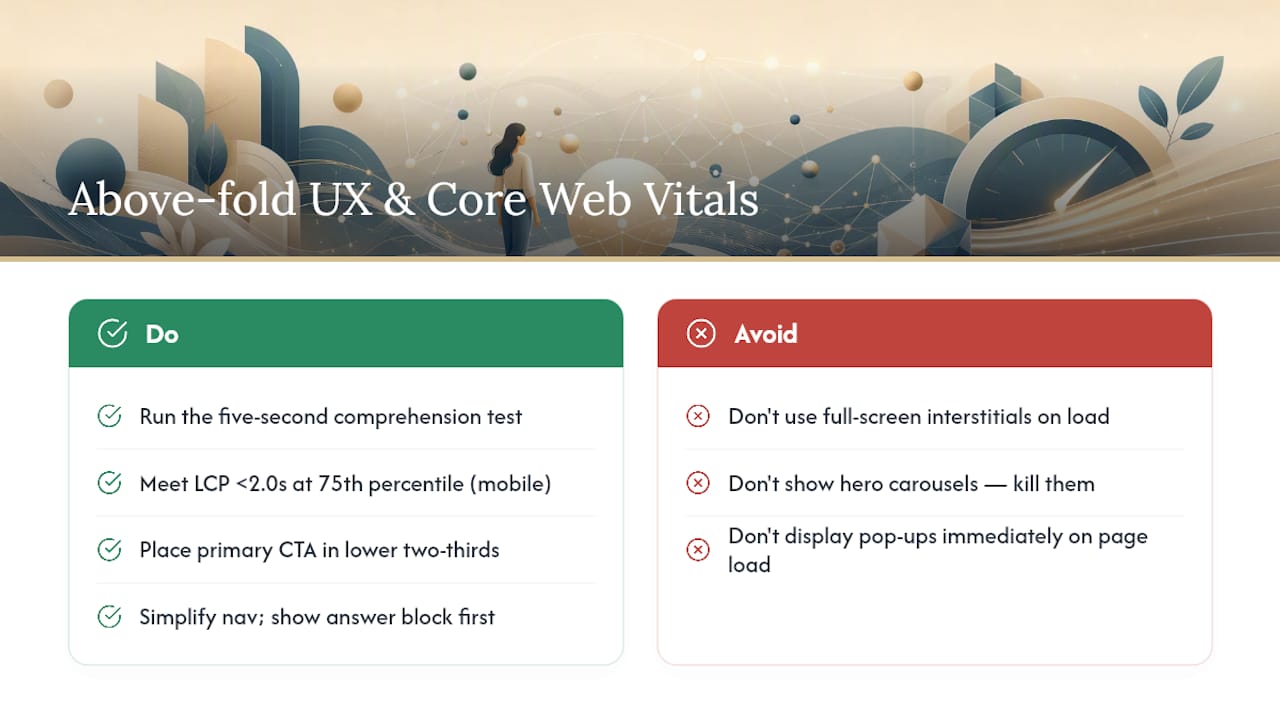
Run this test right now: show your homepage to someone unfamiliar with your business, give them five seconds, then ask what you do and who you do it for. If they can’t answer clearly, the hero headline is broken, no matter how good the rest of the page looks. This five-second comprehension test is one of the fastest, cheapest diagnostics available, and most site owners skip it entirely in favor of debating button colors.
Speed is the other half of the equation, and it’s not optional anymore. Google’s Core Web Vitals guidance sets the bar at a Largest Contentful Paint under 2.0 seconds, measured at the 75th percentile on mobile using real-user data, not a lab test on your office Wi-Fi. Added load time tends to cost conversion rates, based on industry benchmarking, which adds up fast on a page that’s supposed to be converting cold traffic.
Here’s where that time typically gets lost, and how to get it back:
Mobile UX rules follow a different logic than desktop. Thumb reach matters, so primary CTAs belong in the lower two-thirds of the screen, not stretched across the top where a thumb has to travel. Simplify navigation down to the handful of items that genuinely matter, and reorder content so the answer block and hero CTA appear before any secondary sections, since mobile users scroll fast and bail faster.
Pop-ups deserve a hard line. A small, dismissible banner announcing a promotion is fine if it appears after a few seconds of engagement, not on page load. A full-screen interstitial demanding an email before the visitor has read a word does real damage, both to conversion and to how Google treats the page for mobile usability.
Pro Tip: If your current homepage uses a hero carousel to showcase multiple offers, kill it. A rotating hero dilutes your one message into three or four half-messages, and it usually adds meaningful weight to your load time. Pick one, and send the other audiences to dedicated landing pages instead.
Trust Signals That Belong Above the Fold
E-E-A-T on a homepage isn’t abstract. It’s a handful of concrete elements placed where visitors and AI tools can both see them quickly, and it’s one of the areas most homepages get lazy about.
What actually earns trust:
- Named client testimonials, ideally with a business name or a first name and location, not “Great service! - Anonymous.”
- Recognizable client or partner logos, displayed in a clean strip rather than buried in a footer.
- A specific, measurable outcome, a percentage improvement, a timeframe, a number of projects completed.
- Relevant certifications or industry affiliations, shown as small badges rather than a wall of text.
- A link to one or two detailed case studies, not the whole portfolio dumped on the homepage.
Format these signals so they’re visible without cluttering the hero. A single row beneath the fold, right after your answer block, works better than scattering trust elements across the entire page.
Structured data helps here too. Marking up review and organization data with schema gives AI systems a verifiable, machine-readable version of your claims instead of forcing them to infer trust from design alone. That distinction is becoming more relevant as AI Overviews increasingly decide which businesses to cite based on what they can confirm, not just what reads persuasively.
Proxiumdigital builds SEO into the homepage from the first wireframe rather than retrofitting it after launch, which is why the sites it builds tend to load faster and rank sooner than sites where design and SEO were handled by separate vendors working from different priorities…
Internal Linking and the Decision-Flow Homepage
Your homepage’s job isn’t to hold every piece of information about your business. It’s to read the visitor in the first few seconds and route them to the exact page that answers their question, a pattern often called decision-flow architecture.
- Flatten your navigation. Every priority page should be reachable in one click from the homepage, not buried three menus deep.
- Pick three to five priority pages. These are the pages that need to rank and convert, usually your top service pages or category pages, not every page on the site.
- Write descriptive anchor text. “Learn more” tells a search engine nothing. “Commercial roofing services in metro Detroit” tells it exactly what’s on the other end.
- Link contextually, inside body content, not just in the footer. A contextual internal link placed inside a sentence about a specific service carries more weight than the same link sitting in a footer list, because it signals topical relevance rather than boilerplate navigation.
- Watch for keyword cannibalization. If your homepage and a service page are both trying to rank for the same term, your homepage links should point traffic and authority toward the more specific page instead of competing with it.
If you serve genuinely distinct audiences, say, both residential and commercial clients, don’t try to address both fully on one homepage. Build a dedicated landing page for each and use the homepage to segment visitors quickly into the right path. That’s the difference between a well-structured service page that ranks on its own and a homepage trying to be everything at once and ranking for nothing in particular.
The Technical SEO Checklist Every Homepage Needs
None of the content and design work above matters if the technical foundation is broken. Run through this before you consider the homepage finished:
- Confirm robots.txt isn’t accidentally blocking the homepage or its critical assets.
- Check that the canonical tag on the homepage points to itself, not to a stray parameterized URL.
- If you run multiple language or regional versions, verify hreflang tags are correctly set.
- Make sure the homepage is included in your sitemap.xml.
- Confirm the homepage returns a clean 200 status code with no redirect chains sitting in front of it.
- Test server response time (TTFB); anything consistently over 600ms needs attention.
- Validate your Organization and FAQ schema using a structured data testing tool.
- Check Open Graph tags so social shares render correctly.
- Audit third-party scripts (chat widgets, analytics, ad pixels) that block rendering before the page paints.
- Confirm your heading hierarchy is semantic and logical for screen readers and accessibility tools.
Run these checks again anytime you touch the homepage, especially during a website redesign, since redesigns are the single most common moment homepages quietly lose rankings without anyone noticing until traffic drops weeks later.
Measuring What Actually Works After You Ship Changes
Guessing whether a homepage change worked is how sites end up making the same mistakes twice. Track a small, specific set of numbers instead of everything Google Analytics offers.
- Search Console clicks, impressions, and CTR for your homepage’s target queries, tracked weekly, not just glanced at monthly.
- LCP at p75 mobile, pulled from real-user Chrome UX Report data rather than a single lab test, since field data reflects what actual visitors experience far better than a lab score ever will.
- Conversion rate by traffic cohort, separating organic, branded, and paid so a lift in one doesn’t get credited to the wrong change.
When you A/B test, change one variable at a time, headline, CTA color, or hero image, never all three together, or you’ll have no idea which one moved the number. Give the test enough traffic to reach statistical significance before calling a winner; a homepage getting a few hundred visits a week may need several weeks to produce a reliable result.
After any change ships, keep watching Search Console and your CWV dashboard for at least two to three weeks. Regressions in load time or rankings often show up quietly, not as a cliff, and catching them early is far cheaper than diagnosing them after they’ve been live for a quarter.
Publisher Perspective: How Proxiumdigital Treats the Homepage
Homepage SEO breaks down most often when design and SEO get handled by separate teams that never talk to each other. Proxiumdigital builds SEO into the wireframe stage itself, choosing image formats, preload strategy, and internal link placement before a single line of production code gets written. That sequencing is why sites built this way tend to launch already fast rather than needing a speed audit six months later.
— Bryan
Get Your Homepage Fixed by People Who Build for Both Search and Speed
Most of what separates a homepage that ranks from one that doesn’t comes down to execution, not strategy. Proxiumdigital is the alternative to hiring a design firm and an SEO vendor separately: one team handles the audit, the redesign, and the ongoing optimization, so the site is built fast and search-ready from day one instead of patched together after launch.

The engagement flow is straightforward. Proxiumdigital starts with a technical and content audit of your current homepage, prioritizes the fixes that will move the needle fastest (usually image weight, hero clarity, and internal linking), runs structured A/B tests on the changes that matter, and reports results monthly so you can see what moved and why. If your homepage is a full rebuild rather than a tune-up, the web design and development team handles that from the ground up with SEO baked in, not bolted on afterward. If it just needs sharper on-page optimization and ongoing management, the SEO optimization services cover that directly.
Ready to see where your homepage is losing traffic or conversions? Request an audit through Proxiumdigital’s solutions page and get a prioritized list of fixes instead of a generic report.
Sources
Keep Google’s Core Web Vitals documentation handy for the current LCP thresholds. Search Engine Land’s piece on homepage relevance explains the shift toward AI-driven homepage traffic in more depth. For AI-aware content structuring, Baby Love Growth’s content optimization guide is worth a read, and TinyPNG remains a quick, reliable tool for image compression before you touch anything else.
- Your homepage matters again for SEO — here’s why
- Core Web Vitals - Google Developers
- Homepage SEO: What Makes It Unique & How to Do It - Semrush
- Homepage conversion optimization checklist for 2026 - Design Key
- TinyPNG
FAQ
How do I SEO optimize my homepage?
Start with a clear hero headline that names your outcome, audience, and primary keyword, then fix load speed so LCP stays under 2.0 seconds at p75 mobile, and add Organization schema plus a short AEO answer block near the top.
What are the three C’s of SEO?
Definitions vary across sources, but a common version refers to content, code, and credibility, meaning the words on the page, the technical structure behind it, and the trust signals that back up its claims.
What are website homepage best practices?
A strong homepage pairs a single clear message above the fold with fast load times, working internal links to three to five priority pages, and visible trust signals like testimonials and client logos.
How long should a title tag be on a homepage?
Keep it between 50 and 60 characters, with the primary keyword placed near the front and the brand name added at the end if space allows.
Should my homepage have an FAQ section?
Add FAQ schema only when the homepage genuinely contains question-and-answer content; forcing it in just to earn a rich result tends to backfire once Google or an AI tool checks the answer against the actual page text.