Google Penalty Recovery: A Step-by-Step Workflow for Site Owners

If your site just lost a significant portion of its organic traffic overnight, the worst thing you can do is start changing pages. Stop. Open Google Search Console first, check the Manual Actions report and export your current URL-level performance data before you touch anything else. That single decision, made in the first 48 hours, determines how quickly you can diagnose the real cause and how much evidence you’ll have when you need it most.
Google penalty recovery splits into two very different problems: a manual action (a human reviewer flagged your site) and an algorithmic ranking drop (a core or spam update recalibrated how Google scores your content or links). The fix for each is different, the timeline is different, and mixing them up wastes months. The workflow below walks you through both, in order, with the exact tools and exports you need at each stage.
Before you change a single page, do these three things:
- Export your GSC Performance report (last 16 months, all pages, all queries) and save it as a CSV.
- Screenshot or export the Manual Actions report in GSC. A clean report does not mean you’re safe from algorithmic issues; it tells you which recovery path to follow.
- Pull your GA4 landing-page organic sessions report for the same 16-month window and note the exact date traffic dropped.
The first few weeks matter more than most site owners realize. A manual action reconsideration request submitted with strong documentation moves faster than one filed with thin evidence. And if the cause is algorithmic, the data you capture now becomes the baseline you’ll measure recovery against for the next 3–6 months.
Key Takeaways
Recovering from a Google penalty requires a forensic diagnosis before any remediation, and the evidence you collect in the first 30 days determines both the speed and the completeness of the recovery.
| Point | Details |
|---|---|
| Manual vs. algorithmic | Check GSC’s Manual Actions report first; no notice means the drop is algorithmic, not a manual penalty. |
| Diagnose before fixing | Export GSC and GA4 baselines before changing any page; premature edits destroy the evidence trail. |
| Document everything | Outreach logs, screenshots, and disavow files are decisive in reconsideration requests and recovery audits. |
| Phased recovery timeline | Professional-led recoveries average 2–4 months; DIY recoveries typically take 6–12 months. |
| Proxiumdigital | Proxiumdigital provides forensic audits, backlink remediation, and reconsideration support for Michigan businesses and beyond. |
Table of Contents
- How to tell manual actions from algorithmic ranking drops
- Forensic diagnosis: the exact metrics to capture and in what order
- What to fix: technical SEO, content quality, and thin-content remediation
- Backlink audits, outreach for removal, and when to use the Disavow tool
- Preparing and submitting a successful reconsideration request
- Recovering from algorithmic core updates: a phased plan
- What to monitor while you fix issues and realistic recovery timelines
- Hardening your site to avoid future penalties
- Essential tools, exports to collect, and a printable checklist
- What hands-on recoveries actually look like
- Proxium Digital’s penalty recovery services
- Sources
- FAQ
How to tell manual actions from algorithmic ranking drops
The distinction shapes everything that follows, so get it right before you spend a single hour on remediation.
Manual actions show up explicitly. Log into Google Search Console, navigate to Security & Manual Actions, and click Manual Actions. If Google’s spam team flagged your site, you’ll see a notice there with a description of the violation, the scope (site-wide or partial), and a link to the relevant policy. Common triggers include unnatural inbound links, thin or auto-generated content, cloaking, hidden text, and structured data markup violations. No notice in that report means no manual action, full stop.
Algorithmic drops leave a different fingerprint. The traffic decline correlates with a named Google update rather than a specific reviewer decision. Cross-reference your drop date against Google’s confirmed update history. If your traffic fell within a 1–2 week window of a broad core update, a helpful content update, or a spam update rollout, you’re almost certainly looking at an algorithmic recalibration, not a penalty in the traditional sense.
Three practical checks help you confirm which you’re dealing with:
- Check GSC messages. Manual actions always generate a message. No message, no manual action.
- Inspect indexation state. Use the URL Inspection tool on your top-traffic pages. If key pages are deindexed or marked “crawled, not indexed,” that points to a content-quality or technical issue, not necessarily a link penalty.
- Map URL-level drops. In your GSC Performance export, sort by the largest impression drops. If the pattern hits a specific content category (thin product pages, auto-generated FAQ pages, low-authority blog posts), you’re looking at a content-quality signal. If the drop is spread across the whole domain but link-heavy pages took the biggest hit, Penguin-era link signals may be at play.
Pro Tip: Cross-reference your drop date with Google’s update release calendar. A drop that starts on the same day a core update begins rolling out and stabilizes 2 weeks later is almost certainly algorithmic. A sudden, single-day cliff that doesn’t match any update window is worth investigating for a manual action or a technical change on your own site.
Forensic diagnosis: the exact metrics to capture and in what order
Diagnosis before remediation. Every hour spent guessing costs you weeks of recovery time.
Step 1: Validate that the drop is real
Before attributing anything to Google, rule out tracking issues. Check GA4 for a broken measurement ID, a missing tag on key templates, or a recent GTM change. A GA4 configuration error looks identical to a traffic collapse in the dashboard.
Step 2: Tie the drop to a specific date
In GSC Performance, set the date range to “Custom” and pull 16 months. Switch to the “Pages” tab and sort by largest impression decline. Note the exact first-drop date for your top 20 pages. That date is your anchor for everything that follows.
Step 3: Match the date to update windows
Industry guidance recommends waiting for a rollout to finish before measuring the full impact of any changes, because mid-rollout data is noisy. If your drop date falls inside a rollout window, wait until the update is confirmed complete before drawing conclusions.
Step 4: Run URL-level diagnostics
For each affected URL, capture these fields in a spreadsheet:
| Field | Where to pull it | Why it matters |
|---|---|---|
| URL | GSC Performance export | Primary key for all other data |
| Impressions (pre/post) | GSC Performance | Measures visibility loss |
| Clicks (pre/post) | GSC Performance | Measures traffic loss |
| CTR (pre/post) | GSC Performance | Flags title/meta issues |
| Average position (pre/post) | GSC Performance | Quantifies ranking drop |
| First-drop date | GSC Performance | Anchors cause to update |
| Index status | GSC URL Inspection | Confirms page is indexed |
| Crawl anomalies | Screaming Frog | Finds redirect chains, errors |
| Backlink count change | Ahrefs / Semrush | Flags link losses or spikes |
Step 5: Layer in crawl and log data
Run a full Screaming Frog crawl and export all 4xx/5xx errors, redirect chains longer than two hops, and pages returning a noindex directive. If you have server log access, pull the Googlebot crawl frequency for the 30 days before and after the drop. A sharp decline in crawl frequency often precedes a ranking drop by 2–4 weeks and confirms Google is pulling back on the site.
Combine GSC, GA4, and Ahrefs or Semrush backlink data for corroboration. No single tool gives the full picture. GSC shows what Google sees; Ahrefs and Semrush show what’s linking to you; Screaming Frog shows what’s broken on the site itself.
What to fix: technical SEO, content quality, and thin-content remediation
Once you know which pages are affected and why, the audit splits into two tracks: technical and content. Run them in parallel, but fix technical issues first. A well-written page that can’t be crawled or indexed doesn’t recover.

Technical audit checklist
Start with the issues that block Google from accessing and understanding your pages:
- Core Web Vitals: Pull your CWV report from GSC. Pages with “Poor” LCP (Largest Contentful Paint above 4 seconds) or high CLS (Cumulative Layout Shift above 0.25) are at a disadvantage in rankings. Common web design mistakes that hurt rankings include unoptimized images, render-blocking scripts, and unstable layout elements.
- Mobile usability: GSC’s Mobile Usability report flags clickable elements too close together, content wider than the screen, and viewport configuration errors.
- Crawl errors and redirect chains: Screaming Frog’s redirect chain report is the fastest way to find chains longer than two hops. Flatten them to a single 301 where possible.
- Canonicalization: Check for self-referencing canonicals on paginated pages and confirm that canonical tags point to the correct preferred URL, not a redirect destination.
- Robots.txt and noindex directives: A misconfigured robots.txt or a stray noindex tag on a template is one of the most common causes of sudden traffic drops that look like penalties.
- Structured data: Run your key page types through Google’s Rich Results Test. Incorrect schema markup can trigger a manual action for misleading structured data.
Content audit: rewrite, consolidate, or remove
Google’s quality self-assessment focuses on original, valuable information, comprehensive coverage, and clear expertise. Score each affected page against four questions: Does it offer original analysis or information? Does it cover the topic with enough depth that a reader wouldn’t need to search again? Does it demonstrate clear expertise and a named author or organization? Does it exist to serve the reader, or primarily to rank?
Pages that fail two or more of those checks fall into one of three buckets:
- Rewrite: The topic is worth keeping, but the page is thin, outdated, or generic. Enrich with original data, expert quotes, or structured depth.
- Consolidate: Two or more pages cover the same topic at low quality. Merge the best content into one authoritative page and 301-redirect the others.
- Remove: The page serves no reader purpose and has no traffic or links worth preserving. Noindex or delete and redirect to a relevant parent page.
Consolidation with 301 redirects has produced some of the clearest content-quality recoveries. A site with 400 thin blog posts consolidated to 80 well-developed ones often sees stronger recovery than one that rewrites all 400 in place, because the link equity concentrates and the crawl budget sharpens.
Pro Tip: When auditing content, use a structured content update workflow to prioritize pages by traffic potential and fix effort. Pages that once ranked in positions 4–15 and dropped are usually the fastest to recover with targeted rewrites.
Backlink audits, outreach for removal, and when to use the Disavow tool
Toxic links are the most documented cause of manual actions and one of the contributing factors in spam update hits. The process has three stages: audit, outreach, and disavow.
Audit workflow
- Export your full backlink profile from GSC (Links report → Top linking sites → Export).
- Pull a separate export from Ahrefs and Semrush. The three sources rarely overlap completely, and you want the broadest possible picture.
- Filter for toxicity signals: links from domains with spam scores above 60 (Semrush’s Toxicity Score or Ahrefs’ Domain Rating below 5 combined with irrelevant anchor text), links from link farms, exact-match anchor text patterns that look manufactured, and links from hacked or deindexed domains.
- Flag links with commercial anchor text pointing to money pages. A pattern of “buy cheap X” or “best X service” anchors from unrelated domains is a classic Penguin-era signal.
Use PageRank concepts to prioritize: a handful of high-authority toxic links from domains with real traffic are more damaging than hundreds of links from zero-traffic spam domains Google has likely already discounted.
Outreach process
- Draft a short, professional removal request. State the URL of the linking page, the URL being linked to, and a direct request to remove the link. Keep it under 150 words.
- Send to the contact email on the domain’s whois record or contact page. If no contact exists, try the domain registrar’s abuse address.
- Log every outreach attempt in a spreadsheet with these fields: linking domain, linking URL, target URL, date sent, contact email used, response received, date of removal (if confirmed).
Capture everything. Google’s reviewers expect to see this log in a reconsideration request, and incomplete outreach documentation is one of the top reasons reconsideration requests are rejected.
When to use the Disavow tool
The Google Disavow Tool is appropriate in two situations: you have a confirmed manual action for unnatural inbound links, or you have a large volume of toxic links that you cannot get removed through outreach after genuine attempts. For algorithmic drops without a manual action, Google’s systems already discount most low-quality links, and a disavow file submitted unnecessarily can sometimes remove signals you actually want.
Format the disavow file correctly: one URL or domain per line, using “domain:” prefix for whole-domain disavows. Submit it through GSC before filing your reconsideration request.
Pro Tip: Never disavow a link before attempting outreach. Google’s reviewers look for evidence that you tried to remove links manually first. A disavow file submitted without an outreach log is a weaker submission than one backed by documented removal attempts.
Preparing and submitting a successful reconsideration request
A reconsideration request is only relevant for manual actions. If you’re dealing with an algorithmic drop, skip this section and focus on the phased recovery plan below.
What to include
Google expects a clear, honest account of what happened, what you fixed, and proof that the fix is complete. Structure your submission around four components:
- Problem statement: Acknowledge the violation plainly. Don’t minimize it or argue with the reviewer’s assessment. State what was found and when.
- Remediation actions: List every specific action taken, with dates. “We removed 847 spammy links, consolidated 34 thin content pages, and corrected structured data markup on all product templates” is the right level of specificity.
- Supporting documentation: Attach or link your outreach log (CSV), screenshots of removed pages or corrected markup, your disavow file, and before/after crawl reports from Screaming Frog.
- Forward-looking commitment: Describe the process changes you’ve made to prevent recurrence. This signals to the reviewer that the fix is structural, not cosmetic.
Manual actions require full remediation and thorough documentation. Incomplete cleanups are the most common reason reconsideration requests are rejected, and a rejection resets the clock. Submit only when the work is genuinely complete.
Timeline and handling rejections
Google typically reviews reconsideration requests within a few days to a few weeks. If your request is rejected, read the response carefully. Rejections usually indicate that the cleanup was incomplete or that the documentation didn’t satisfy the reviewer. Address the specific gap, complete the remaining work, and resubmit. There is no limit on resubmissions, but each one should represent a materially better state than the last.
Recovering from algorithmic core updates: a phased plan
Core updates are broad recalibrations of Google’s ranking systems, not targeted penalties. There’s no reconsideration request to file. Recovery means improving the underlying quality signals that the update measured, then waiting for the next update cycle to confirm the improvement.
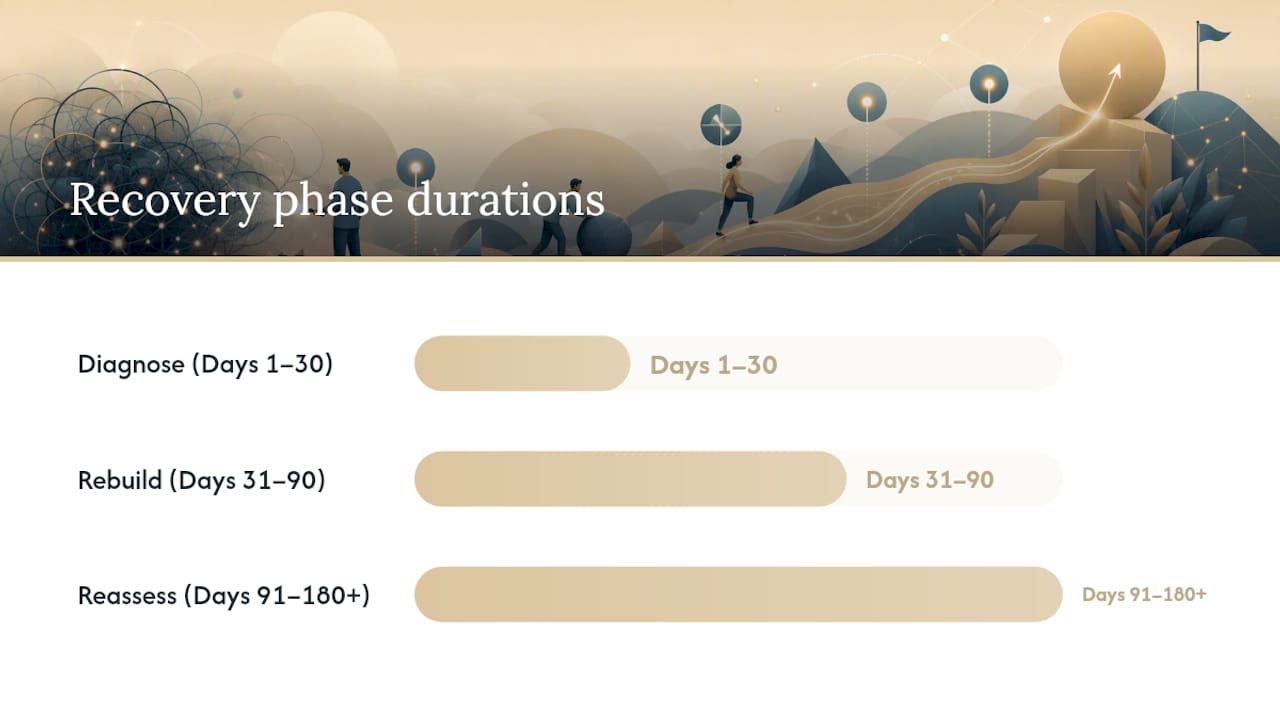
Phase 1: Diagnose (Days 1–30)
Pull your GSC data for the 90 days before and after the update. Identify the content clusters that lost the most impressions. Group affected pages by topic, content type, and author. Look for patterns: did all your product comparison pages drop? Your listicles? Your how-to guides? The pattern tells you which quality dimension Google recalibrated.
Compare your affected pages against the top-ranking pages for the same queries. What do those pages have that yours don’t? More original data? Named authors with credentials? More comprehensive coverage? Structured answers that match search intent more precisely?
Phase 2: Rebuild (Days 31–90)
Prioritize pages that ranked in positions 4–20 before the drop. These are closest to recovery and will show the fastest improvement. For each priority page:
- Rewrite for depth and originality. Add data, examples, and expert perspective that competitors don’t have.
- Add or strengthen author attribution. A named author with a linked bio and verifiable credentials is an E-E-A-T signal Google’s quality raters look for.
- Consolidate near-duplicate pages with 301 redirects to concentrate link equity.
- Fix any technical issues identified in the audit: Core Web Vitals, mobile usability, crawl errors.
For content consolidation and rebuild workflows, a structured approach to blending SEO and content strategy helps teams prioritize effort and avoid rewriting pages that should be removed instead.
Phase 3: Reassess (Days 91–180+)
Recovery from a core update rarely happens between updates. Most sites see meaningful improvement only after the next broad core update, which Google releases several times per year. Monitor your GSC impressions weekly. Look for incremental position improvements on your rebuilt pages as a leading indicator. A page moving from position 18 to position 12 is a signal the changes are working, even if traffic hasn’t recovered yet.
Industry data indicates professional-led recoveries average 2–4 months, while DIY recoveries commonly take 6–12 months. The difference is usually speed of diagnosis and prioritization, not the quality of the eventual fixes.
| Phase | Timeframe | Primary actions | Success signal |
|---|---|---|---|
| Diagnose | Days 1–30 | GSC export, update correlation, content cluster analysis | Root cause identified, priority pages listed |
| Rebuild | Days 31–90 | Content rewrites, consolidation, technical fixes | Pages re-crawled, position improvements begin |
| Reassess | Days 91–180+ | Monitor impressions, track position changes, wait for update | Impressions recover, next update confirms gains |
What to monitor while you fix issues and realistic recovery timelines
Recovery is not a single event. It’s a signal that accumulates across weeks and update cycles. Tracking the right KPIs keeps you from misreading noise as progress, or progress as failure.
KPIs to track weekly:
- GSC impressions and clicks (total and per affected page cluster)
- Average position for your top 20 target queries
- Index coverage: confirmed indexed pages vs. excluded pages
- Crawl frequency from server logs or GSC’s crawl stats report
- Organic conversions in GA4 (not just sessions, because a position improvement without a conversion improvement may indicate the wrong pages are recovering)
Recovery timelines vary significantly by cause. Technical fixes (a misconfigured robots.txt, a broken canonical, a noindex on a template) can recover in days to weeks once corrected and recrawled. Content-quality improvements take longer because Google needs to recrawl, reindex, and re-evaluate the pages, then confirm the improvement in the next update cycle. Link-related recoveries after a disavow submission typically take 4–8 weeks for Google to process the file and recalculate link signals.
For realistic SEO improvement timelines that account for both penalty recovery and organic growth, the pattern is consistent: technical fixes are the fastest, content quality is the slowest, and link remediation sits in between.
When a core update is actively rolling out, pause your measurement cadence. Changes made during a rollout are impossible to evaluate accurately because the ranking signals are in flux. Set a calendar reminder for two weeks after the confirmed rollout completion date, then pull your comparison data.
Hardening your site to avoid future penalties
Prevention is cheaper than recovery. That’s not a platitude; it’s a budget argument. A manual action reconsideration process costs weeks of staff time and months of lost revenue. A quarterly audit costs a few hours.
Recurring audit schedule:
- Monthly: GSC manual actions check, index coverage review, Core Web Vitals report, and a spot-check of new content against quality standards.
- Quarterly: Full Screaming Frog crawl, backlink toxicity review in Ahrefs or Semrush, content performance audit (pages losing impressions for 60+ days get flagged for rewrite or consolidation).
- Annually: Full technical SEO audit, E-E-A-T review of author pages and editorial standards, structured data validation across all page templates.
E-E-A-T operational controls
Author credentials, editorial controls, and transparent sponsorship disclosure materially improve E-E-A-T signals and reduce content-quality risk. Practically, that means:
- Every content page has a named author with a linked bio that includes verifiable credentials or experience.
- Sponsored content and affiliate links are disclosed clearly, per FTC guidelines.
- Content sourcing rules are documented: primary sources, expert quotes, and data citations are required for factual claims.
- Editorial review is logged: who reviewed a page, when, and what changed.
Ongoing website management with structured reporting makes these controls operational rather than aspirational. A managed monthly review catches issues before they compound.
Pro Tip: Before deploying major structural changes (a site migration, a URL restructure, a template overhaul), test them in a staging environment and validate with a Screaming Frog crawl and a GSC fetch-and-render check. A staging test that catches a broken canonical or a missing hreflang takes 30 minutes. Fixing the same issue after it’s been live for 60 days takes 30 days.
Essential tools, exports to collect, and a printable checklist
Every tool in the recovery stack has a specific role. Using the wrong tool for a task wastes time; missing a tool leaves a gap in your evidence.
| Tool | Primary role | Key export for recovery |
|---|---|---|
| Google Search Console | Manual action detection, URL-level performance, index coverage | Performance CSV (16 months), Manual Actions screenshot, URL Inspection results |
| GA4 | Organic traffic baseline, conversion tracking, landing-page analysis | Landing-page organic sessions report (16 months) |
| Ahrefs | Backlink audit, referring domain toxicity, anchor text analysis | Full backlink export, referring domains export |
| Semrush | Toxicity scoring, competitor gap analysis, keyword tracking | Backlink Audit export, Toxicity Score report |
| Screaming Frog | Technical crawl, redirect chains, canonicalization, structured data | Full crawl export (all response codes), redirect chain report |
| Google Disavow Tool | Link disavowal for manual actions or confirmed toxic link patterns | Disavow file (formatted .txt), submission confirmation screenshot |
Exports to store before you start remediation:
- GSC Performance CSV (all pages, all queries, 16 months)
- GSC Manual Actions screenshot (even if clean)
- GA4 landing-page organic sessions (16 months)
- Ahrefs and Semrush full backlink exports
- Screaming Frog full crawl report
- Server log Googlebot crawl frequency (30 days pre/post drop)
- Outreach log template (domain, linking URL, target URL, date sent, contact, response, removal date)
A strict recovery log, tracking what changed, on which pages, and when, markedly improves diagnosis and makes it far easier to measure progress across update windows. Without it, you’re comparing two snapshots with no record of what happened between them.
For a complementary recovery checklist that covers the same workflow from a different angle, the step-by-step penalty recovery guide is worth bookmarking alongside this one.
What hands-on recoveries actually look like
The pattern that shows up most often in agency-led recoveries is not what site owners expect. They come in expecting a single smoking gun: one bad link, one thin page, one technical error. What the audit usually finds is a cluster of compounding issues, none of which would have triggered a problem alone, but together they pushed the site below Google’s quality threshold.
The three mistakes that slow recovery down most consistently are: starting remediation before the diagnosis is complete, submitting a reconsideration request before the cleanup is finished, and measuring results during an active update rollout. Each one adds weeks or months to the timeline.
Consider a typical scenario: a service business site loses 40% of organic traffic after a broad core update. The initial assumption is thin content. The audit reveals something more layered: 60 near-duplicate service-area pages with auto-generated copy, a backlink profile with 200 exact-match anchor links from a link scheme the previous agency built two years earlier, and Core Web Vitals in the “Poor” range across mobile. No single issue explains the full drop. Fixing only the content while leaving the links and technical issues in place produces partial recovery at best.
What changes the outcome is treating the audit as a complete picture before touching anything. Consolidate the service pages, document and disavow the link scheme, fix the CWV issues, and then wait for the next update window. Sites that follow this sequence often come out stronger than before the drop, because the cleanup forces improvements that should have happened years earlier. Thorough remediation frequently uncovers legacy issues that, once fixed, improve long-term performance beyond the pre-penalty baseline.
The other thing worth saying plainly: relying on a penalty to expire is not a viable strategy. A manual action doesn’t age out. An algorithmic demotion doesn’t reverse itself. The sites that recover are the ones that do the work and document it.
Proxium Digital’s penalty recovery services
Losing organic traffic to a Google penalty is a revenue problem, not just an SEO problem. Proxiumdigital’s Michigan-based team handles the full recovery workflow: technical SEO audits, backlink remediation and outreach documentation, content consolidation and rewrites, and reconsideration request preparation for manual actions.

What you get is an evidence-driven remediation plan with measurable milestones, not a vague “we’ll improve your SEO” retainer. Every engagement starts with a forensic audit using GSC, GA4, Ahrefs, and Screaming Frog, and every recommendation is tied to a specific finding. Reporting is monthly, and you see exactly what changed, what was fixed, and what’s being monitored.
If you’re ready to start, pull your GSC Performance export and your Manual Actions screenshot before the first call. That data cuts the discovery phase in half. Explore Proxiumdigital’s SEO and recovery services or review the full solutions and pricing to find the right engagement for your situation.
Sources
These are the primary references used throughout this guide. They’re also the sources you should cite in a reconsideration request to show Google that your remediation followed authoritative guidance.
- Google core updates: What they mean & how to recover
- Google Algorithm Update Recovery: A Practical SEO Guide
When preparing a reconsideration request, linking to or quoting from Google’s own documentation in your submission demonstrates that your remediation followed the correct standard, not a third-party interpretation of it.
FAQ
How do I fix a Google penalty?
Start by checking the Manual Actions report in Google Search Console. If a manual action exists, remediate the specific violation completely, document every fix with screenshots and outreach logs, and submit a reconsideration request. For an algorithmic drop, follow the Diagnose → Rebuild → Reassess framework: audit affected pages, fix content quality and technical issues, and monitor across the next update cycle.
How long does a Google penalty last?
A manual action stays in place until Google’s reviewer confirms full remediation after a reconsideration request, which can take weeks to months depending on the scope of the cleanup. Algorithmic drops don’t have a fixed expiration; recovery depends on improving the underlying quality signals and waiting for the next relevant update to confirm the improvement, typically 2–4 months with professional help or 6–12 months with a DIY approach.
What is a Google penalty recovery agency?
A penalty recovery agency is an SEO firm that specializes in diagnosing the cause of a Google ranking drop, executing the technical and content remediation required, and preparing reconsideration request documentation for manual actions. Proxiumdigital provides this service for businesses in Michigan, covering forensic audits, backlink cleanup, content consolidation, and ongoing monitoring through the recovery cycle.
Should I use the Disavow tool for every toxic link?
No. The Disavow tool is appropriate when you have a confirmed manual action for unnatural links, or when documented outreach has failed to remove a significant volume of toxic links. For algorithmic drops without a manual action, Google’s systems already discount most low-quality links, and unnecessary disavow submissions can remove signals you actually want to keep.
Can a site fully recover after a Google penalty?
Yes, and many sites surpass their pre-penalty traffic after a thorough remediation. The cleanup process often surfaces legacy technical and content issues that were suppressing performance even before the penalty. Sites that treat remediation as a full audit rather than a targeted patch tend to see the strongest long-term results.