Google Business Profile Optimization: A 30-Day Local Checklist

Good google business profile optimization comes down to seven things done well: claim and verify ownership, set the correct primary category, complete every contact field, upload real photos, publish a post, request reviews on a schedule, and turn on booking or messaging if your business supports it. Do those seven and you’ve addressed the signals Google says matter most for local ranking: relevance, distance, and prominence.
Here’s the order that actually moves the needle first:
- Claim and verify ownership so Google trusts you to make edits.
- Set one precise primary category rather than a vague, broad one.
- Fill in phone, hours, website, and address exactly as they appear elsewhere online.
- Upload a sufficient number of photos covering your storefront, team, and work.
- Publish one Google Post this week to signal an active profile.
- Ask several recent customers for reviews using a direct link.
- Turn on messaging or booking if your category supports it.
Watch profile views, direction requests, and calls in Insights over the following weeks. Those three metrics move first, before rankings shift.
Key Takeaways
Completing every Google Business Profile field correctly and consistently, not chasing shortcuts, is what actually drives relevance, distance, and prominence rankings.
| Point | Details |
|---|---|
| Verify ownership first | Nothing else you do matters until Google confirms you’re authorized to manage the listing. |
| Pick one precise category | The primary category is your strongest relevance signal, so choose the most specific match available. |
| Keep photos and posts current | Upload new images monthly and publish weekly Posts to signal an active, trustworthy profile. |
| Build steady review velocity | Ask consistently rather than in bursts, and track volume, rating, and pace monthly. |
| Delegate or manage with a partner | Proxiumdigital’s SEO retainers fold GBP optimization into ongoing website and local SEO management. |
Table of Contents
- Verify Your Business and Lock Down Owner Access
- Fill Out Every Field That Affects Discovery and Clicks
- How Do You Pick the Right Business Categories?
- What Photos and Videos Actually Move the Needle?
- Should You Be Posting Regularly on Google Business Profile?
- How Do You Build Review Volume Without Looking Desperate?
- Turning On Messaging, Booking, and Q&A Features
- What Do Relevance, Distance, and Prominence Actually Mean?
- Which Metrics Should You Check in Insights?
- Fixing Duplicate Listings, Suspensions, and Bad Edits
- A 30-Day Plan You Can Hand to Your Team
- Why Accuracy Beats Clever Tricks in Local SEO
- What Local Business Owners Get Wrong About “Optimization”
- Get Hands-On Help With Your Local Profile and Website
- Where to Verify These Guidelines Yourself
- Sources
- FAQ
Verify Your Business and Lock Down Owner Access
Verification tells Google you’re authorized to represent the business, and it directly affects whether you show up in search results at all. An unverified listing can exist on Maps, but you won’t control a single field on it.
Google offers a few verification paths, and which one you get depends on your business type and history:
- Postcard by mail — the default for most new listings; arrives in 5 to 14 days with a code you enter in your dashboard.
- Phone or text — instant, but only offered to profiles Google already trusts based on signals like an established website.
- Email verification — rare, usually reserved for specific account types.
- Instant verification — automatic if you’ve already verified the same business in Google Search Console.
Check who has owner versus manager access before you do anything else. Managers can edit most fields, but only the owner can remove other users, verify the profile, or delete it. If a former employee or old agency still holds owner status, request access transfer through the dashboard immediately.
Pro Tip: If your postcard never arrives, don’t request a second one and wait again. Try switching to phone verification from the same dashboard menu, it often unlocks once 15 to 30 days have passed since your first request.
Fill Out Every Field That Affects Discovery and Clicks
Name, address, and phone number (NAP) need to match, word for word, across your website, your profile, and any directory listing you’ve ever touched. A mismatch, like “St.” on one site and “Street” on another, quietly weakens the trust signal Google uses to confirm you’re a real, stable business.
Your business description deserves more thought than most owners give it. The first sentence is what Google is most likely to extract and reuse in search snippets, so lead with your service, your city, and what sets you apart. Something like “Family-owned plumbing repair in Ann Arbor specializing in same-day emergency calls” does far more work than a generic mission statement.

Hours need the same discipline. Set standard hours, but also load special hours for holidays well in advance. A wrong “open” status on Thanksgiving costs you calls and, over time, costs you the trust signal that comes from an accurate profile.
If your website link sits in your profile, add UTM parameters to it so you can separate Google Business Profile traffic from organic search in your analytics. A link like yoursite.com/?utm_source=google&utm_medium=gbp takes two minutes to build and pays off the first time you run a report.
- Don’t stuff keywords into your business name field. Google can suspend profiles for this.
- Don’t write a description that reads like an ad. Write it like you’re answering a customer’s question.
- Do list attributes (wheelchair accessible, women-led, outdoor seating) that apply. They’re searchable filters.
A profile that says exactly what it does, where it does it, and when it’s open beats a keyword-heavy description every time. Google rewards clarity, not cleverness.
How Do You Pick the Right Business Categories?
Your primary category is the single strongest relevance signal in your entire profile, according to Google’s own category guidance. Choose the most specific match available rather than a broad umbrella term. “Italian Restaurant” beats “Restaurant.” “Family Law Attorney” beats “Attorney.”
- Search the category picker for your exact service before settling on something close enough.
- Add two to four secondary categories that genuinely apply, and stop there. Piling on ten categories dilutes the primary signal instead of expanding your reach.
- List individual services or products under the Services tab so Google can match specific searches, like “emergency drain cleaning,” to your profile even when that phrase never appears in your description.
Be aware that changing your primary category can trigger a re-verification request from Google, so get this right the first time instead of testing options repeatedly.
Pro Tip: Check your top three local competitors’ primary categories. If they’re all using a more specific option than you, that’s usually a sign Google has a better-matched category available for your business too.
What Photos and Videos Actually Move the Needle?
Profiles with active photos consistently see more direction requests and clicks than bare-bones listings. Google gives searchers a visual preview before they ever visit your site, and a thin photo gallery reads as a business that stopped caring.
Upload these first:
- Exterior shots so customers recognize your storefront from the street or parking lot.
- Interior photos that set expectations for the space.
- Team photos, since profiles with visible staff tend to feel more trustworthy to searchers.
- Product or menu shots specific to what you sell.
- Before-and-after photos if your work is visual, like landscaping, renovation, or detailing.
Keep images at least 720x720 pixels, under 5MB, and named descriptively before upload (“ann-arbor-plumber-team.jpg” beats “IMG_4821.jpg”). Add several photos in your first week, then upload new ones regularly to keep the profile looking active.
Should You Be Posting Regularly on Google Business Profile?
Yes, and it’s one of the most underused features on the platform. Posts function like a small newsfeed attached to your listing, and they’re a direct signal to Google that someone is actively managing the profile.
- Offers work well for time-limited promotions with a clear expiration date.
- Events fit workshops, sales, or seasonal happenings.
- Product posts highlight specific items or services with a photo and price.
- Updates cover general news, like a new hire or extended hours.
Keep posts under 1,500 characters, always include an image, and pick a call-to-action button (“Call Now,” “Learn More,” “Book”) that matches the post’s purpose. Aim for one post weekly, and track click-through in Insights to see which topics actually get clicks.
How Do You Build Review Volume Without Looking Desperate?
Review activity is one of the signals Google explicitly ties to local ranking prominence, and it’s also the single biggest factor in whether a searcher picks up the phone. A repeatable process beats a one-time push every time.
- Ask at the moment of highest satisfaction. Right after a completed job or a positive interaction converts far better than a follow-up email three weeks later.
- Send a direct review link, not a request to “leave us a review sometime.” Your Google Business Profile dashboard generates a shareable link that drops the customer straight into the review form.
- Follow up once, politely, if there’s no response after a week. Don’t chase beyond that.
When responses come in, keep them short and specific. For a positive review, thank the customer by first name and mention the actual service: “Thanks, Maria, glad the water heater install went smoothly.” For a negative review, acknowledge the issue without getting defensive, and move the conversation offline: “We’re sorry the appointment ran late. Please call us at [number] so we can make this right.”
Track three numbers monthly: total review count, average star rating, and review velocity (new reviews per month). A steady trickle of five reviews a week outperforms a burst of twenty followed by silence, and it looks far more natural to both customers and Google.
Pro Tip: Set a modest, specific target, like four new reviews per week, rather than a vague goal to “get more reviews.” Specific targets get delegated and tracked; vague ones get forgotten by week two.
Turning On Messaging, Booking, and Q&A Features
A searcher who can book an appointment or send a message without leaving Google converts at a different rate than one forced to visit your website first. Enable whichever interactive features your category supports.
- Turn on messaging in your dashboard settings and commit to replying within a few hours. A profile that lets customers message but never responds does more harm than not offering the feature at all.
- Enable booking if you take appointments; Google Business Profile can connect directly to several scheduling tools.
- Connect product or ordering links if you’re a retailer or restaurant, and check monthly that the feed still pulls accurate prices and availability.
Don’t leave your Q&A section to strangers. Anyone can post a question on your profile, and anyone can answer it, including competitors. Seed your own Q&A with the five questions customers ask most, “Do you offer free estimates?”, “Is parking available?”, and answer them yourself before someone else does it badly.
What Do Relevance, Distance, and Prominence Actually Mean?
Google’s own guidance names three ranking factors: relevance, distance, and prominence. Translating those into tasks is where most owners get stuck.
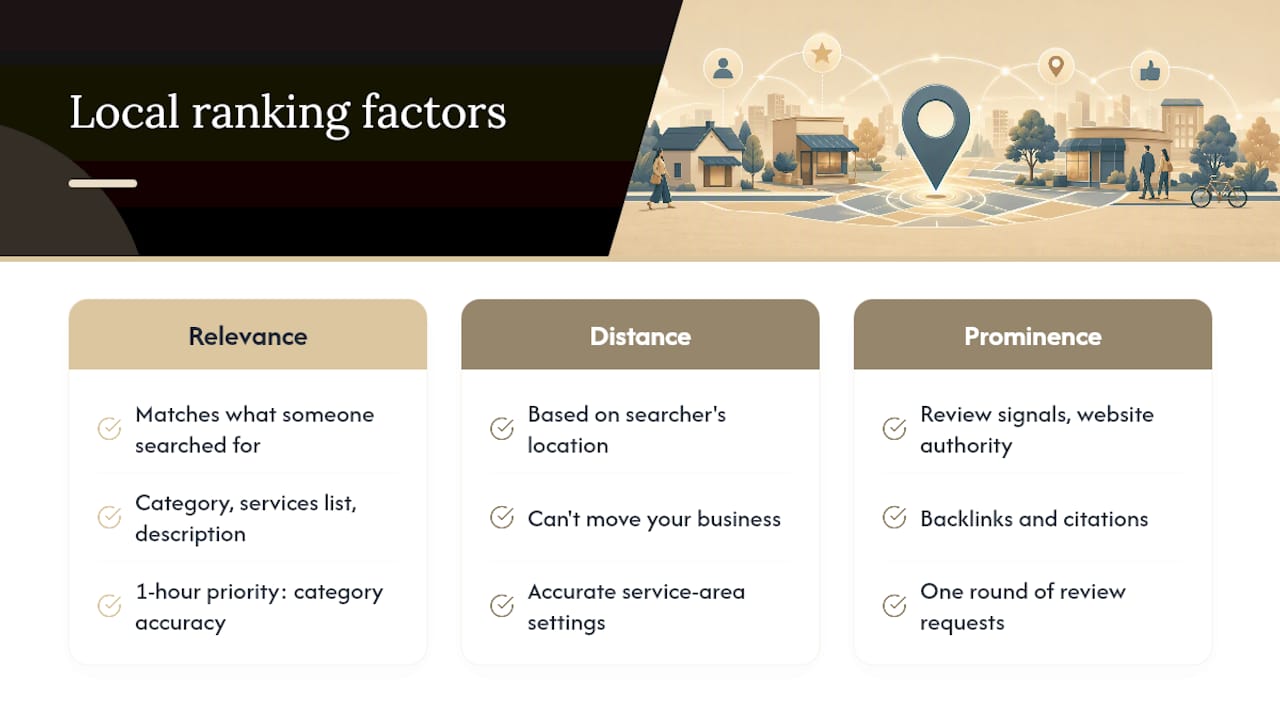
Relevance measures how well your profile matches what someone searched for. Your category, services list, and description all feed this directly.
Distance is largely outside your control on a per-search basis, since it’s based on the searcher’s location relative to yours. You can’t move your business, but accurate service-area settings prevent you from being excluded from searches you should legitimately show up in.
Prominence blends your review signals, website authority, and general online reputation, including backlinks and citations pointing to your site.
If you only have an hour this month, spend it on category accuracy and one round of review requests. Those two levers touch relevance and prominence simultaneously, and they’re free.
Businesses with weak website authority often see prominence stall even after fixing everything else on the profile itself, which is where broader site health starts to matter for local rankings too.
Which Metrics Should You Check in Insights?
Google Business Profile Insights gives you four numbers worth checking regularly: search queries (what people typed to find you), profile views, direction requests, and calls. A rising direction-request count usually shows up before a ranking shift does.
- Pull Insights weekly for the first month after major changes, then monthly afterward.
- Use UTM-tagged website links so Google Analytics can separate Business Profile traffic from organic search or paid clicks.
- Set a simple reporting cadence: one person checks Insights the first Monday of each month and logs the four core numbers in a shared sheet.
- Compare month over month, not week over week. GBP metrics swing with seasonality and local events.
Fixing Duplicate Listings, Suspensions, and Bad Edits
Duplicate listings usually appear after a business moves, rebrands, or gets listed twice by two different employees. Google lets other users suggest edits to your profile, and sometimes those edits are wrong or malicious.
- Search your business name and address on Maps to spot duplicates, then use the “Suggest an edit” option on the extra listing to mark it as a duplicate for removal.
- If your profile gets suspended, check your email for the reason first; common causes include a mismatched name, a virtual office listed as a physical address, or a recent bulk edit that triggered a review. Moz notes that treating your profile as a living document, one that requires ongoing maintenance, prevents most of these issues before they start.
- Reapply with documentation ready: a utility bill, business license, or lease agreement showing your address and legal business name.
- Check your edit history monthly for unauthorized changes to hours or categories, and revert anything you didn’t make yourself.
A 30-Day Plan You Can Hand to Your Team
Spreading this work over four weeks keeps it manageable and gives you time to see early signals before moving to the next phase.
- Week 1: Verify ownership, correct NAP across the profile, set the primary category, and write the description. Assign this to whoever owns your website content, roughly 3 hours total.
- Week 2: Upload 10 to 15 photos, complete every attribute field, and add service listings. A staff member with a phone camera can knock this out in 2 hours.
- Week 3: Launch the review request workflow and publish your first two Posts. This is ongoing work, not a one-time task, so assign an owner who’ll keep it running.
- Week 4: Enable messaging or booking, seed your Q&A section, and pull your first Insights report to compare against your baseline.
Some GBP changes show measurable movement within 30 to 60 days, while review-driven prominence gains typically take 60 to 90 days in competitive markets. Audit each week’s tasks against a simple checklist before moving forward, half-finished categories or unanswered messages undo the benefit of everything else.
Why Accuracy Beats Clever Tricks in Local SEO
No hack outperforms a profile that’s simply correct. Google’s own guidance ties ranking to completeness, review activity, and website authority, not to tricks or workarounds. Businesses chasing shortcuts usually end up fixing basic errors months later anyway.
Pro Tip: Set a recurring 15-minute monthly audit, hours, phone number, category, and photo freshness, owned by one named person. Accuracy that nobody’s accountable for tends to drift within a quarter.
What Local Business Owners Get Wrong About “Optimization”
Most advice on this topic treats Google Business Profile like a puzzle to be solved once. It isn’t. The businesses that actually win local visibility over time treat the profile like a storefront window: something you dust off and rearrange regularly, not something you set up and forget.
The quick win I’d point to first for almost any local client is the primary category. Owners default to the broadest option because it feels safer, “Restaurant” instead of “Ramen Restaurant”, and that single choice quietly caps how well the profile can compete for specific searches.
DIY works fine if you can commit to the weekly review-request habit and the monthly audit. If your team can’t hold that cadence consistently, that’s usually the moment a managed local SEO service starts paying for itself.
Get Hands-On Help With Your Local Profile and Website
Everything above works, but it only works if someone actually does it, week after week, month after month. That’s the part most solo owners underestimate: the checklist isn’t hard, staying consistent with it is. Proxiumdigital handles Google Business Profile optimization as part of a broader local SEO retainer, so your category, reviews, and posts get managed alongside your website instead of sitting in a separate, forgotten task list.
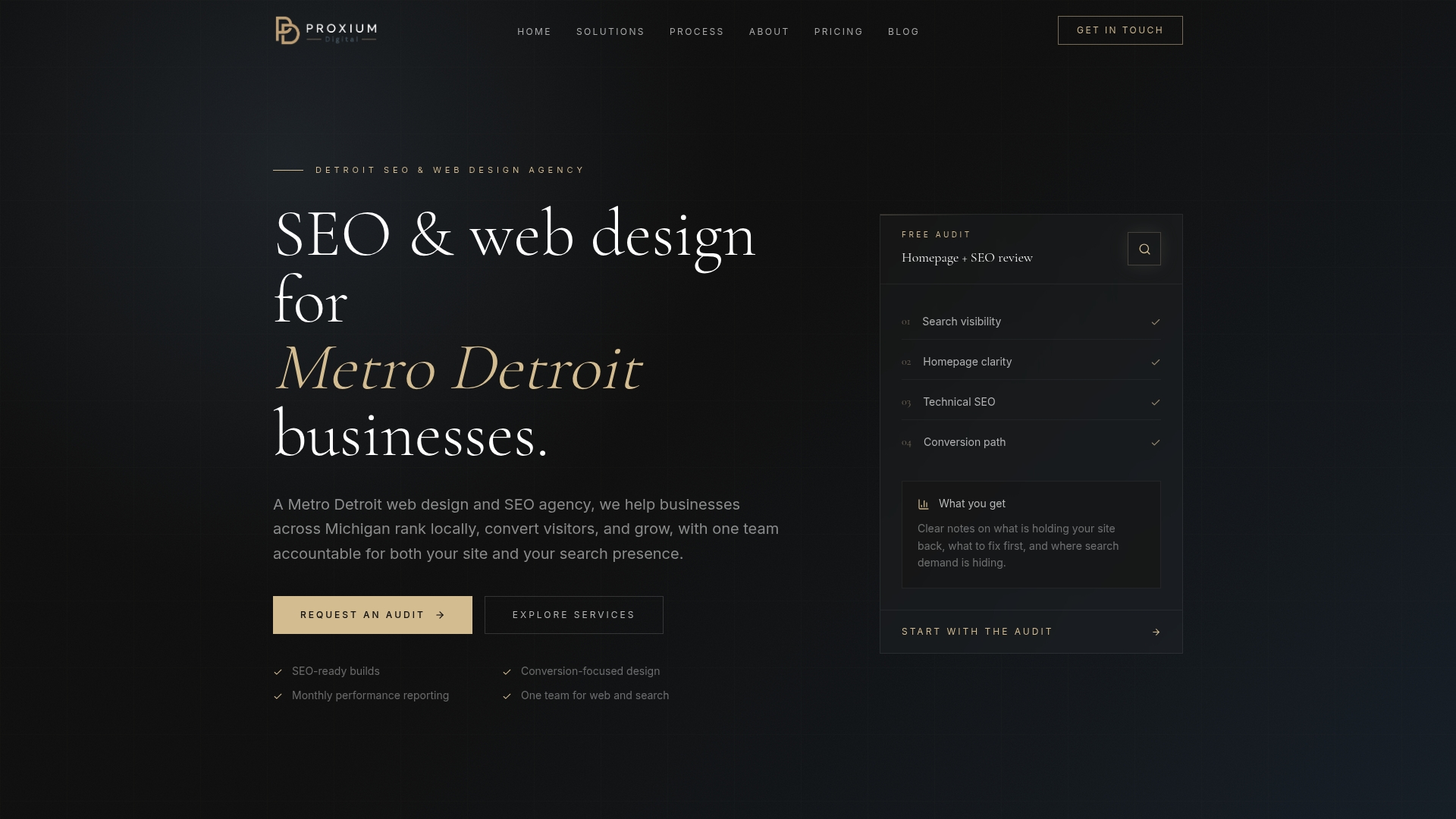
Because Proxiumdigital builds websites with SEO baked in from the start, the site changes that support GBP prominence, like UTM tracking, page speed, and schema, happen without waiting on a separate vendor. Our SEO optimization services cover profile management, review strategy, and monthly reporting so you can see exactly what moved and why. If you’d rather hand this off than manage it yourself, check our full service overview and book a discovery call to get a straightforward audit of where your profile stands today.
Where to Verify These Guidelines Yourself
Google’s own documentation is worth bookmarking, since GBP features and requirements shift periodically.
- Tips to improve your local ranking on Google covers the official ranking factors directly from Google.
- Manage your business category explains category selection rules and re-verification triggers.
- Get listed on Google is the canonical Business Profile product page, useful for checking current feature availability.
- REST Resource: categories and Method: categories.list matter if you or your agency manages multiple locations programmatically.
- Moz’s beginner’s guide to Business Profiles offers a practical framework for treating the profile as ongoing maintenance rather than a one-time setup.
Sources
- Tips to improve your local ranking on Google
- Manage your business category - Google Business Profile Help
- Get listed on Google - Google Business Profile
- How to Optimize Your Google Business Profile in 2026
FAQ
How Do I Optimize My Google Business Profile?
Verify ownership, choose the most specific primary category available, complete every contact and hours field, upload fresh photos monthly, publish weekly Posts, and run a steady weekly review-request habit.
How Much Does Google Business Profile Optimization Cost?
Setting up and verifying a profile yourself costs nothing beyond your time, but ongoing management, reviews, posts, photo updates, delegated to an agency typically runs as part of a monthly local SEO retainer; Proxiumdigital’s pricing page breaks down what’s included at each tier.
How Long Does It Take to See Results From GBP Optimization?
Some changes, like completing missing fields or fixing categories, can show measurable movement within 30 to 60 days, while review-driven prominence gains usually take 60 to 90 days in competitive local markets.
Is Google Business Profile Being Discontinued?
No. Google Business Profile remains an active, actively updated product, and Google’s own product page continues to add features like booking, messaging, and product listings rather than winding the service down.
What’s the Single Biggest Mistake Owners Make on Their Profile?
Choosing an overly broad primary category. A specific, accurate category match is the strongest relevance signal in the entire profile, and it’s free to fix.