Core Web Vitals: What They Are and How to Pass Them

Core Web Vitals measure three things: how fast your main content loads (LCP), how quickly your page responds to clicks and taps (INP), and how much it jumps around while loading (CLS). To pass, you need LCP within a recommended threshold, INP under a recommended threshold, and CLS below a recommended threshold, each measured at the 75th percentile of real visitors. Get there and you improve both user experience and your standing in search results.
TL;DR:
- Fixing server response time and optimizing content delivery dramatically improves LCP and overall Core Web Vitals pass rates.
- Prioritize addressing TTFB and LCP before tackling interaction responsiveness and layout stability issues to maximize performance gains.
- Real user metrics from field data are the most reliable for monitoring progress, with CrUX and RUM tools providing ongoing validation.
- WordPress sites often fail due to plugin bloat and hosting latency, making managed hosting and lightweight themes key for better scores.
- Consistent, site-wide fixes at the foundational level prevent costly retrofits and ensure sustained performance over time.
Table of Contents
- What Core Web Vitals actually measure
- Why Core Web Vitals matter beyond the score
- How to measure your Core Web Vitals scores
- The right order to fix Core Web Vitals problems
- Practical fixes for each metric
- Why WordPress sites struggle with Core Web Vitals
- Why performance and SEO can’t be separate projects
- How Proxiumdigital gets your site passing
- Where to verify the details yourself
- Sources
- FAQ
What Core Web Vitals actually measure
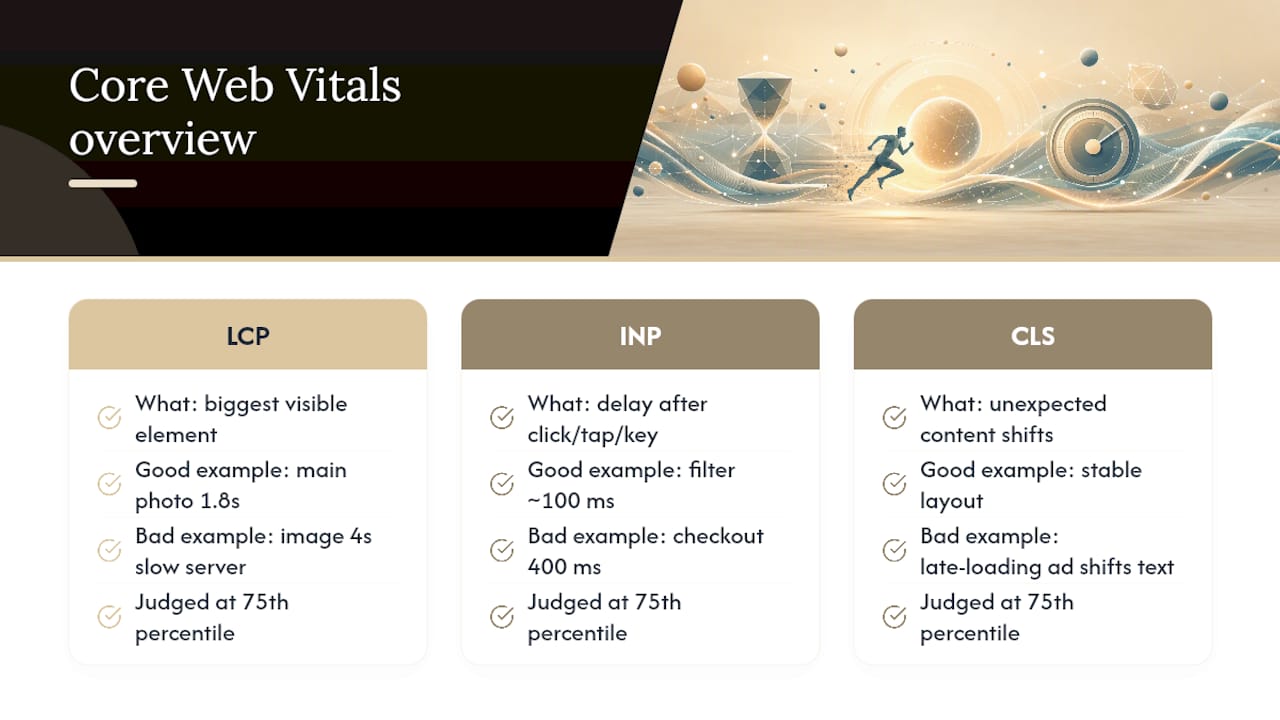
Largest Contentful Paint (LCP) tracks how long it takes the biggest visible element, usually a hero image or headline, to render. A product page where the main photo pops in at 1.8 seconds passes easily. One where it drags to 4 seconds because of an unoptimized JPEG loaded from a slow server does not.
Interaction to Next Paint (INP) measures the delay between a click, tap, or keypress and the moment the browser visibly responds. A search box that filters results within 100 milliseconds feels instant. A checkout button that takes 400 milliseconds because a bloated script hogs the main thread feels broken.
Cumulative Layout Shift (CLS) scores how much content shifts unexpectedly, like when an ad loads late and pushes text down mid-read. All three metrics get judged at the 75th percentile, meaning three out of four of your visitors need a good experience for the page to pass, not just your average visitor.
Recommended thresholds for performance categories exist for LCP, INP, and CLS, defining “good”, “needs improvement”, and “poor” ranges.
Fast fact: Google has already swapped one of these metrics once, replacing First Input Delay with INP in March 2024, and reserves the right to keep evolving the lineup as it learns more about what actually predicts a frustrating page.
Why Core Web Vitals matter beyond the score
A slow, jumpy page costs you readers before they finish reading your headline. Visitors on a laggy site bounce faster, scroll less, and convert at lower rates. That’s not a Google-specific problem. It’s a basic response to friction.
Google has confirmed Core Web Vitals as one input in its page experience signals, and while it’s not the dominant ranking factor content quality is, it can act as a tiebreaker between similarly relevant pages. As AI-generated search overviews pull from a narrower set of sources, sites that load fast and render cleanly are simply easier for crawlers and users alike to trust.
- Faster pages correlate with lower bounce rates and longer session times
- CWV is a confirmed search ranking signal, not just a UX nice-to-have
- Fixing performance issues rarely hurts and frequently helps both engagement and visibility
The business case is straightforward: performance work pays off twice, once in user behavior and once in search competitiveness.
How to measure your Core Web Vitals scores
You have two fundamentally different types of data here, and mixing them up is the most common mistake site owners make.
Field data comes from real visitors using real devices on real networks. This is what Google actually uses to judge your site, and it’s what the Chrome User Experience Report (CrUX) aggregates. Lab data comes from a simulated test run in a controlled environment, useful for debugging but not what determines your ranking treatment.
- PageSpeed Insights blends both, showing lab data from Lighthouse plus field data from CrUX for the same URL
- Search Console’s Core Web Vitals report groups your failing URLs by root cause so you can fix templates instead of one page at a time
- CrUX itself is the underlying field dataset, updated on a rolling 28-day window
- Lighthouse runs a one-off lab audit, great for isolating a single page’s issues
- The web-vitals JavaScript library lets you log real user metrics directly from your own site
- WebPageTest offers deeper diagnostics than Lighthouse, including waterfall charts and filmstrip views for tracking down exactly what’s slow, according to WebPageTest’s own documentation
- Real User Monitoring (RUM) tools track live visitor experience continuously, rather than waiting on Google’s aggregation cycle
Because CrUX runs on that 28-day rolling average, a fix you shipped yesterday won’t show up there yet. RUM is how you confirm a change worked before the official field data catches up.
The right order to fix Core Web Vitals problems
Trying to fix all three metrics at once usually means fixing none of them well. There’s a sequence that works because each layer depends on the one below it.
- Start in Search Console. Open the Core Web Vitals report and see which URL groups are failing and on which metric. This tells you whether you have a site-wide template problem or a handful of outlier pages.
- Diagnose Time to First Byte (TTFB) first. If your server takes too long to respond, every downstream metric suffers, especially LCP. A slow host or missing server cache poisons everything built on top of it.
- Fix LCP next. This is usually the hardest metric to pass and the one with the biggest impact on your overall pass rate, according to official guidance on prioritizing fixes. Address hosting, caching, and image delivery before touching anything else.
- Move to INP. Once your content loads fast, tackle what happens when someone interacts with it. This is almost always a JavaScript problem.
- Handle CLS last. Layout stability issues are typically the fastest fixes (sizing attributes, font strategy) and build on a page that already loads and responds well.
- Verify with RUM immediately, then check Search Console and CrUX again in two to four weeks once the field data window catches up.
Pro Tip: Don’t chase a perfect Lighthouse score in isolation. A page can score 100 in a lab test and still fail in the field if your real visitors are on slower phones or spottier connections than the simulated test environment assumes.
Practical fixes for each metric
Once you know your priority order, here’s what to actually change.
For LCP:
- Make sure the LCP element, usually a hero image, exists directly in your HTML rather than being injected by JavaScript
- Add
fetchpriority="high"to that image tag and never lazy-load it - Use
rel="preload"for the resource when it’s buried deep in your document - Put a CDN in front of your assets to cut delivery time regardless of visitor location
- Add server-side caching so your TTFB doesn’t bottleneck everything downstream
For INP:
- Defer or delay any JavaScript that isn’t essential to the first interaction
- Break up long-running tasks into smaller chunks so the browser can respond to input between them
- Audit third-party scripts (chat widgets, ad tags, analytics) since these are frequent INP offenders
- Use scheduling patterns like
isInputPending()or yield points to keep the main thread responsive
For CLS:
- Specify explicit width and height attributes on every image and video
- Reserve fixed space for ad slots before they load
- Self-host your fonts and use
font-display: optionalorswapto prevent invisible text flashes - Avoid CSS animations that alter layout properties like height or margin
Pro Tip: Fix LCP and TTFB before you touch anything else. Web.dev’s own guidance on the most effective fixes consistently points to server response time and LCP resource prioritization as the two changes with the largest impact on whether a page passes at all.
Why WordPress sites struggle with Core Web Vitals
WordPress isn’t the problem. What gets stacked on top of it usually is. Page builders inject extra CSS and JavaScript layers, plugins pile up unused code, and cheap shared hosting adds latency before your page even starts rendering. Analyses of CrUX data consistently show WordPress trailing hosted platforms on mobile pass rates, largely because of these accumulated layers rather than any flaw in WordPress core itself.
- Swap a heavy page builder for a lightweight theme or a custom template where possible
- Audit your plugin list and remove anything not actively earning its place
- Move to managed hosting with server-level caching and a CDN baked in
- Target a TTFB under 400 milliseconds, and treat under 200 milliseconds as the real goal
Why performance and SEO can’t be separate projects
Most Core Web Vitals failures I see trace back to the same root cause: a site got built by one team and handed to another for SEO, with nobody responsible for how those decisions interact. A designer picks a page builder for flexibility, an SEO consultant later discovers it’s tanking LCP, and now you’re paying to unwind a decision that should never have shipped.
Proxiumdigital’s approach bakes performance into the build itself. Sites launch with clean markup, proper caching, and image delivery already handled, so there’s no retrofit later. That’s the real argument for hiring an agency instead of DIY: not because plugins can’t fix things, but because prevention costs less than remediation, every time.
— Bryan
How Proxiumdigital gets your site passing
Fixing Core Web Vitals on a site that was never built with performance in mind is slow, expensive work, plugin patches, hosting migrations, and a lot of trial and error. Proxiumdigital builds that foundation in from day one instead of retrofitting it later.

The process is straightforward: a technical audit identifies exactly which pages and metrics are failing, then prioritized fixes address TTFB, LCP, INP, and CLS in that order, then ongoing monitoring catches regressions before they cost you rankings or conversions. That last piece matters more than most site owners expect. A CWV pass today doesn’t guarantee a pass in six months once a new plugin or a marketing script gets added without anyone checking the performance impact.
If your site is struggling with load times or you’re not sure where your pages currently stand, Proxiumdigital’s SEO and web design services start with exactly that kind of audit. Businesses that also want speed built into ongoing site changes can look at website management services for continuous monitoring after the initial fixes ship. Check current pricing to see what a prioritized audit and fix plan would cost for your site.

Where to verify the details yourself
For definitions and thresholds, go straight to web.dev’s Core Web Vitals guide. For live scoring, run your URL through PageSpeed Insights. For deeper diagnostics, WebPageTest shows the waterfall behind your numbers, and readers wanting the marketing-side case for speed can see how faster sites lift conversions.
Sources
FAQ
What are the Core Web Vitals?
They’re three field metrics Google uses to judge page experience: Largest Contentful Paint (loading speed), Interaction to Next Paint (responsiveness), and Cumulative Layout Shift (visual stability).
Are Core Web Vitals still relevant?
Yes. Google confirms they remain part of its page experience signals, and the metrics themselves still evolve, INP replaced First Input Delay in 2024, showing Google keeps refining rather than retiring this framework.
What is considered a good Core Web Vitals score?
At the 75th percentile of real visitors, “good” means meeting recommended performance thresholds for LCP, INP, and CLS.
How do I pass a Core Web Vitals assessment?
Diagnose failing pages in Search Console, fix server response time and LCP first, then address INP and CLS, and verify with real user monitoring since CrUX and Search Console take two to four weeks to reflect your changes in field data.